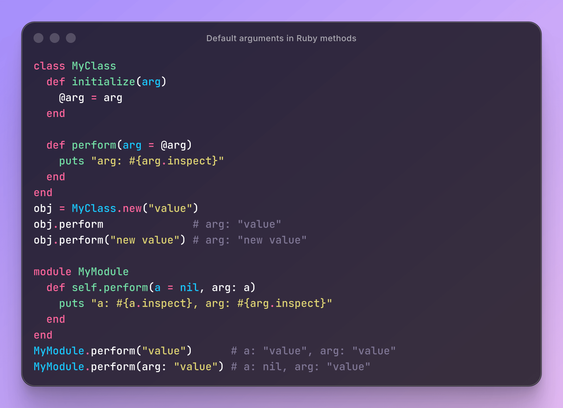
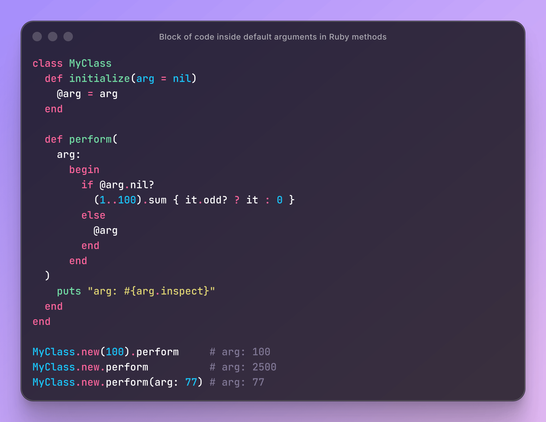
Following up on my previous post https://mastodon.social/@yegorov/116594842832339445 (where I showed how to set default values in Ruby methods), it turns out you can write not just a single expression on the right side, but an entire block of code inside a begin-end construct.

#Ruby #Method #Default #Arguments #KeywordArguments #BeginEnd
If you work with Ruby, you should know that arguments in methods can be set to a default value, for example:
```
def perform(arg: "d")
# .
end
```

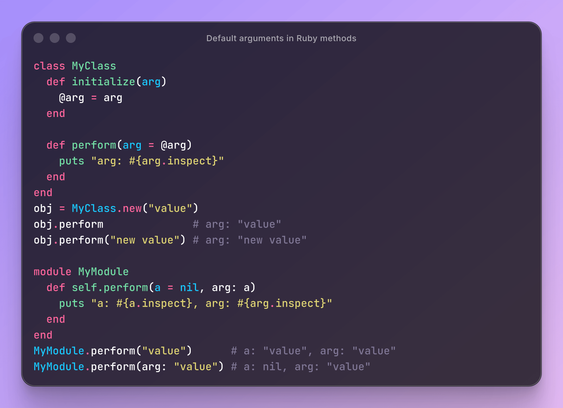
But did you know that you can use instance variables as default values, like this:
```
class MyCls
def initialize(arg); @arg = arg; end
def perform(arg = @arg); end
end
```

Or other arguments of this method:
```
module MyMod
def self.perform(a = nil, arg: a); end
end
```

#Ruby #Method #Default #Arguments #KeywordArguments #InstanceVariable

If you work with Ruby, you should know that arguments in methods can be set to a default value, for example:
```
def perform(arg: "d")
# .
end
```

But did you know that you can use instance variables as default values, like this:
```
class MyCls
def initialize(arg); @ARG = arg; end
def perform(arg = @ARG); end
end
```

Or other arguments of this method:
```
module MyMod
def self.perform(a = nil, arg: a); end
end
```

#Ruby #Method #Default #Arguments #KeywordArguments #InstanceVariable

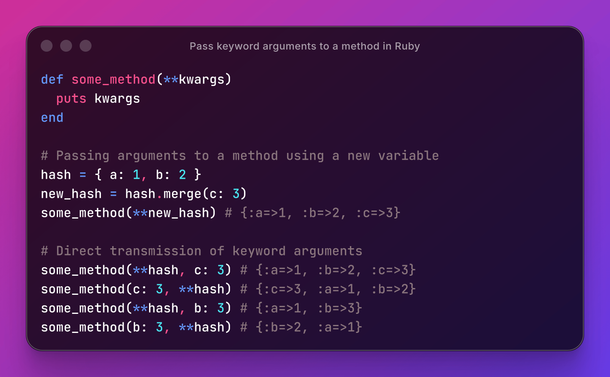
If you work with Ruby, you've often encountered a situation where a method takes multiple keyword arguments. And you need to pass a hash to it and also add another new argument.
In most cases, you do the following: create a new hash and pass it as an argument to the method using the double splat operator `**`. But you can do this more concisely: instead of creating a new hash, pass the hash followed by another argument.

#Ruby #Hash #KeywordArguments #kwargs #Function #Method #DoubleSplat