Charges dropped against suspect in keying of Tesla Cybertruck in Victoria
The incident was caught on the vehicle’s security cameras, and Victoria police shared surveillance video showing a person appearing to scratch the Tesla with a key.
#Crime #Cybertruck #Victoriacrime
https://globalnews.ca/news/11855490/charges-dropped-suspect-keying-tesla-cybertruck-victoria/
Charges dropped against suspect in keying of Tesla Cybertruck in Victoria
The incident was caught on the vehicle’s security cameras, and Victoria police shared surveillance video showing a person appearing to scratch the Tesla with a key.
#Crime #Cybertruck #Victoriacrime
https://globalnews.ca/news/11855490/charges-dropped-suspect-keying-tesla-cybertruck-victoria/

Green screen, also know as chroma key, is a video technique that dynamic replaces your video background. Applications like Kdenlive, Shotcut, Flowblade, OBS and Natron support green screen.

Here are three main rules to setup your green screen.

1. Light your screen evenly.
2. Avoid casting any shadows on your green screen.
3. Light your green screen separately from the lighting on your subject as much as possible.

#green #screen #chroma #key #keying #kdenlive #shotcut #natron #flowblade #obs

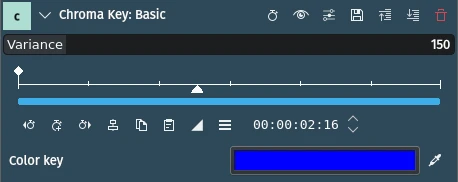
How to use the "Chroma Key: Basic" effect in Kdenlive.

1. In the "Effects" panel, search for "Chroma Key."

2. When you find the "Chroma Key: Basic" effect, drag it onto the clip in the Timeline.

3. In the "Effects/Composition Stack"
panel, use the color picker and click on the background color you want to remove from the video.

4. Use the "Variance" slider to control the amount of color that is keyed out.

#linux #kde #kdenlive #chroma #keying #greenscreen