Working on upgrading my  #NixOS to 25.11, one of the config evaluation errors is:

error: 'kbibtex' has been removed, as it is unmaintained upstream

#KBibTeX is unmaintained? Aha. This commit history with recent commits in the last days does not look like an unmaintained project:

https://invent.kde.org/office/kbibtex/-/commits/master?ref_type=HEADS

The nixpkgs commit does not elaborate.

https://github.com/NixOS/nixpkgs/commit/50021ed95d54a83ceb77649e5f955cb54af7e819

Having a ball doing #literatureResearch with @zotero. I previously hated doing it, but it turns out it was because I didn't have the right tool.

I used #kbibtex and  #gitAnnex before. Robust, decentralized, very fine syncing control, fully offline-capable, etc. - but it was missing the streamlined, well-integrated polish that #Zotero has and felt a bit too clunky to be efficient.

#PhDLife #academicMastodon

@vrtxd Tried it yesterday. #JabRef is basically a better #kbibtex. Very nice that it works directly with bibtex, but it doesn't help syncing and managing and annotating PDFs as #Zotero does AFAICS.

Testing out @zotero for the first time after many years of #kbibtex. I'm very impressed and together with the #BetterBibTeX plugin it seems to fill all my needs.

And you can even expose your own publications on their website:

https://www.zotero.org/yann.buechau

#PhDLife #academicMastodon

Zotero | People > yann.buechau

Zotero is a free, easy-to-use tool to help you collect, organize, cite, and share research.

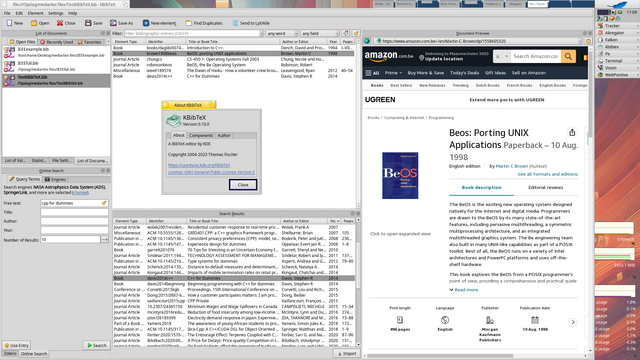
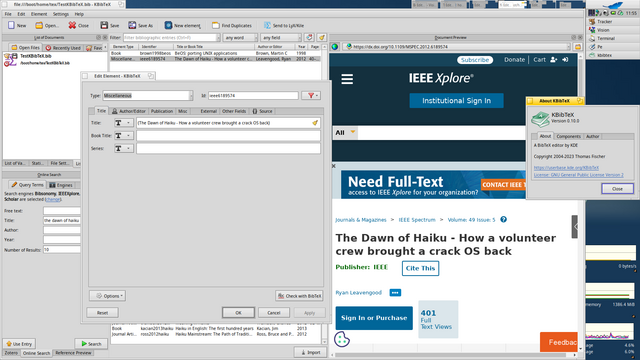
Coming up at #HaikuOS, #KBibTeX 0.10.0 for 32bit and 64bit, tested on both architectures, I just can't seem to get a preview for pdf links.

Can some #nix guru please quickly walk me through how I get into a dev environment for e.g. #kbibtex on  #NixOS? I really need to fix a bug there.

UPDATE: solution:

> nix develop nixpkgs#kbibtex
> unpackPhase
> cd kbibtex*
> cmakeConfigurePhase
> buildPhase
> installPhase
> export QT_QPA_PLATFORM_PLUGIN_PATH="$(nix eval --raw nixpkgs#qt5.qtbase.bin)/lib/qt-$(nix eval --raw nixpkgs#qt5.qtbase.version)/plugins"
> ../outputs/out/bin/kbibtex

Wow, it seems to be impossible to have #bibLaTeX handle multiple semicolon-separated urls in the url= field. It just interprets the entire url= content as one url and happily makes a (broken) link out of it. 🙄

#KBibTeX joins multiple urls like this.

#StackOverflow solution doesn't do anything: https://tex.stackexchange.com/a/57993
#chatGPT couldn't help: https://chat.openai.com/share/e3d1819b-1922-4c7c-b06f-88fad9f1e912

Couldn't find anything else... #TexLaTeX is powerful but oh so complicated... 😮‍💨

How to use multiple URLs for one bibtex reference?

I have used this BibTeX reference in my work @Misc{oai:CiteSeerPSU:562256, title = "Gerris: {A} Tree-Based Adaptive Solver For The Incompressible Euler Equations In Complex Geometries...

TeX - LaTeX Stack Exchange

Anyone knows a way (preferrably cli-only and automatable) to extract only the needed/used references from a gigantic BibTeX-file?

The .bbl, .aux and .tex files contain the used identifiers, but parsing those seems fragile. But I guess another script needs to be made in the end...

Hand-picking a custom subset from the gigantic bibliography file in the first place kinda defies the purpose of a database.

SOLUTION: Use the shipped 'bibexport' tool!

#TexLaTeX #BibTeX #KBibTeX #PhDLife

@joeyh @gpoo @joeyh Ah okay maybe it's then a problem with the program invoking evince, #KBibTeX in my case! Apparently it launches evince with the full path. Thanks for checking!
Apparently the #Evince PDF reader is one of the programs that doesn't understand symlinks. That's a pity, as I use  #gitAnnex to sync my #TexLaTeX #BibTeX bibliography which I manage with #KBibTeX. So either I live with this, `git annex unlock` all my files or try to fix Evince myself 😅