Hallo zusammen!

Vorhin bin ich über diesen Beitrag gestolpert:
https://www.mobiflip.de/x-sense-integriert-warnmelder-in-home-assistant/

Ich kenne bisher nur die #HACS Custom-Integration für #HomeAssistant, die über die Cloud-API auf #XSense SBS50 zugreift ...

Das Ganze lokal per #MQTT zu realisieren, klingt natürlich sehr verlockend, aber ich kann diese "native Integration" nirgends finden.
Ist euch da irgendwas dazu bekannt?

@homeassistantde @homeassistant
#Rauchwarnmelder #SmartHome #SmartSecurity

X-Sense integriert Warnmelder in Home Assistant

Das Unternehmen X-Sense integriert kompatible Warnmelder ab sofort nativ in die Smart-Home-Plattform Home Assistant. X-Sense hat die native Unterstützung …

mobiFlip

@frenck It makes perfect sense.

Implementing boundaries and guidelines for agents is an ongoing process.

You may recall that I initiated a blueprint for HACS-based integrations, aiming to establish that foundation as a starting point to prevent AI from starting on an empty slate.

https://github.com/jpawlowski/hacs.integration_blueprint

#HomeAssistant #HACS

GitHub - jpawlowski/hacs.integration_blueprint: AI-enabled Modern Home Assistant Custom Integration Blueprint

AI-enabled Modern Home Assistant Custom Integration Blueprint - jpawlowski/hacs.integration_blueprint

GitHub
Hat jemand eine Ahnung, ob so ein Verhalten vom #HACS akzeptiert wird ?

I am trying to make the configuration of my Home Assistant somehow generic, to avoid code/configuration duplication. In a way, that when I am adding some entity, I want to have some behaviour preconfigured by a very simple way. For example, I want to have some sockets which are always on, some to turn off when no one is home, and turn on back on return, and some are irrelevant. This is achievable by creating a label, and on leaving/entering home zone switch off/on, with the target set to the label. Then when adding a new socket, I can just apply a label to it, and done.

It's more tricky when you want to do something with the UI. On the main screen I have an auto-entities card (from HACS) to display the location of the people - the name of the zone, or unknown. That part is simple. The magic happens, when you want to click on the entity, and instead of getting the default behaviour of showing a small pop-up widget with the location map, I want to either show a custom screen for given person, or a generic one, if the custom one has not been prepared. Some playing with templates, re-reading the documentation, and here we are.

Pre-requisities:

  • install HACS
  • install auto-entities from HACS
  • create a dashboard, name does not matter, but it is important, that the URL is specified as dashboard-residents; you can have different value here, but then you need to modify the example below as appropriate
  • under this dashboard create a view, the name nor URL does not matter, it is important, that this view if the 1st one on the dashboard, as it will contain a generic content, put whatever you want here
  • under the same dashboard create views for each user you want to have a custom page for, it is important, that the URL matches the ID of the user
  • on the home screen (or whenever you like) create a card as follows:
type: custom:auto-entities
card:
type: glance
filter:
template: |-
[{% for p in states.person %}
{'entity': 'person.{{ p.attributes.id }}',
'tap_action': {
'action': 'navigate',
'navigation_path': '/dashboard-residents/{{p.attributes.id}}'
}
},
{%- endfor %}]

Enjoy!

Now I wonder if it is possible to retrieve the URL on the generic page, to know for which user we want to generate the content, and pass it to some templates, to prepare something reasonable. But that's for another time. If you know the answer, please let me know, it will save me some time 😊

#HomeAssistant #HACS

Seit einem der letzten Updates vom #HomeAssistant #HACS von #Zendure fehlt mir mindestens eine Entität, eher zwei, die ich vorher hatte..
Um den Energie- & Leistungseingang in den Akku zu monitoren..

RE: https://swiss.social/@kelvan/116547019836226462

It is now available in HACS default repos, no need to add the repo manually anymore! #hacs #HomeAssistant #Gardena

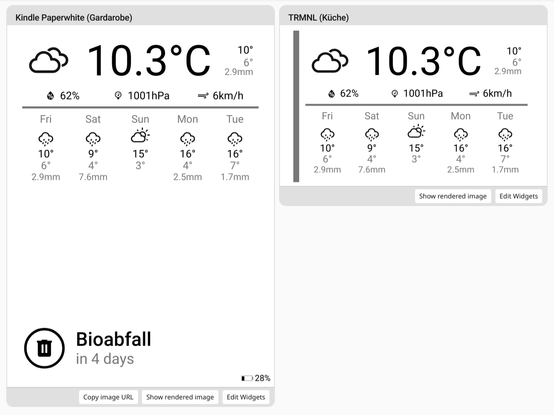
I've released version 0.2.0 of the E-Ink Dashboard for Home Assistant. I had a lot of duplicate code PIL renderer in the backend and canvas renderer in the frontend. I found a solution to only have onc: SVG Jinja templates! A browser can display SVG and I can rasterize them for E-Ink Displays. Also the widget are a bit nicer now.

https://github.com/cryptomilk/hass-eink-dashboard

#homeassistant #trmnl #eink #dashboards #HACS

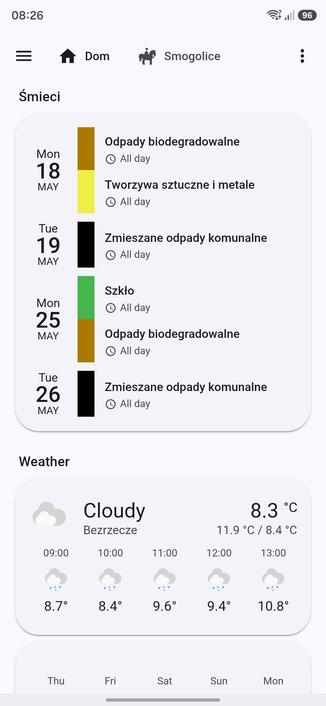
So now my #homeassistant has met.no integration and I have hourly and daily weather for my home.

I have also created local calendars for trash schedule. And Infused Calendar Card Pro from #HACS to show them.
Colored so I know which trash bin to fill before they will be emptied 😅

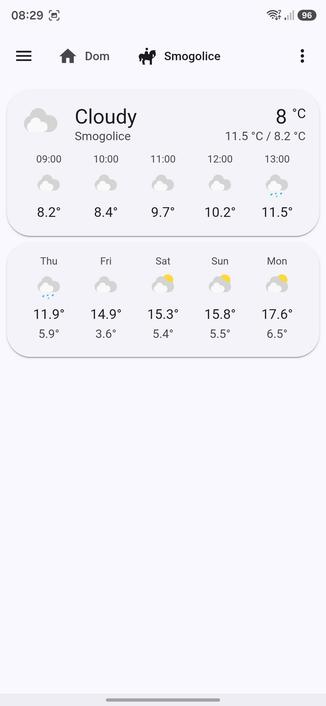
And on top of that I have a second dashboard for my wife with the weather for the place where the horse is.

HACS ist ein echter Game-Changer für mein Smart Home. Endlich habe ich Zugang zu unzähligen Erweiterungen, die meine Automationen auf das nächste Level bringen. Aber Vorsicht: Nicht jede Integration ist gleich gut. Recherchieren und Backup machen bleibt Pflicht! https://hobbyblogging.de/home-assistant-hacs-installation #HomeAssistant #HACS #SmartHome
Home Assistant HACS: Installation, Nutzung & Vorteile - Hobbyblogging

In Home Assistant HACS nutzen? Sehr interessant! Ich zeige dir Installation, Nutzung sowie Vor- und Nachteile für dein Smart Home!

Hobbyblogging
ohoho #homeassistant #hacs and #moonraker = an automation to turn off the 3D printer after the job is done 😄