"[#EIS #negotiations with employers are] based on the accurate details of teacher pay since 2008 (i.e. 20-25% real terms #PayErosion since then) and on the full picture of pay comparisons with teachers in the wider UK and in the OECD (experienced teachers being paid less than counterparts in England and at least 13 other OECD countries)."

Quote is from the teachers' side of things, but the situation similar for us.

#TheDifferenceIsStriking

Nest #strike date for #EdinburghNapier is 25 Jan

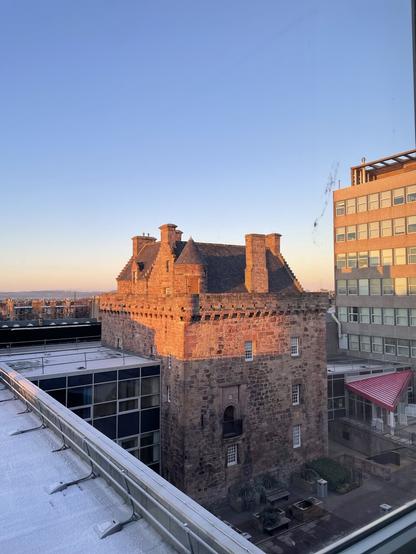
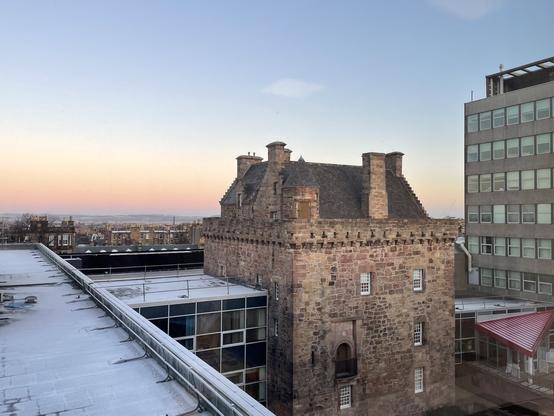
And now in the golden hour before twilight #merchiston #edinburgh #edinburghnapier
#university #edinburgh #edinburghnapier #accommodation The extractor fan in my student accommodation flat thing was finally replaced.
I had sent an email ages ago, but it couldn't be actioned on due to the fact my flatmate tested positive for the Big Virus (and presumably myself as well; tested but apparently the test never made it to a lab, thanks system!).
They then seemed to forget about it.

So, five days ago I sent an email with renewed interest in this being fixed. I'd sent this email at night; the next morning, my Accommodation Officer knocked on my door and asked me to show her that the fan indeed didn't spin...and that it was actually receiving power; though she could see that from the picture I had sent her.

Later that day, a contractor serving as an electrician appeared, told me he was here to replace the extractor fan, set down his bag, jacket and stepladder, asked about whether he could remove his mask (he, like I do, wears glasses and mentioned that they'd get fogged up and that he's blind enough as is), I agreed, and he set to work.
He quickly told me he'd need to forcibly mangle the fascia around the existing fan to be able to agree (telling me he'd need to 'wreck my bathroom'); I said that as long as he left it in a good state he could go ahead (:

After some struggle to remove the old fan, drilling new holes, dealing with power, testing it, applying the new grille and all, he told me that he'd finished. The new holes were needed because the new unit was slightly smaller than the old one. Still, fine.

I asked him about whether these extractor fans failing was a common occurrence, and he told me that it was. It's not clear to me *what* about the fan failed though...the motor hadn't seized up at all -- poking around, I could easily spin it -- and it would spin when it was particularly windy.
Something in the motor itself may have died, or the power delivery to the motor may have gone poof.
Regardless, his answer surprised me.

Once he'd finished, I thanked him, and held the doors open for him so he could leave more easily (carrying a bag and a stepladder, etc).

Anyway, it works! I have fanspin! And it's pretty quiet...with the tradeoff of not being all too productive in terms of moving air, as far as I can tell.

See pics and captions! (:

#university #edinburgh #edinburghnapier

So, I decided to go for a walk — like before, I attempted to get myself lost. I failed miserably, and ended up at my campus. So, I talked to a very nice security/maintenance guy, and he told me how to reserve a computer in the library. It’s running on a slow HDD and as such took forever to boot. I’m now curious about what I can do with it, as it seems fairly interesting. the pingtimes to CloudFlare are worse here than in my accommodation (a whole 6ms, which is like 9 times the nominal pingtime from my flat!), but I do get access to a symmetrical gigabit connection here, which is nice.

The specs of the library computer I’m using (mini-PC mounted behind the screen with stupid guard things around the cables at the back) are:

  • An i5-4690S
  • 8GB of 1600MHz DDR3 (on SO-DIMMS, interestingly)
  • a 500GB Seagate HDD — specifically, the st500lm021-1kj152.
  • an HP EliteDisplay E201, which seems to be a 1600*900 60hz affair. Where did all these 1600*900 not-laptop-display monitors come from? I’d never really seen any, and now I’ve used a few. Perhaps it’s just this university that decided to buy new displays at a really unusual time.

In terms of peripherals, I’m using a Microsoft Intellimouse X800472. My secondary school had some of these in one or two of the computer rooms. For whatever reason, I actually kinda like it. Sure, it’s ancient to the point that it says it supports PS/2, but, once I disabled mouse acceleration in Windows (why why why why why is it on by default!?) and upped the sensitivity, it’s nice. It’s not quite big enough for my hands, but it’s definitely on the larger side. The keyboard is probably one which came with the desktops we’re using, an HP KU-1156. It’s fine, apart from the fact that the risers (which are thankfully still there — I’m happy to be somewhere people don’t just snap those off for fun) are completely floppy and loose apart from their two extreme positions.

The hard drive looks interesting. This Amazon listing, among other listings online, appear to state that this model of drive is a hybrid one, with an SSD cache. https://www.amazon.co.uk/Seagate-ST500LM021-SSD-Hybrid-1KJ152-020/dp/B00SW6P91O Apart from in some Apple products, I don’t believe such drives ever really caught on.

This is the Seagate manual/white paper (?) I found for the drive, and while it contains much more information than I realized would be available about any given commercially-built HDD, it does not seem to state anything about SSD caching. Do I have the wrong sub-model or whatever? Or are the listings I’m seeing based on incorrect (or incorrectly-interpreted) information? https://www.seagate.com/www-content/product-content/momentus-fam/momentus-thin/en-us/docs/100737930b.pdf

The display is also fairly weird. Its colours look pretty normal to me, but its brightness was set to a measly 25%. Of course, I immediately maxed it out, and suddenly had a much better experience. Looking through the settings, I found a Sharpness adjustment thing with six options. Now, I’m no display expert, but I can tell when something is being oversharpened. On level 4 (I think it was on that by default), I noticed that everything looked fine. Increasing the ‘Sharpness’ definitely added artifacty crap, as expected. However, decreasing it made everything on the display blurry. Is there something I’m missing here, or is there literally a hardware implementation of something to blur my display? Things were definitely being blurred to an unreasonable level when set to the lowest amount of ‘sharpness’ available, but they weren’t being sharpened when at one of the middling settings. It’s just…odd.

I’ve already played with a few things, like getting Git Bash running on the machine and trying to clone a largeish repository. Using the portable version (as it’s basically made for this sort of use), I experienced no issues. However, apparently the repository is too large compared to the amount of space we have available to us. Disappointing!

The Microsoft Store app is available to use, but is locked down to only 12 applications total. I didn’t know that organisations could do such a thing, but it makes a lot of sense. I installed Ubuntu 18.04 LTS (the most interesting thing available), but sadly it doesn’t work because there’s no WSL support baked in, and I don’t have the privileges to get it. Regardless, this machine will presumably attempt to wipe all traces of me once I log out, and all that will remain will be on my pitifully small network share (500MB in size total, as reported by Windows).

Unlike the computers we used in the lesson I physically attended (link: https://landofkittens.social/notice/9zFYf3ky96PUb3DegC), the AppsAnywhere system actually works here. Of course it’s slow on these machines, but it lets me use Adobe applications and Eclipse (for example) as intended. (Not like I have enough storage to do anything fun in Lightroom/Photoshop and especially not Premiere…) Time for me to check VMWare Horizon…nope, there isn’t enough space to grab the executable with the other stuff I have, and I probably wouldn’t have the permission required to install it to use it regardless.

This was a fun experience, and I have a feeling I may return to use the library, as a space in which I can concentrate on work, if nothing else. Once (…if…) I learn more about the 24/7 computer labs and whether they’re indeed open during this stage of the pandemic, and manage to use it, it may be much more enticing than the library, especially if it actually has decently fast machines (which I’ve been told it does). I’d like to have fun with some GPU-accelerated stuff that my AMD-based system probably wouldn’t be capable of doing well, if at all. Sadly, I believe they don’t have any RT or Tensor Core enabled machines, from asking someone here about it ):

I think I’m going to wipe down everything I’ve touched here (within reason), sanitize my hands and walk back to my flat though. I kinda need the bathroom, and I don’t think I’m particularly allowed to try to access it from here.

Now, can I trust that I’m not being keylogged? I have no clue…

It’s all curious to me. hmmmmmmmmmm

#university #edinburgh #edinburghnapier #cybersecurity my first in-person lesson.

(This is adapted from an email I sent to my parents last night)

The experience of the first in-person lesson was very weird. I managed to get there on-time, despite leaving a bit late and Google Maps completely failing to cooperate with me on my phone in terms of determining which direction I was facing/building I was nearest. (It worked fine on the walk back, and I don’t know what changed.)

There was a QR code to scan with the university’s app on my phone to log my attendance, which I didn’t see until after I’d made it through the door due to my glasses being too fogged up from a minute of mask-wearing, and being too blind to see the QR code without glasses on, despite its size. I figured that out, sanitized my hands (sanitizer stations right by the entrance are highly convenient) and made my one-way up the stairs to Floor $floor. Room $room was the one I was timetabled to be in. I opened the door and saw two maintenance/technician men who told me that they had no clue whether there was a lesson scheduled in there. Anyway, I entered the room, and a fellow Cybersecurity first-year student named $other_chill_student followed suit. We sat down at a couple of desks and were confused about being the only ones. We wondered whether everyone else had elected to work from home (well, accommodation). It later turned out that the others who chose to also physically attend had been directed (on their timetables) to use some of the other rooms on the floor. Relatively extreme social distancing!

So, it was time for us to set up to work. This did not go well. We needed to use the following software:

  • WebEx Training, to digitally attend the lecture.
  • A web browser of some sort, to access Moodle, which is the service through which we are given our items of work. Also, we needed a browser to be able to get into a WebEx session due to the means of authorization.
  • Eclipse, a popular free-to-use development environment for Java. (Sadly, we are working with Java).

This sounds fairly simple. Sadly, it’s not.

We tried to use the University’s own computers, because we were literally stationed in a computer lab. Each spot had two screens! (There were major variations in colours between the two screens I had, despite them being the same model and even after I had configured them identically in the firmware.) Logging in was simple, and pretty fast. The browsers even figured some session data stuff for us, which was a positive and scary surprise. Using WebEx wasn’t even too bad — you just install the Chrome extension, it gives you an executable, you install it, do another clicky thing and it loads. But what about audio? It seems as though the computers we’re using don’t have any internal speakers or microphones, which is perfectly reasonable. I brought my headphones with me, so I plugged them in. Nothing happened. I tried the other port. Nothing happened. Checking in the sound settings, which we’re thankfully allowed to access, I confirmed that the computer didn’t recognize my headphones. So I tried another computer, and witnessed exactly the same result. Concerned that my headphones were damaged, I tested them with my laptop. They’re fine. At this point I was resigned to using my laptop to, at least, attend the lecture, because there’s no point in me attending it if not to mostly listen. By comparison, $other_chill_student, with his earphones, had only a little trouble getting sound through them. They were recognized and sound played through them, and I think it’s because those used a three-pole connector instead of the two-pole connector on my headphones. Still, that’s not okay, and my headphones should have worked regardless.

The next hurdle? Eclipse. Eclipse wasn’t installed on the computers, which was fine. We have a service called AppsAnywhere, the name of which is decently accurate at describing its primary goal: make apps usable with little regard to what specific device you’re using or where you may be using it, within reason. I went there in the browser, and immediately had issues. Some applications available are free and the service does little more than to list them for you. Some applications, you can simply download through the service. Other applications, however, are being used by the University in a licensed way, and the computer you’re using must be verified (in other words, authorized) to use said apps. The site, when loaded, immediately tried to verify the computer and failed because the application AppsAnywhere uses for verification wasn’t there. I didn’t look into it, but it looks like there were items to indicate that it should be there, which were obviously misleading. Unfortunately, I lack(ed) the power to install this to fix the problem. This is fine. I have my laptop. I can just use Eclipse as I already have installed on there. Oh wait, I installed the wrong version. That was easy to fix. I also tried the AppsAnywhere solution on my laptop. Its client was easy enough to install and configure, and it indeed allowed me to try to launch Eclipse. However, the way that it was running Eclipse, as far as I can tell, was to run the application on a remote server and stream the output to me (remote-controlling it basically)… and it looks like the application (or its environment) was not configured correctly on the other machine. I got it working on my laptop though, so all was fine.

$other_chill_student had also taken his laptop with him, but it wasn’t charged, and he had managed to take with him the wrong power adapter. The situation on the computer he logged into was identical to mine. Solution for him: the University has a Virtual Desktop Service, which is there to allow students to access a Windows virtual machine from kind-of-wherever. I took him through setting that up (I have experience with such systems from $sixth_form_college), and it worked for him, although very, very slowly.

Finally, we both have working environments. $other_chill_student has to show me how to configure Eclipse because I have no clue, and we set to work and listening to the lecture. The work itself was trivial for someone of my skill and knowledge, but still annoying as it required highly-obscure knowledge. It barely took any time once I figured out a backwards-compatibility thing, and I haven’t really learned anything yet, apart from how drastically Java’s support for libraries vastly changes between versions. I also managed to get the two screens at my spot in the room hooked up to my laptop, which provided a nice experience.

The lecture was scheduled to finish at 15:30, but it continued past 16:00. I finished most of the work without paying much attention to the lecture (it was pretty much wasteful for me to listen to it as it would just slow me down), said goodbye to $other_chill_student, and walked back to the flat.

Meh.