
Quick follow-up: crypto_aead_chacha20poly1305_decrypt was missing from libsodium-esphome because the include path was incorrect. This is now fixed: https://github.com/esphome/libsodium-esphome/pull/16/changes #ESPHome #Doorbird
Fix ChaCha20-Poly1305 AEAD source path by aaronk6 · Pull Request #16 · esphome/libsodium-esphome

When trying to use the ChaCha20-Poly1305 AEAD functions (e.g., crypto_aead_chacha20poly1305_decrypt) in my ESPHome program, I ran into a linker error: Successfully created ESP32 image. Linking .pio...

GitHub

Too many hours went into this (I’m really not experienced with hardware and soldering), but here’s a working prototype of my ESPHome-based PoE DoorBird chime. It listens to UDP packets from the DoorBird intercom, decrypts them, and plays a sound when someone rings.

On startup, it plays a familiar sound once the first UDP packet is received to indicate network connectivity.

I’ll put it on GitHub soon!

#ESP32 #ESPHome #HomeAssistant #DoorBird #DIY

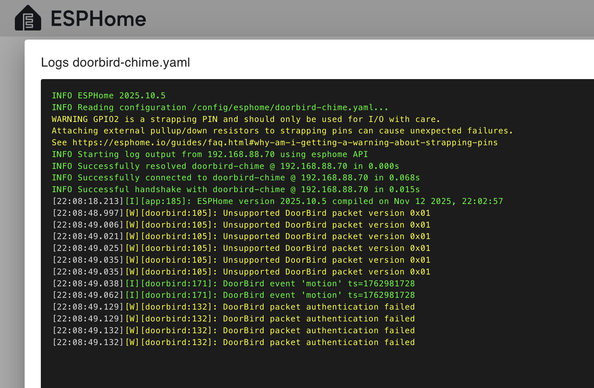
Got it working! 🎉 The ESP32 now receives the UDP broadcasts from the DoorBird and successfully decrypts them. (In the screenshot, it picked up a motion event.) #DoorBird #ESP32
So after an evening of research and vibe-coding, I now have a C++ program on my Mac that receives the DoorBird’s UDP packets and decrypts them successfully. It uses libsodium. However, ESPHome only includes a reduced version of libsodium, and crypto_aead_chacha20poly1305_decrypt is missing. #DoorBird #ESP32

Considering building my own ESP32-based door chime instead of spending almost €200 on the “DoorBird IP Door Chime A1061W”. I can probably buy all required components for less than €15.

#DoorBird sends local UDP broadcasts and the encryption scheme is publicly documented, so it should be straightforward to receive and parse those packets on an #ESP32. And then, depending on which doorbell button was pressed, simply play a sound.

https://www.doorbird.com/downloads/api_lan.pdf?rev=0.36

Reason #19 to Choose DoorBird: Remote Firmware Updates

Stay updated effortlessly. DoorBird offers remote firmware updates to enhance features and maintain security—all automatically.

#DoorBird d #SmartHome #AdlerSmartHome #DoorBirdSingapore #IntercomSingapore

Reason #10 to Choose DoorBird: Two-Way HD Audio

Experience crystal clear communication. DoorBird’s two-way HD audio features noise and echo cancellation, ensuring every conversation is heard clearly.

#DoorBird #SmartHome #AdlerSmartHome #DoorBirdSingapore #IntercomSingapore

Reason #14 to Choose DoorBird: High-Definition Camera

See everything clearly. DoorBird's high-definition camera provides a crisp, detailed view of visitors, enhancing security.

#DoorBird #InvestInDoorBird #SmartHome #AdlerSmartHome #DoorBirdSingapore #IntercomSingapore

Reason #20 to Choose DoorBird: Tamper Alerts

Stay informed of unauthorized access. DoorBird's tamper alerts notify you instantly if tampering is detected, keeping your property secure.

#DoorBird #SmartHome #AdlerSmartHome #DoorBirdSingapore #IntercomSingapore

Reason #11 to Choose DoorBird: Power Over Ethernet (PoE)

Simplify installation with Power over Ethernet. DoorBird combines power and data into one cable for an easy, clean setup.

#DoorBird #PoE #SmartHome #AdlerSmartHome #DoorBirdSingapore #IntercomSingapore