 BlablaLinux
CoreCtrl - Infos et prise en mains de votre GPU (AMD)
 Linux Magazine
From this week's Linux Update: Erik Bärwaldt looks at tuning tools CoreCtrl and RadeonTop to potentially boost performance of AMD chips
https://www.linux-magazine.com/Issues/2025/297/Tuning-for-AMD-GPUs?utm_source=mlm
#AMD #performance #graphics #chips #RadeonTop #CoreCtrl #tools #OpenSource #monitoring #FOSS
https://www.linux-magazine.com/Issues/2025/297/Tuning-for-AMD-GPUs?utm_source=mlm
#AMD #performance #graphics #chips #RadeonTop #CoreCtrl #tools #OpenSource #monitoring #FOSS
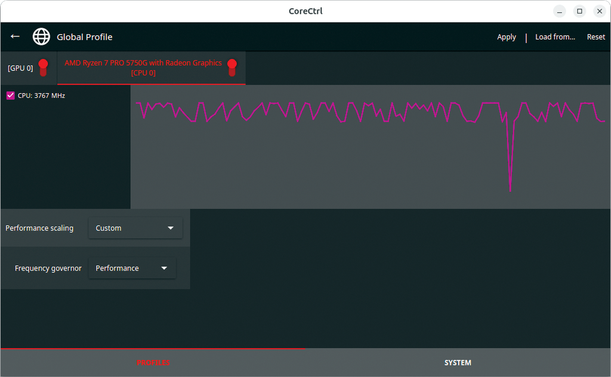
 川音리오@KawaneRio#8706
You can see the dropoff on graph for GPU memory usage after I log off VRChat.
#CoreCtrl
#CoreCtrl
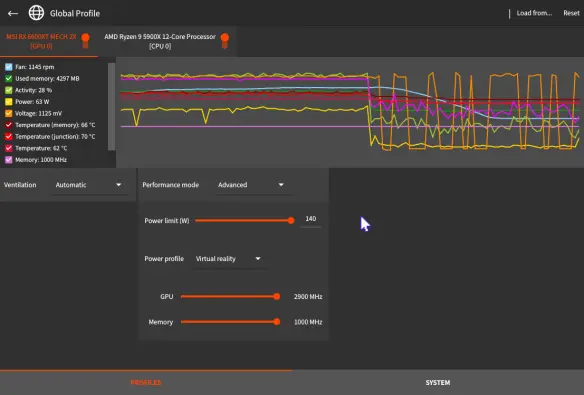
 Liam @ GamingOnLinux
CoreCtrl app has entered maintenance mode with no new features coming
#CoreCtrl #Linux #OpenSource
CoreCtrl app has entered maint...
CoreCtrl app has entered maint...
 Liam @ GamingOnLinux 🐧🎮
CoreCtrl app has entered maintenance mode with no new features coming https://www.gamingonlinux.com/2025/05/corectrl-app-has-entered-maintenance-mode-with-no-new-features-coming/

 Denzil Ferreira
Folks with AMD RX 9070 and Linux: enable overdrive by adding this to your kernel arguments: amdgpu.ppfeaturemask=0xffffffff. Reboot so that the next steps are available.
Install CoreCtrl and in the System > Software tab, make sure you are on Mesa 25.1.0 and kernel 6.13.5+. In the Profiles tab, change Performance mode to Advanced, change the Power profile to 3D Fullscreen. Set voltage offset to -10mV and reduce the maximum memory MHz by 100MHz (yes, do it).
With the lower voltage, the GPU core clock will get closer to XT levels, and reducing the memory clock a tiny bit will make it stable. Your non XT will perform better, cooler and stable. Saw about 10-20fps more in Returnal with these settings!
PS: tested on Fedora 41, Gigabyte RX 9070 Gaming OC card.
 j4n3z
j4n3zSnažil jsem se sepsat výsledek mojí snahy o to dostat pod kontrolu teploty a výkon na grafice.
Je tam jeden podle mě velmi užitečný tip v podobě #CoreCtrl a pak spousta myšlenek hozených do textu 😄
https://janez.cz/posts/post-2/
Je tam jeden podle mě velmi užitečný tip v podobě #CoreCtrl a pak spousta myšlenek hozených do textu 😄
https://janez.cz/posts/post-2/
Poslední dny jsem měl problém s #AMD RX 5700 XT 50th Anniversary Edition, která při hraní seděla na Tj 110°C. 10min práce v #CoreCtrl, #undervolt na cca 1,1V a trochu agresivnější křivka ventilátorů poslalo GPU na teploty kolem 65°C. Spokojenost 😊
Ale i tak mám objednanou pastu a teplovodivé pady a pro jistotu jí dám ještě nějakou péči.
Ohledně CoreCtrl: ocenil bych možnost zadat hodnoty napětí přes pole a netahat za body na křivce, je to trochu nepohodlné 😅
Ale i tak mám objednanou pastu a teplovodivé pady a pro jistotu jí dám ještě nějakou péči.
Ohledně CoreCtrl: ocenil bych možnost zadat hodnoty napětí přes pole a netahat za body na křivce, je to trochu nepohodlné 😅
 stqn
stqnAnyone else noticed the colors on the screen changing when the frequency of their #Radeon #7800xt changes? Using #CoreCtrl on Linux I see it clearly, low frequencies -> yellowish colors, high frequencies -> normal colors.
Before I was using CoreCtrl the colors would change randomly when watching videos, very annoying.
I’ve also had green and black screens + reboots. Lowering the power limit to 200W seems to have helped a lot. But my 850W PSU should be more than enough.
 Lars
Lars 

@Helix @MoreCoffee Been using #CoreCtrl a few months now and gotta say, it's very nice and gets the job done.