@marjolica @Wen

You almost certainly won't have anything that truly does ISO/IEC 9995-3:2010. I had to write my own keyboard layout mechanism.

Interestingly, #ThumbKey (by @dessalines) makes em dash and ellipsis (and proper left/right quotes) first class citizens on its various 'writer' flavoured keyboard layouts.

So the world of mobile devices, outwith physical keyboards, actually has progressed to the point that people cannot complain (as I once did, long ago) that they don't have a dash key.

You could be worse off when it comes to these characters looking the same.

On the framebuffer console on my machines, I use an #Unscii derivative. In 8×16 there aren't enough horizontal pixels available to reasonably distinguish amongst minus, hyphen, figure dash, en dash, em dash, horizontal bar, and horizontal line.

https://github.com/jdebp/unscii/blob/trunk/src/punctuation.txt#L389

Mind you, GNU #Unifont is even worse for these, and only has 3 distinct glyphs. U+2014 and U+2015 are identical in Unifont.

#ComputerKeyboards

unscii/src/punctuation.txt at trunk · jdebp/unscii

UNSCII, a Unicode bitmap font family inspired by classic computer systems. - jdebp/unscii

GitHub

@marjolica @Wen

It's [Shift]+[AltGr] [AltGr]+[M], note.

It's [Shift]+[AltGr] [M] gives me μ.

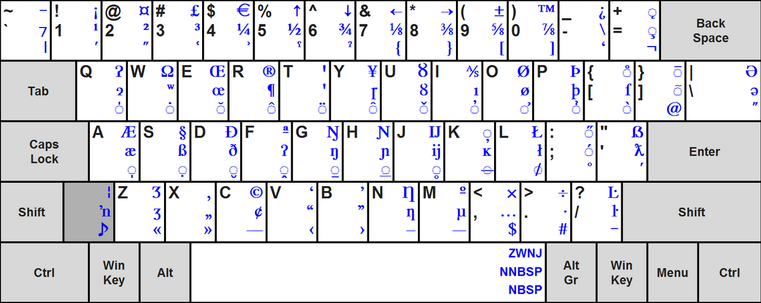
[Group2] latch, which is [Shift]+[AltGr] since there's no physical [Group2] key, basically gives me all of the stuff in blue:

https://commons.wikimedia.org/wiki/File:ISOIEC-9995-3-FCD-2009A.png

which is supposed to be fixed however the stuff in black changes by country/culture.

Of course, they mucked around with the standard this year, and I get to decide whether the new 'Latin International keyboard' is worth investing any effort into. I'm not convinced that it gives anything over and above what the 2010 standard already gives.

#ComputerKeyboards

File:ISOIEC-9995-3-FCD-2009A.png - Wikimedia Commons

@Wen @marjolica

If we all had standard ISO/IEC 9995-3:2010 keyboard layouts, the em dash would be [Group2] [AltGr]+[M] everywhere as it is part of the common secondary layout.

As it is, I am in the not large but not entirely empty set of people for whom that is true, and I can type an em dash that way irrespective of the country-specific layout in the primary group.

[Group2] is [Shift]+[AltGr] on my keyboard, so it is four keystrokes. en dash is the same except with [N] instead of with [M].

I was so glad to *finally* get a way of typing an em dash directly, without having to remember a code point value — even though I had to write the keyboard processing myself in order to do so. (-:

#ComputerKeyboards

@patcharcana @cstross

Oh, but it has. Long since.

https://ceratech.co.uk/collections/left-handed-1

https://a4tech.com/product.aspx?id=137

#Maltron even long since went to the extreme of doing a left-hand-*only* keyboard. No, I have no idea why the letter U gets to be special and done with the thumb.

https://maltron.com/store/p1/Maltron_Single_Hand_Keyboards_-_UK_English.html

#Accuratus #A4Tech #ComputerKeyboards #LeftHanded

Left Handed

@hitthetowpath

'Menu' is, however, already a different key, usually to be found next to the right GUI key at location A11 on the #ISO9995 layout.

The 'Super' key from the 1970s Space-Cadet keyboard long pre-dates the 'Windows' key from Microsoft's 1990s Windows keyboards. It is indeed a bit misleading to conflate the two, and confuses the Hell out of novices looking for 'Super' when their doco says to use it.

The irony of using 'Super' as the name is twofold. First: The Space-Cadet keyboard that people wistfully want only had 100 keys, fewer than even an old 101-key U.S.A. Model M keyboard, let alone a modern 124-key Windows keyboard, with its Internet+multimedia keys and 8 electrically and wire-protocol distinct modifiers.

Second: Things like the USB HID specification avoid trademarks like 'Windows' & 'Apple' anyway, calling the two keys (usages 0xE1 and 0xE7 on the keyboard page) the left and right 'GUI' keys.

#ComputerKeyboards #retrocomputing #USBHID #HumanInputDevices

I knew that there was #HJKL navigation and #WASD navigation, and some of the full-screen utilities in the #nosh toolset support both.

I read that there's also QAOP, which alas contradicts the conventional use of 'q' that those utilities already have, and ESDF which alas overlaps WASD.

One cannot be all things to all people, and it seems excessive to make this configurable somehow when they're only limited-use bonuses over just using the normal arrow keys.

#ComputerGaming #ComputerKeyboards

@Twig

I've heard of HJKL and WASD. I've never encountered QAOP. I'm going to look that one up.

… (Looks at Hacker News.) …

Turns out there's ESDF too. Heh!

#ComputerKeyboards #ComputerGaming #ZXSpectrum #joysticks

@WiteWulf

Having to hold the #FnKey down all of the time defeats the nature of #NumericKeypads, I find. Part of the point, surely, is not to have to hold a modifier down whilst typing to do lots of numbers.

Although @Jayenkai can argue, at least, that pressing Fn means that one is pushing down on the keyboard on both sides of the knee and keeping things in balance. (-:

#ComputerKeyboards

@Jayenkai @WiteWulf

Speaking as someone who does not enjoy them, I diffidently suggest that you might not need it even now. (-:

I have a collection of add-on #NumericKeypads . One of these days I'll find someone flogging a cheap Canon DK1000i so that I can add it to the collection.

#NumLock #FnKey #ComputerKeyboards #Canon

@matty

Not nearly enough modifiers added there for what is obviously a very simple action. They should definitely require that you simultaneously pull the clutch lever too. (-:

And if "Meta" isn't Alt for them, what key *is* it?

One has to love a "universal format" that uses a key that is pretty much universally *not present on* keyboards, and is variously understood as a range of different approximations.

Whose notice is this?

#emacs #ComputerKeyboards #HumanInputDevices

https://jdebp.uk/Humour/exiting-emacs.html

Exiting emacs