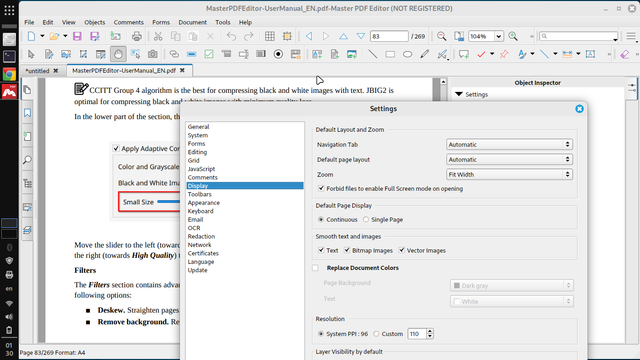
The most powerful open source PDF editor is the one found in the newer versions of OnlyOffice. But if that doesn't work for you, there's the commercial Master PDF Editor (also available for Linux). Here's running on my Mint.

#linux #opensource #foss #pdf #masterpdfeditor #onlyoffice #libreoffice #office #acrobatpro
Seems #Microsoft #Excel isn't making enough money - they seem to have been bribed by #Adobe to plug #AcrobatPro.
I usually export a sheet to a PDF if it's for public consumption. File / Export made that relatively painless.
When I tried it today, I instead saw File / Save as Adobe PDF, and when I ran it, I was informed I could use it once every 30 days, unless I bought an Adobe Pro license.
Fortunately, File / Print / Print to PDF still works.

I asked Adobe's support community about my floating toolbar problem in Acrobat Pro, and got a response back that was essentially "Sorry, but that's what it's like now," but that maybe they'll change it in the future. Oh well. #acrobatpro #adobeacrobat #adobeacrobatpro

https://community.adobe.com/t5/acrobat-discussions/how-do-i-move-the-quick-actions-toolbar-in-acrobat-pro-2022-003-20281-on-a-mac/m-p/13385589

How do I move the quick actions toolbar in Acrobat Pro 2022.003.20281 on a Mac?

I'm using Acrobat Pro 2022.003.20281 on a Mac OS 12.5. In past versions I could dock the Quick Actions Toolbar to the top of the window, but in this version of Acrobat, it hovers in the upper left, sometimes covering art that I need to see when zooming in. Is there a way to dock it so it isn't hover...

https://community.adobe.com

Anyone know how to move the floating Quick Action Toolbar in Adobe Acrobat Pro so that it is embedded at the top like it used to be, rather than "floating" on the left where it can sometimes cover part of a document when zoomed in? I can't find any info online after looking for some time.

#acrobatpro #adobeacrobat #adobeacrobatpro

heise+ | PDF-Editoren für macOS im Vergleich

Das Portable Document Format ist längst kein reines Austauschformat mehr. Unter macOS findet sich dafür eine gute Auswahl einfacher und universeller Editoren.
PDF-Editoren für macOS im Vergleich

Das Portable Document Format ist längst kein reines Austauschformat mehr. Unter macOS findet sich dafür eine gute Auswahl einfacher und universeller Editoren.