Robin Kipp has moved

56 Followers
219 Following
254 Posts
This is my old Mastodon account. Please follow me at @robin
GitHub URLhttps://github.com/robin24
Exciting stuff! I now have my own #GoToSocial instance up and running on my home server. Still doing some maintenance tasks and running tests to make sure this is ready to go, but so far this is looking really good and the setup was incredibly straightforward as well.

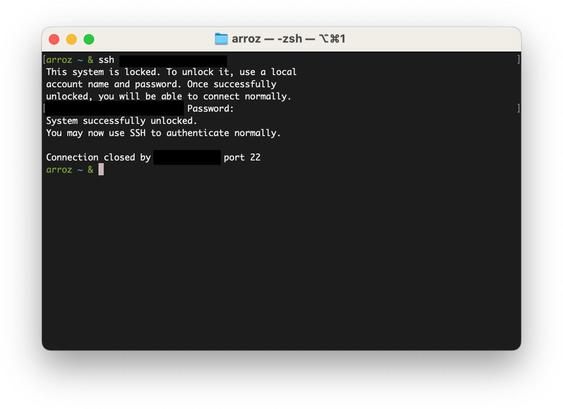
macOS Tahoe UI has a HUGE new feature for folks like me who have 24/7 Mac Minis running and access them remotely: you can now type the boot password remotely via SSH!

Power on the Mac, then SSH to it. A simple SSH server will handle your request. Typing the password there is equivalent to typing it on the keyboard. The connection then closes and the machine boots normally.

Combine this with "Start up automatically after a power failure" and you can ditch that KVM! #macadmins

@Estrella The difference between this and a Zoom product is that a Zoom recorder does just that, record audio. This Plaud device does have a microphone yes, but isn’t so much a traditional recorder, as it’s main purpose isn’t necessarily to capture high-quality audio, but to capture audio that is just about good enough to be transcribed by an AI model. This transcription service is Plaud’s core feature, whereas Zoom is more focused on giving you a simple recording experience with great quality.
@matt Thinking about it, it must have been around 2006 or so when I discovered BOINC. I really was into cryptography at the time, and there was a project that utilized BOINC to compute rainbow tables for MD5. They also had a site where you could supply an MD5 hash and see if the rainbow tables could decrypt it. This was all incredibly fascinating to me back then, honestly still is now when I think about it.
@matt There’s also the Berkeley Open Infrastructure for Network Computing, or #BOINC for short. One of the first scientific distributed computing networks, and it is still going strong these days. https://en.wikipedia.org/wiki/Berkeley_Open_Infrastructure_for_Network_Computing
Berkeley Open Infrastructure for Network Computing - Wikipedia

@alexhall @matt Yup, I’m in exactly the same position. No static IP and would have to pay a small fortune to get one, and honestly also not sure if I’d even want that for my home internet, my browsing behavior would be even easier to track by advertisers in this way. Hit me up if you do decide to try this again, I already have a working config for this anyway and I’m sure it could easily be modified for your setup.
@alexhall @matt Had to come up with a solution for this myself recently. Home server is hosting several private things that only I need to have access to over LAN or Tailscale, but some things need to be publicly accessible. Didn’t feel like publishing my home IP in DNS records either, solution was to rent a cheap (€3 / month) VPS, which then directs internet traffic to my home server via Tailscale using haproxy. Works surprisingly well so far.
@adam Well, I’ll keep my fingers crossed for you and hope they’ll be willing to come up with a good solution. With those specs you’re probably paying quite a bit for that server, hopefully they’ll take that into account as well as it actually being an accessibility issue for you given their web console is inaccessible.
@adam Sure thing, glad I could help! That BMC should have a different MAC address than your NIC, so routing a public IP to that shouldn’t be a problem for your hoster. Once done, you should be able to create an allow list of IP addresses that can connect to it, and I’d highly suggest doing that and blocking all other IPs. BMC firmwares can have security bugs, but locking down the allowed IPs besides enabling authentication should be solid.
@adam And as for setting up SOL, that’s something you would need to do on the server. I unfortunately can’t remember the exact steps, but it comes down to figuring out which TTY device the IPMI controller is bound to, and then setting up console redirection to that device.