Maria Reyes

36 Followers
43 Following
100 Posts
A dragon roaring through life 🐉
I roast inaccessible design for lunch.
Budding programmer building with AI.
Accessibility-first tools.
AI nerd, bookworm, and food lover.
Author of accessinterrupted.substack.com
Social media for the blind:
Bluesky, hardly any Alt Text. To understand an image, you must open the post, tap on the image and hope your screen reader can describe it, or spend a minute or so scanning it.
X, hardly any image descriptions. The built-in AI will try to describe the images which is a major improvement, but you need to wait until the screen reader finishes reading all the info about the post.
Mastodon, loads of image descriptions. What a pleasure it is to browse my timeline here.
New book just released available on BookShare and Kindle: I've been looking forward to reading this book by David Pogue, Apple: the First 50 Years. It is available on BookShare. Now, the silly question is: do I pay about $20 to read it on my Dot Pad multi line Braille display with Kindle, or, do I read it for free on BookShare with one single line? A very, very first world problem. :-) I have just downloaded it on BookShare but I'm having an argument with myself as to whether I want to read it on the Dot Pad for 20 bucks. This price is according to ChatGPT. Oh wait: another option is to download it on my iPhone with the Voice Dream reader app and hopefully it will read well with the Dot Pad that way for free. So many options! That's what's so awesome!

A powerful partnership. A shared mission. An incredible opportunity.
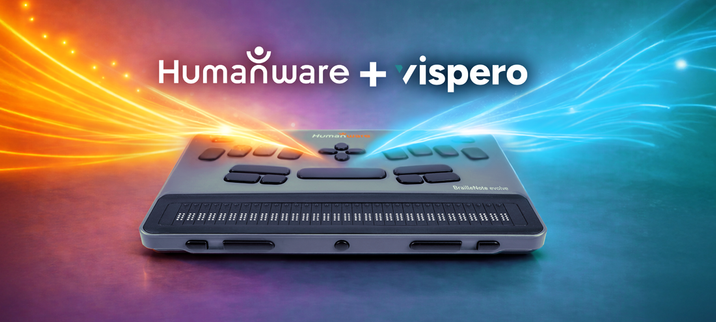
We are proud to announce that BrailleNote evolve is evolving into something even greater.
HumanWare and Vispero have joined forces in a powerful partnership, united by a mission to empower individuals who are blind or visually impaired, opening doors to learning, awareness, and opportunities that help them thrive.
As part of this collaboration, we are delighted to offer a FREE 6-month JAWS subscription with every BrailleNote evolve. HumanWare also confirmed it will manage the global distribution of JAWS for BrailleNote, further expanding access to powerful screen reading technology for BrailleNote users worldwide.
This exceptional offering reflects the strong alignment between our two organisations. Together, we are committed to empowering users with the tools and skills they need to succeed, in education, rehabilitation and the workplace.
BrailleNote evolve is far more than a notetaker. It is the lightest and most portable braille computer of its kind, seamlessly combining Windows with the familiar KeySoft environment and a customised NVDA experience, all within one integrated device that puts braille at your fingertips. Now, with JAWS alongside it, BrailleNote evolve becomes an even more powerful gateway to independence, confidence and professional success.
Designed with everyone in mind, whether you are starting your learning journey with braille, studying in education, building confidence through rehabilitation, or advancing in the workplace, BrailleNote evolve adapts to your needs. Users can comfortably operate a full Windows computer through the accessible and familiar KeySoft interface, gradually developing essential screen reader skills at their own pace before fully moving to the JAWS experience.

“At HumanWare, although we do not develop our own screen reader, we have always encouraged users to build strong screen reading skills” says Andrew Flatres, Senior Product Manager at HumanWare. “For those who are just beginning, the learning curve can feel overwhelming. BrailleNote evolve provides a supportive bridge, enabling users to build these critical skills within a familiar environment and, when they are ready, transition seamlessly to the world’s leading screen reader, JAWS — all on the same device.”
“This partnership demonstrates the power of collaboration. By bringing together our expertise, we can create even greater opportunities for the blind and low vision community. Including six months of JAWS with BrailleNote evolve allows users to build confidence and develop essential screen reader skills, with the option to continue their subscription at a preferential rate through HumanWare.”
— Matt Ater, Senior Vice President, Vispero… (1/2)

Parallels confirms MacBook Neo can run Windows in a virtual machine

Link: https://www.macrumors.com/2026/03/13/macbook-neo-runs-windows-11-vm/
Discussion: https://news.ycombinator.com/item?id=47364729

Parallels Confirms MacBook Neo Can Run Windows in a Virtual Machine

Parallels Desktop virtualization software is compatible with the new MacBook Neo, according to an update from the company – but Windows VM...

MacRumors

Interesting nvda add-on from Tony Gebhard, Interactive NVDA screen reader training add-on — guided, hands-on lessons built into NVDA
Submitted for addon store review, you can check out the Github repo here,
https://github.com/tonygeb23/nvdaCoach-
Thrilled to share something I've been building: NVDA Coach is now available —

a free, interactive training add-on for the NVDA screen reader. 🎉

As an assistive technology instructor, I've worked with a lot of people who are

just starting out with screen readers. The hardest part isn't finding the right

resource — it's the gap between reading about a command and actually using it.

NVDA Coach closes that gap.

Instead of reading a manual, students practice real NVDA commands step by step,

inside NVDA itself, with spoken instructions and instant feedback.

📚 Version 1.0.0 includes 24 lessons across three chapters:

→ Getting Started — the 10 essential commands every beginner needs

→ Reading and Moving Through Text — character, word, line, and selection navigation

→ Browse Mode and Web Navigation — heading, link, form, and landmark navigation

What makes it different:

✅ Everything happens inside NVDA — no PDFs, no videos, no switching context

✅ Live practice forms for hands-on Tab and control navigation

✅ Practice text embedded directly in the lesson window for reading drills

✅ A practice web page auto-opens for browse mode lessons

✅ Completely free. No account. No internet required after install.

✅ Built for beginners, usable independently or with an instructor

If you work with people who are learning NVDA, or if you're learning yourself,

I'd love for you to try it and share it with anyone who might benefit.

This is a beta release with plenty of room for feedback, comments, and suggestions. Please feel free to flood my email inbox. :)

🔗 Learn more: tonygebhard.me/NVDACoach

📧 Questions or feedback: [email protected]

#NVDA #ScreenReader #AssistiveTechnology #Accessibility #AT #BlindTech

#DigitalInclusion #AccessibilityTools #A11y #AssistiveTech

I just published a new piece on Access Interrupted and I’m incredibly proud of this one. It’s about how I work as a blind host at Applebee’s, and the tactile system I use to run the front of house. After my original seating chart disappeared, a teacher at Michigan’s Training Center for the Blind 3D printed a brand new tactile map for me with Braille table numbers and pegs for my jump rings. I call it the Dragon’s Command Board . This piece is about accessibility, teamwork, and the creative systems blind people build to do our jobs well. And yes… sometimes it even involves listening for chairs sliding back to know a table might be leaving. If you’ve ever wondered what restaurant work is like from a blind perspective, I think you’ll enjoy this one.
🔗 Read it here:
https://accessinterrupted.substack.com/p/the-dragons-command-board
#Accessibility
#BlindLife
#Blindness
#AssistiveTechnology
#WorkplaceAccessibility
#DisabilityInTech
The Dragon's Command Board

How I Run the Applebee's Host Stand as a Blind Host

Access Interrupted
Can the AI haters give it a rest already? Yes, I know there are concerns, but as a person with a disability, if I didn’t use every tool that was out there because I had concerns about it, I wouldn’t use anything. All this AI hatred is just cutting off our nose to spite our face.
Hi Mastodon peeps! Does anyone know how screen reader accessible #IAWriter and #Obsidian are on Windows? I'm loking for an accessible crossplatform markdown editor that can sync across devices
PSA for Android devs using Jetpack Compose with TalkBack: ExposedDropdownMenuBox breaks linear swipe navigation order. It creates internal Surface nodes with isTraversalGroup = true, which makes TalkBack sort your dropdowns into completely wrong positions in the swipe order — even though explore-by-touch works fine.
The fix: replace ExposedDropdownMenuBox with plain Box + DropdownMenu. You lose the auto-width matching (easy to add
back with onGloballyPositioned) but gain an accessibility tree that actually works.
isTraversalGroup on parent sections didn't help either — the rogue groups inside the Material component override it.
#Android #A11y #JetpackCompose #TalkBack #Accessibility
[New Extension] Gemini Captcha Solver: AI-Powered Image Captcha Resolution for Chrome: https://www.applevis.com/forum/windows/new-extension-gemini-captcha-solver-ai-powered-image-captcha-resolution-chrome
[New Extension] Gemini Captcha Solver: AI-Powered Image Captcha Resolution for Chrome | AppleVis

Gemini Captcha Solver: An AI-powered solution for screen reader users Hello everyone, Following the release of Vision Assistant Pro, which I first shared with this amazing community, I have been working on a specialized tool to tackle one of the most persistent barriers on the web: Image-based Captchas.