 2600 Magazine
Major Announcement Regarding the HOPE Conference:
Effective immediately, HOPE will happen EVERY summer, not every two years. HOPE_16 will be August 15-17, 2025!
https://www.2600.com/content/major-announcement-concerning-hope-conference


Major Announcement Regarding the HOPE Conference:
Effective immediately, HOPE will happen EVERY summer, not every two years. HOPE_16 will be August 15-17, 2025!
https://www.2600.com/content/major-announcement-concerning-hope-conference
Everyone who's ever said "if you have nothing to hide you have nothing to fear" is somebody trying to bully you into giving them the power to strip you of your dignity at a moment's notice.
On a whim, whenever it's convenient for them.
That's the fight. It's not about privacy, it's not about secrets, and it never was. It's about power.
Don't want to link your fresh install of Windows 11 with a Microsoft account? (VM for test, reinstalled laptop or whatever)
Easy peasy! You have two options:
# First option: Provide locked Microsoft account (minimum hassle, requires internet)
When asked to provide a Microsoft account, use [email protected] and a random password. This account is locked, and Windows will error out, and tell you that.
You can then proceed to use any local only account.
# Second option: No internet trick (can also be used if you actually *don't* have internet)
Make sure there's no ethernet cable in the machine. Install like you'd normally do, right up to the point where it whines about internet connectivity requirement.
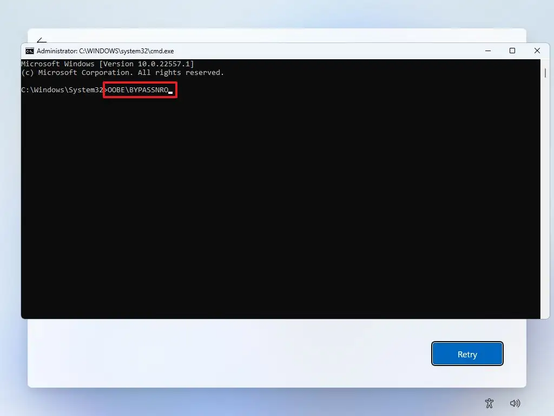
Press Shift-F10, and you get a command prompt. Enter this command:
OOBE\BYPASSNRO
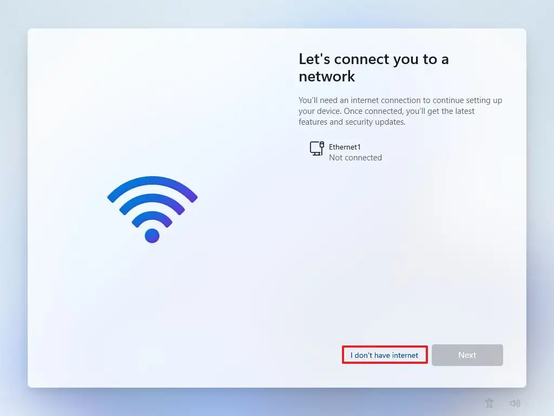
Your installation will now restart, but at the network requirement part, theres a "I don't have internet" option. Click on that, and you can create a local only user.
Both tricks works for the latest Windows 11 22H2 too!
Okay, now I'll post the responses I wrote down before I read what everyone else had to say...
https://infosec.exchange/@chrissanders88/109315290472660056
1. SOC Analyst = Family Medicine / General Practitioner. They diagnose afflictions and refer to specialists where needed. They also triage the severity of issues to prioritize various tests, treatments, or referrals.
2. Incident Response = Emergency Medicine. They identify enough information to stabilize the situation and determine the next steps for diagnosis and/or treatment.
3. Malware Analyst = Virology or Pathology. They study the characteristics and symptoms of afflictions by isolating them and performing behavioral and static tests.
4. Threat Hunter = Infection Disease. They're diagnosticians that form hypotheses and try to find evidence that either proves them or rules them out. Likely the weakest of the comparisons in terms of inputs, since most folks they see do have symptoms whereas TH usually doesn't.
5. Threat Intelligence = Epidemiology. They study the characteristics and proliferation of afflictions, as well as the relationships between them.

Which medical specialties are most comparable to each of these security roles: 1. SOC Analyst 2. Incident Responder 3. Malware Analyst 4. Threat Hunter 5. Threat Intelligence I'm curious about your thoughts... I'll post mine a bit later. 🩺🧑⚕️
Amazing #OSINT work by Bellingcat. Great read.
https://petapixel.com/2022/11/09/a-russian-missile-crew-was-geolocated-from-just-this-photo/
Some Mastodon thoughts, for bird-site expats (which include myself). I'm aggregating these from posts I've boosted before, so little of this is my own brain.
- There's no algorithm here. That means favoriting/liking doesn't do anything except communicate approval to the OP and others (which is still nice!).
- No algorithm means boosting ("retweeting") is the true method to increase a post's visibility. Do that more than you did on birdsite.
- There's no post-quoting here, and that's by design. Look at quote-tweets on the birdsite; it's a feature primarily used for toxicity.
- There's no direct word-search here either; that means you want to use hashtags to make posts more searchable. This is also intended, since word-searching posts was often used to harass/stalk on the birdsite and elsewhere, so that was left by the wayside here. This also means hashtags are much more a thing here than any of the algorithm-powered sites.
- It's encouraged to put in text descriptions when you post images; a lot of Mastodon users use screen-readers due to various disabilities, and getting an image description read out loud helps them immensely.
- Speaking of screen-readers: using capitalization in your hashtags allows the screen-readers to read them more easily, especially if you're smashing multiple words together. #rockmusic = unreadable. #RockMusic = readable.
- The best way to make threads is to make set your first post as public, but "unlist" all of your replies. This prevents your whole thread from clogging up feeds.
- Content Warnings should be used more liberally here. If you haven't gotten the impression yet, much of Mastodon was built and populated by marginalized groups who were harassed/bullied off of other platforms. This is the culture they built, to respect each other's mental health. It's not a rule, but it's well-appreciated.
- Consider chipping a few bucks towards whomever runs the server you're on; the strain is real, and most server admins were likely paying out of pocket before so don't have an existing donation base. The growth here has been extremely fast, and that means money's needed.
- DMs are just posts with privacy settings. So if you @ someone in a DM, you pull them into the thread. That could be embarrassing.
- Also, no, DMs aren't end-to-end encrypted, but they aren't on Twitter either. Don't use either if you want true privacy.
- Including your Mastodon handle in your birdsite profile will help people find you here; there's a tool (pruvisto.org/debirdify/ is one of them that's used) people can use to pull Mastodon handles from Twitter profile.
- Use the blocking and reporting features liberally, if needed. This should go without saying, but they work, and work well!
- If there's an entire Mastodon server you don't want to hear from, you can block the whole thing too.
- Preferences -> Appearance -> "Slow Mode": this can make larger "Local" feeds and any "Federated" feed much more readable.
I'll reply with some more as I see them, or reply here too. I've only been here 4 days but I'm loving it so far.
If you download your #Twitter archive it arrives wrapped as a static HTML page, which is not very useful for doing anything with, and worse: it requires the original account to be still active to do useful things like enlarge the images since they use t.co links.
So here's a #Python script to convert a Twitter archive to #markdown or other formats: https://github.com/timhutton/twitter-archive-parser
Now you can archive your tweets in any way you want.
 Leah Neukirchen
 mhoye
mhoye Lars Karlslund
  Ray Sinclair
 Chris Sanders 🔎 🧠
 Alexis Brignoni


 Christopher
 Tim Hutton