Apple's SwiftUI docs need Community Notes

Josh Pyles
@joshpyles
- 61 Followers
- 93 Following
- 48 Posts
iOS at Linear. Creator of TinyPoll. Formerly at Substack, Cocoon, and more.
 robb
robbWe wrote a few words about why and how we created our own Material for the Linear app. In a nutshell: Why? Control. How? Shaders. https://linear.app/now/linear-liquid-glass

Today, we've updated Linear Mobile with an all-new design that looks great on iOS 26, and thanks to the powerful APIs #SwiftUI has been adding over the past few years, we're bringing it to iOS 18 with zero compromise.
Get the update here: https://apps.apple.com/app/linear-mobile/id1645587184
In case anyone else needs to do this, put up a quick gist here: https://gist.github.com/pixelmatrix/86f8816c68fa1435e1a0124af894e651

We ended up precompiling our shaders to metallib files and checking those in, just to get CI to work consistently on Xcode 26.
You can create a ShaderLibrary from a metallib url. If you go this route, make sure to cache your ShaderLibrary instance because it is expensive to generate.
Using Metal shaders with Xcode 26 is such a mess. They moved the toolchain to a separate install, which is reasonable, but Xcode frequently can't find it, despite being installed. ~70% of our CI builds fail to compile shaders in Xcode Cloud 😒
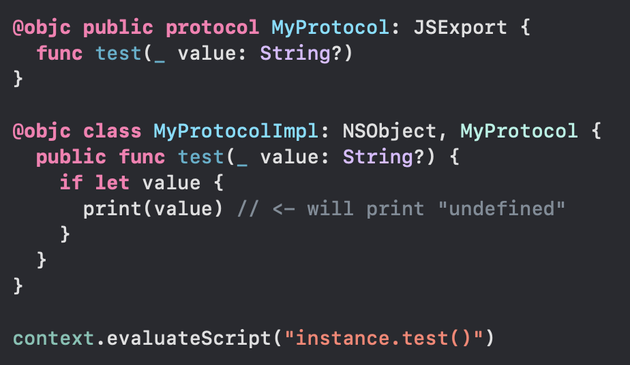
Here's a fun JavaScriptCore quirk. When JavaScriptCore calls into your Swift functions with optional params, they will always receive a value, even if the caller didn't actually pass the argument, or if called with a different type.
For example, with a string param you'd get a value like "undefined" instead of nil.
Under the hood it seems to just cast whatever is passed into the expected Swift type. Safer to just use JSValue for all your parameters.
I've been working with JavaScriptCore quite a bit lately for a project, and have been surprised by the lack of discussion about it online. It's quite powerful but seems to have many surprising gotchas.
My post on how to recreate this iCloud Onboarding Animation is live on Patreon: https://www.patreon.com/posts/134476453/
 David Smith
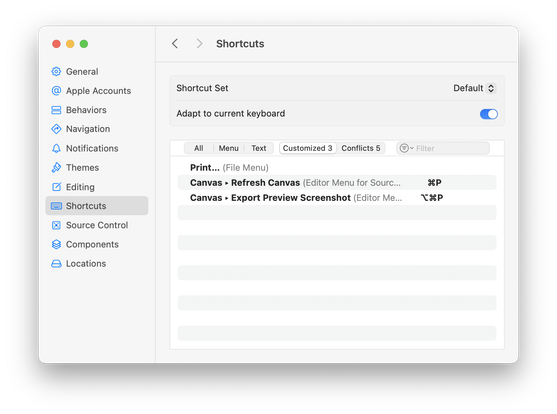
If you are spending your days doing tons of rapid iteration of your SwiftUI views as part of your iOS 26 redesign, can I recommend these two custom keyboard shortcuts”
1) Re-map “Refresh Canvas” to ⌘P. I never print my code but find I need to manually refresh things very often.
2) Re-map “Export Preview Screenshot" to ⌥ ⌘P. This saves a PNG screenshot of the current canvas view. I'm using this as part of my Design Diary series, but otherwise I use it all the time just to have past references.