51 Followers
53 Following
350 Posts
twitter.com/@greggZ251

PowerShell Weekly for March 13, 2026

https://programming.dev/post/47131479

PowerShell Weekly for March 13, 2026 - programming.dev

## Blogs, Articles, and Posts - Monitor your PowerShell modules in Azure [https://autosysops.com/blog/monitor-your-powershell-modules-in-azure] Learn how you can add monitoring to your PowerShell modules with Azure Application Insights - Deploy Enterprise PowerShell Modules Using Azure Artifacts [https://adamtheautomator.com/deploy-enterprise-powershell-modules-using-azure/] Build a private PowerShell repository using Azure Artifacts with automated CI/CD publishing, semantic versioning, code signing, and JEA integration for secure enterprise module distribution. - A Slopoly start to AI-enhanced ransomware attacks [https://www.ibm.com/think/x-force/slopoly-start-ai-enhanced-ransomware-attacks] During a ransomware engagement, X-Force discovered a PowerShell script deployed on an infected server. The script appears to be the client component of a novel C2 framework we named “Slopoly.” - Windows Terminal Preview 1.25 Release [https://devblogs.microsoft.com/commandline/windows-terminal-preview-1-25-release/] Windows Terminal 1.25 is released to the Preview Channel, with Settings Search, Action Editing, New Languages, and more. - Intune PowerShell Script Delay? Here Is What Really Causes It [https://bit.ly/4aXmKLS] Why does an Intune PowerShell script not run immediately? This post explains the 8 hour IME timer and session change triggers. ## Projects, Scripts, and Modules - AvaloniaUIShell [https://github.com/mdgrs-mei/AvaloniaUIShell] Cross-platform Desktop GUI framework for PowerShell powered by Avalonia UI. - mdgrs-mei/AvaloniaUIShell - Specter VSCode Extension [https://github.com/JustinGrote/Specter-vscode] This VS Code extension provides PowerShell Script Analysis using Specter - PowerInvoke [https://github.com/adamdriscoll/PowerInvoke] Source generators for PowerShell commands in .NET. - adamdriscoll/PowerInvoke ## Books, Media, and Learning Resources - Learning PowerShell on Microsoft Learn [https://powershellisfun.com/2026/03/06/learning-powershell-on-microsoft-learn/] If you don’t already know, there is a ‘Learning PowerShell’ section on Microsoft Learn. It’s truly a great start (or continuation) of your PowerShell journey. In this blog post, I will highlight the different chapters. - Automating Windows 11 Hyper-V Deployments with PowerShell [https://www.ciraltos.com/automating-windows-11-hyper-v-deployments-with-powershell/] Building and maintaining a virtual lab can be time consuming, especially when each virtual machine needs manual configuration after first boot. ## Community - Zero Trust and PowerShell in K12 with Jim Tyler Zero [https://powershellpodcast.podbean.com/e/zero-trust-and-powershell-in-k12-with-jim-tyler/] Returning guest and Microsoft MVP Jim Tyler joins The PowerShell Podcast to talk Zero Trust security, K–12 IT leadership, open-source tooling, and building technology that serves real-world needs. Jim shares how he uses PowerShell to proactively harden school environments, including his Ghost module for endpoint lockdown and his Chrome extension You Shall Not Pass for classroom device management. - PowerShell Community Award Nominations [https://survey.sogolytics.com/survey/form?k=SsQSQTQTsSPsPsPsP&lang=0] Have you submitted your nominations for the PowerShell Community awards? Make your voice heard. - Monad to Millions - Celebrating Jeffrey Snover & the PowerShell Community [https://www.youtube.com/live/TumiwLblaVQ] If you missed the Live Steam, you can still watch the recording. ## Events - PowerShell + DevOps Global Summit 2026 [https://www.powershellsummit.org/] April 13-17, 2026 in Bellevue, WA Check out psweekly.dowst.dev [https://psweekly.dowst.dev/] for all past editions as well as a searchable archive.

The wait is over! PowerShell Weekly for March 13, 2026 has just been published. Explore Announcements, Learning Resources, Community news, and more.
#PowerShell #Automation #TechNews
https://psweekly.dowst.dev/?p=8693
DOWST.DEV | March 13, 2026

PowerShell Weekly for March 6, 2026

https://programming.dev/post/46770220

PowerShell Weekly for March 6, 2026 - programming.dev

## Announcements! - Windows Terminal v1.25.622.0 Release [https://github.com/microsoft/terminal/releases/tag/v1.25.622.0] It sports a new search experience inside the Settings page, the ability to edit actions, command palette entries and key bindings with a rich editor–rather than just their key bindings–support for Kitty’s keyboard protocol and two completely new community translations! ## Blogs, Articles, and Posts - Enable batch file secure mode in Windows 11 with LockBatchFilesWhenInUse: Lock running batch scripts [https://4sysops.com/archives/enable-batch-file-secure-mode-in-windows-11-with-lockbatchfileswheninuse-lock-running-batch-scripts/] Windows 11 Insider Preview builds introduce a new secure processing mode for batch files and CMD scripts. IT administrators can enable it via a registry value named LockBatchFilesWhenInUse, which prevents batch files from being altered while they execute. The feature also improves performance when Windows Defender Application Control (WDAC) code integrity policies are active. It is currently available in the Dev Channel build 26300.7939, and the Beta Channel build 26220.7934. - Measuring KPIs like Response Times for Shared Mailboxes [https://office365itpros.com/2026/03/05/shared-mailbox-kpi/] Shared mailboxes are not CRM systems. However, many Microsoft 365 tenants use shared mailboxes to handle customer queries and then want to measure KPIs such as agent responsiveness to customer queries or the number of queries handled per agent in a month. As explored in this article, it’s possible to use the Microsoft Graph to extract some KPI-like data from shared mailboxes. - Monitoring Secure Boot certificate installation status with Intune and PowerShell [https://4sysops.com/archives/monitoring-secure-boot-certificate-installation-status-with-intune-and-powershell/] Microsoft Secure Boot certificates issued by the 2011 Certificate Authorities (CAs) are expiring starting June 2026. Every Windows device with Secure Boot enabled must be updated to trust the 2023 certificates before expiration to retain security update support. Microsoft provides a monitoring-only approach using Intune Remediations that runs a PowerShell detection script on enrolled devices and reports Secure Boot and certificate status back to the Intune admin center — without making any changes to devices. This article explains the prerequisites, deployment steps, data collected, and how to read the results. - Discovering PowerShell provider dynamic parameters [https://oofhours.com/2026/03/03/discovering-powershell-provider-dynamic-parameters/] PowerShell ships with providers that expose things like file systems, the registry, certificates, environment variables, etc. To see which are available in your PowerShell session, you can use Get-PSProvider: Not surprisingly, these behave differently based on the type of data or objects they are working with. ## Projects, Scripts, and Modules - DLLPickle [https://github.com/SamErde/DLLPickle] A PowerShell module that helps you get un-stuck from dependency version conflicts that can occur when connecting to multiple Microsoft services in the same session. ## Books, Media, and Learning Resources - New to PSReadline? Start here. [https://www.youtube.com/watch?v=dcr3sQ-9ZWk] PSReadLine is shaping your PowerShell experience whether you realize it or not. ## Community - PowerShell is fun :) Hits 1,000,000 views! [https://powershellisfun.com/2026/02/27/over-1-000-000-views] Congrats to Harm on crossing 1 million views mark! If you haven’t already be sure to check out his amazing site, filled with a ton of great content. - PowerShell Tools for PKI and Secure Boot with Richard Hicks [https://powershellpodcast.podbean.com/e/powershell-tools-for-pki-and-secure-boot-with-richard-hicks/] Long-time Microsoft MVP and consultant Richard Hicks joins The PowerShell Podcast to talk about ADCS security, PKI misconfigurations, and why PowerShell is a consultant’s ultimate force multiplier. Richard shares real-world stories from auditing enterprise certificate environments, explains how simple template mistakes can lead to full domain compromise, and walks through tools like Locksmith that help administrators quickly identify dangerous configurations. ## Events - PowerShell + DevOps Global Summit 2026 [https://www.powershellsummit.org/] April 13-17, 2026 in Bellevue, WA - Monad to Millions - Celebrating Jeffrey Snover & the PowerShell Community [https://www.linkedin.com/events/7425468327407321088/] Join us, Thu, Mar 12, 2026, for a special live-stream celebration honoring Jeffrey Snover, the creator of PowerShell, and the incredible community that turned a bold idea (Monad) into a global movement. Check out psweekly.dowst.dev [https://psweekly.dowst.dev/] for all past editions as well as a searchable archive.

Just dropped the latest edition of PowerShell Weekly for March 6, 2026! Dive into the freshest scripts and tips to supercharge your workflow. Don’t miss out!
#PowerShell #Automation #TechNews
https://psweekly.dowst.dev/?p=8678
DOWST.DEV | March 6, 2026

Hot off the press! The newest issue of PowerShell Weekly for February 27, 2026 is now available. Stay updated with the latest in PowerShell and automation. Read it today!
#PowerShell #Automation #TechNews
https://psweekly.dowst.dev/?p=8654
DOWST.DEV | February 27, 2026

PowerShell Weekly for February 27, 2026

https://programming.dev/post/46419312

PowerShell Weekly for February 27, 2026 - programming.dev

## Blogs, Articles, and Posts - The PowerShell Wiggum Loop [https://pckt.blog/b/posh/the-powershell-wiggum-loop-stez852] One of the best things about PowerShell is that you can interactively explore anything. Long before the Wiggum Loop was a thing, PowerShell let you explore - Using Strict Mode in PowerShell [https://powershellisfun.com/2026/02/20/using-strict-mode-in-powershell/] PowerShell is incredibly flexible; it’s a forgiving scripting language. But this could turn into scripts not written according to best practices or that rely on things that work automatically, and sometimes fail without really understanding why. In this blog post, I will show you how Strict mode works and how it can help you :) - 4 PowerShell commands that fix common Windows problems fast [https://ift.tt/MbCjnR6] These four simple PowerShell scripts fix common Windows headaches and save time with quick, copy-and-paste commands. - Fighting the PUP Wave: A Practical PowerShell Cleanup Workflow for MSPs [https://www.kylereddoch.me/blog/fighting-the-pup-wave-a-practical-powershell-cleanup-workflow-for-msps/] When unwanted apps keep sneaking onto client endpoints and allowlisting is not in the budget, a repeatable uninstall script plus RMM automation can still move the needle. ## Projects, Scripts, and Modules - Sixel v0.7.0 [https://www.powershellgallery.com/packages/Sixel/0.7.0] Display images in the terminal using various protocols - ISpy v0.3.0 [https://www.powershellgallery.com/packages/ISpy/0.3.0] PowerShell module for decompiling .NET assemblies using ILSpy decompiler. Provides comprehensive cmdlets for assembly analysis, type discovery, method examination, and source code decompilation with advanced filtering and export capabilities. - TextMate v0.1.0 [https://www.powershellgallery.com/packages/TextMate/0.1.0] A PowerShell module for syntax highlighting using TextMate grammars. Using PwshSpectreConsole for rendering. - pwsh-host-rs [https://github.com/Devolutions/pwsh-host-rs] Rust PowerShell Hosting Library. - GitHub - Skatterbrainz/psWarpTerminal: PowerShell wrapper for the Warp Terminal (Oz) CLI [https://github.com/Skatterbrainz/psWarpTerminal] PowerShell wrapper for the Warp Terminal (Oz) CLI. Contribute to Skatterbrainz/psWarpTerminal development by creating an account on GitHub. ## Community - Escaping Tutorial Hell with Pablo Correchel [https://powershellpodcast.podbean.com/e/escaping-tutorial-hell-with-pablo-correchel/] In this episode of The PowerShell Podcast, Andrew Pla sits down with Pablo Correchel, an early-career IT professional who is publicly documenting his PowerShell and learning journey. Just one year into his first help desk role while studying cybersecurity, Pablo shares how consistent practice, sharing what you learn, and embracing beginner questions have accelerated his learning. - How much vibe is the coding [https://www.meetup.com/de-de/powershell-usergroup-inn-salzach/events/313519631/?eventOrigin=group_upcoming_events] 12th March 2026 - From Pipelines to Agentic Pipelines: Jeffrey Snover & Doug Finke Live [https://www.meetup.com/nycpowershellmeetup/events/313507496/] Wednesday, Mar 4 · 1:30 PM to 2:00 PM EST ## Events - PowerShell + DevOps Global Summit 2026 [https://www.powershellsummit.org/] April 13-17, 2026 in Bellevue, WA - Monad to Millions - Celebrating Jeffrey Snover & the PowerShell Community [https://www.linkedin.com/events/7425468327407321088/] Join us, Thu, Mar 12, 2026, for a special live-stream celebration honoring Jeffrey Snover, the creator of PowerShell, and the incredible community that turned a bold idea (Monad) into a global movement. Check out psweekly.dowst.dev [https://psweekly.dowst.dev/] for all past editions as well as a searchable archive.

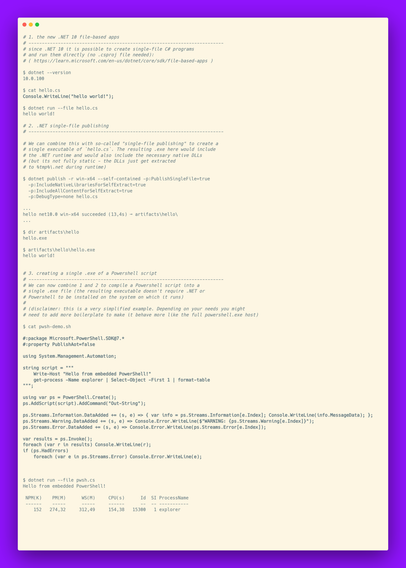
quicktipp #112: I've often joked Powershell should be called ".NETscript" as it uses .NET types and can embed C# code.

With the new .NET10 things also work the other way around: You can directly run C# "scripts". If you are on Unix, just create a .cs file with the shebang `#!/usr/bin/env dotnet`.

And, to go full circle, you can embed powershell code in .cs scripts.

Going further, you can compile these .cs scripts into single .exe files.

No VS, no csproj.

#powershell #dotnet #csharp #windows

Your weekly dose of PowerShell magic has arrived! Discover Announcements, Blogs, Modules, and more in PowerShell Weekly for February 20, 2026. Time to level up!
#PowerShell #Automation #TechNews
https://psweekly.dowst.dev/?p=8636
DOWST.DEV | February 20, 2026

PowerShell Weekly for February 20, 2026

https://programming.dev/post/46063606

PowerShell Weekly for February 20, 2026 - programming.dev

## Announcements! - PowerShell v7.6.0-rc.1 Release [https://github.com/PowerShell/PowerShell/releases/tag/v7.6.0-rc.1] Come get the first release candidate for PowerShell 7.6 - PowerShell, OpenSSH, and DSC team investments for 2026 [https://devblogs.microsoft.com/powershell/powershell-openssh-and-dsc-team-investments-for-2026/] As is tradition, we are publishing our planned team investments for the year. This is based on our current understanding of customer and community needs, but is subject to change based on emerging priorities throughout the year. ## Blogs, Articles, and Posts - Using Dev Proxy with the Microsoft Graph PowerShell SDK [https://office365itpros.com/2026/02/19/dev-proxy-graph-sdk/] Dev Proxy is a Microsoft tool built to help developers figure out the most effective way of using Microsoft Graph API requests. On the surface, Dev Proxy doesn’t seem like a tool that would interest people who use the Microsoft Graph PowerShell SDK to write scripts for Microsoft 365. But all tools have some use, and Dev Proxy can help. - Exchange Online deprecates -Credential parameter in Connect-ExchangeOnline PowerShell cmdlet [https://4sysops.com/archives/exchange-online-deprecates-credential-parameter-in-connect-exchangeonline-powershell-cmdlet/] Microsoft announced on February 12, 2026, a significant change to its Exchange Online PowerShell module: the deprecation of the -Credential parameter for the Connect-ExchangeOnline cmdlet. This change represents part of a broader initiative to enhance security across Microsoft 365 administrative interfaces by eliminating authentication methods that do not support multifactor authentication. - Using the ZLocation PowerShell Module to navigate folders [https://powershellisfun.com/2026/02/13/using-the-zlocation-powershell-module-to-navigate-folders/] Switching back and forth between folders on your system requires a lot of typing and thinking about where that xyz folder was located… Zlocation helps you navigate frequently accessed folders. In this small blog post, I will show you how it works. - Validating PowerShell script syntax in GitHub Actions workflows - Gérald Barré [https://www.meziantou.net/validating-powershell-script-syntax-in-github-actions-workflows.htm] Learn how to validate the syntax of PowerShell scripts embedded in GitHub Actions workflows using a custom PowerShell function. ## Projects, Scripts, and Modules - PSNotes v 1.0.0.0 [https://www.powershellgallery.com/Packages/PSNotes/1.0.0.0] PSNotes is a PowerShell module that provides a structured, versioned snippet and script library for reusable automation patterns. Create notes with aliases, tags, and metadata to quickly execute, copy, or preview commands. Organize notes into local or remote catalogs, search by name, tag, details, or snippet content, and turn frequently used automation into first-class commands. - Template for the Win32 PowerShell script installer in Microsoft Intune [https://www.imab.dk/template-for-the-win32-powershell-script-installer-in-microsoft-intune/] Introduction Microsoft Intune now supports using a PowerShell script as the installer for Win32 apps. Instead of specifying a command line, you upload a script. This gives admins more flexibility when deploying applications. I’ve created a template (install and uninstall) that can serve as inspiration - dbatools v 2.7.25 [https://github.com/dataplat/dbatools/releases/tag/v2.7.25] The community module that enables SQL Server Pros to automate database development and server administration - PSClaudeCode [https://github.com/dfinke/PSClaudeCode] Ever wondered how AI agents like Claude Code work their magic? Dive into this PowerShell implementation and build your own intelligent assistant from scratch! ## Community - Learning PowerShell in 2026 with Tara Learning PowerShell in 2026 with Tara [https://powershellpodcast.podbean.com/e/learning-powershell-in-2026-with-tara/] In this episode of The PowerShell Podcast, Andrew Pla is joined by Tara, a longtime IT professional who has officially started her PowerShell learning journey. Tara shares her honest experience transitioning from a GUI-first mindset to learning PowerShell fundamentals, including objects, verb-noun commands, variables, pipelines, and error messages. The conversation captures the real emotions of learning something new later in a career—confusion, frustration, breakthroughs, and growing confidence. - PowerShell Community Call - February 19th, 2026 [https://www.youtube.com/watch?v=WgoJnmobYMo] The PowerShell Community Call is held on the 3rd Thursday of every month for 30 minutes at 9:30 AM US Pacific Time. Topics include PowerShell 7, Windows OpenSSH, PSEditorServices/VSCode-PowerShell, PSScriptAnalyzer, PowerShell Gallery, Azure PowerShell/CLI, DSCv3 and any other projects owned by the PowerShell Team. ## Events - PowerShell + DevOps Global Summit 2026 [https://www.powershellsummit.org/] April 13-17, 2026 in Bellevue, WA - Monad to Millions - Celebrating Jeffrey Snover & the PowerShell Community [https://www.linkedin.com/events/7425468327407321088/] Join us, Thu, Mar 12, 2026, for a special live-stream celebration honoring Jeffrey Snover, the creator of PowerShell, and the incredible community that turned a bold idea (Monad) into a global movement. Check out psweekly.dowst.dev [https://psweekly.dowst.dev/] for all past editions as well as a searchable archive.

PSNotes v1.0.0 Released (A Snippet Library for PowerShell)

https://programming.dev/post/46030438

PSNotes v1.0.0 Released (A Snippet Library for PowerShell) - programming.dev

I just released PSNotes v1.0.0. PSNotes is a PowerShell module that lets you build your own snippet library with: * Aliases for quick recall * Catalog-based organization * Direct execution or clipboard copy * Executing script via paths or as saved snippets * Support for remote catalogs allowing you to have your snippets everywhere * Quick browser to see all your notes at a glance * Works from Windows Terminal, VSCode, pwsh, or any PowerShell host (even ISE if you’re still using that) The goal is simple: make it easier to reuse the commands you run constantly and remember the ones you don’t. Or if you are like me and get sick of typing out [System.Collections.Generic.List[PSObject]] forty times a day. Full documentation and samples: https://github.com/mdowst/PSNotes [https://github.com/mdowst/PSNotes] Release notes: https://github.com/mdowst/PSNotes/releases/tag/v1.0.0 [https://github.com/mdowst/PSNotes/releases/tag/v1.0.0] PowerShell Gallery Listing: https://www.powershellgallery.com/packages/PSNotes/1.0.0.0 [https://www.powershellgallery.com/packages/PSNotes/1.0.0.0] I hope you find it useful. And as always, I’m open to any suggestions or feedback.