Neat post on using Drafts as a quote library: https://blog.warrenweb.net/using-drafts-as-a-quote-library/
| Website | https://getdrafts.com/ |
| User Guide | https://docs.getdrafts.com/ |

| Website | https://getdrafts.com/ |
| User Guide | https://docs.getdrafts.com/ |
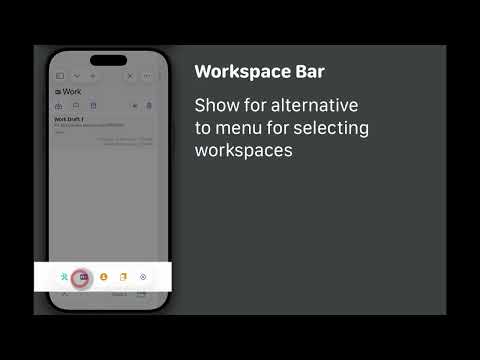
TIP: Prefer an alternative to menus for quickly accessing your workspaces? Enable the workspace bar (requires iOS 26) - back by popular demand in Drafts 51!
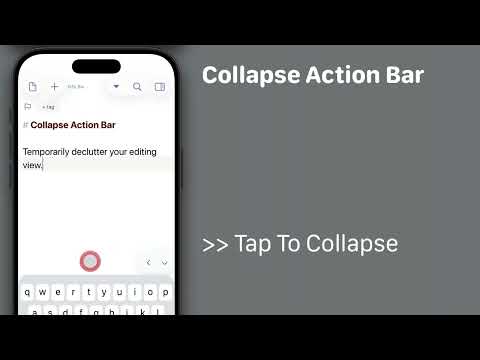
Starting with Drafts 51, it is possible to temporarily collapse the Action Bar (buttons above keyboard) on iOS 26 to reduce distractions while editing.
To do so:
* Long-press the downward arrow button to the right of the Action Bar for options menu.
* Tap the `>>` to collapse the bar to a minimal size.
* When done, use the `<` to re-expand the bar.
Drafts 51 is out! Editor performance improvements, return of the Workspace/Action Group bars, Action Bar improvements.
Details: https://forums.getdrafts.com/t/drafts-51-is-out-editor-performance-action-bar-improvements/16586

Any combination of two of the below work great together. All three do not:
* Drafts
* iOS 26.4 beta
* The "Reduce Transparency" accessibility feature
If you use Drafts and Reduce Transparency, maybe hold off on the iOS beta, or you will get blank text in the editor.
If you have installed the iOS beta, turn off Reduce Transparency to workaround.
Apple Folks: FB22153022
FYI: The official Drafts Model Context Protocol server is now available in the Claude Extension Directory, for easy installation and updates.
If you want to be able to query your Drafts library from the Claude app on your Mac, this is for you!
Details: https://forums.getdrafts.com/t/drafts-mcp-server-for-claude-ai-integration/16507/3?u=agiletortoise

Interested in using Claude to work with your Drafts library? Try out our new MCP server. With it, you can use natural language prompts to read, analyze, update drafts in your library and integrate with other apps! (Mac Only)
Details: https://forums.getdrafts.com/t/drafts-mcp-server-for-claude-ai-integration/16507


Drafts 50.0.3 has been released: iOS App Store Mac App Store Details below. For a complete history of updates, visit the release notes. 50.0.3 This release brings a number of AppleScript changes to better support integration with the Model Context Protocol server. If you are interested in using Drafts with Claude or other MCP-supporting tools, see details on MCP server release in the forums. AppleScript Changes Breaking Change: tags on drafts in AppleScript have been renamed to tag list (a...
TIP: Working with Task-Shopping Lists in Drafts
An all time classic workflow tip, which covers a lot of cool features like: tasks, alternate syntaxes, link mode, pinning, and more.
https://forums.getdrafts.com/t/tip-working-with-task-shopping-lists-in-drafts/2523

Task lists with tappable task marks are easy to create in Drafts. This article is focused on how some features of Drafts can be used in combination to make it easier to check of items on lists. If you have ever hit the grocery store with a list of items in a notes app (Drafts, Apple Notes, or others), you know there can be some real annoyances to trying to use that list at the store to get your shopping done. If these sound familiar, this article is for you: Oops, I meant to tap the checkbox, ...