David Holland

25 Followers
157 Following
155 Posts
Husband. Technologist. Founder at Big Tree Technical. Michigan, USA
Big Tree Technicalhttps://www.bigtreetechnical.com

For those that care about such things (👋 hi, me too!), the change in iOS 26.4 that moved the Updates screen deeper in the App Store hierarchy has proven to be a seemingly needless irritation.

Happily, there is a solution. You can long-press the App Store app icon and select Updates directly from the context menu. Nice!

Did you know if you want to quickly look at your desktop, holding WIN + Comma will hide all your open windows until you release the keys? 👀

If you're using that command line in Windows, don't forget you can use clip to pipe the output of your command to the clipboard!

Like this:

systeminfo | clip

Puts the output of the command directly on your clipboard so you don't need to manually select and copy it

😊

#Windows #Tips

Thoughtful lessons from a Google software engineer. “The punchline isn’t ‘never innovate.’ It’s ‘innovate only where you’re uniquely paid to innovate.’ Everything else should default to boring, because boring has known failure modes.” https://addyosmani.com/blog/21-lessons/
21 Lessons From 14 Years at Google

Lessons learned from 14 years of engineering at Google, focusing on what truly matters beyond just writing great code.

I'm a forty-five-year-old man, and I've been using desktop web browsers for twenty-eight of them, and only a few months ago I learned how to highlight text that is a hyperlink without clicking the link: by holding Alt why highlighting. I use it many times a day now. How did even use the web before that?

In case you still didn't know it, now you do.

Thank you @jhsoby for teaching me this.

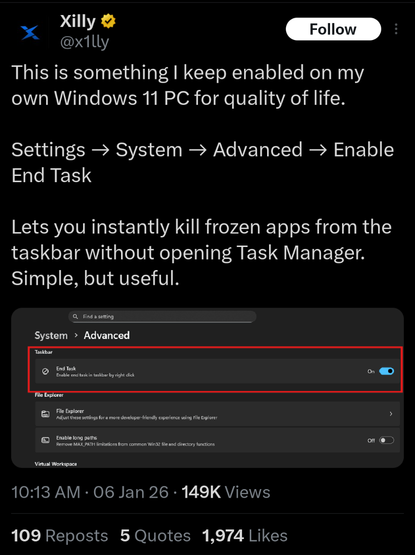
Did you know we added the ability to end tasks directly from the taskbar in Windows 11?

So you don't need to open task manager - when enabled you can just right click an app and end it from that menu

#Windows #Tips

Mac tip: If you can’t remember where a command is in the menu bar:
❶ Use Shift+⌘+/ (question mark) to get the Help menu.
❷ Type a few letters until you see the command you want.
❸ Arrow down to it and trigger with Return.
➜ You also get to see where the command is located for the next time.
#macOS
Microsoft isn't rewriting Windows in Rust with AI, despite many reports about it over the past couple of days

Did you know if you hold ALT when you double click a file or folder in File Explorer, it will open Properties for that item? 👀

#Windows #Tips

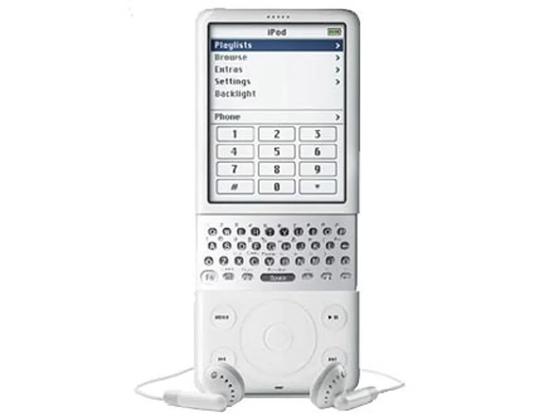
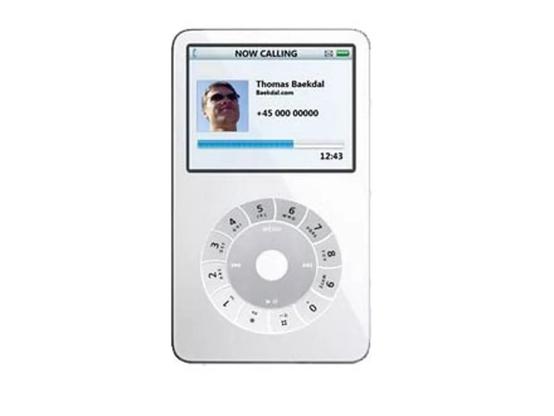
iPhone concepts from 2006, a year before the iPhone actually launched...