I'm looking for recommendations for inexpensive but reliable ARM / fanless small server at the lowest cost possible. The software on it will be debian/ Yunohost (a git forge, nextcloud, some internal docomentation, etc).

Min-specs: 4-8GB RAM.
Budget: Hopefully under $250, or something I can find in the used market.
I was told rasberry pi's are not as reliable, is there better?

#askfedi #yunohost #selhosting

@NiwlCraft any requirements in terms of storage/storage options (nvme?), number of cores?
@NiwlCraft dunno why they told you that. I've ran a pi 4 as a home server for years with no reliability issues. ofc you have to get a decent quality memory card or use an SSD

@NiwlCraft If ARM is not a strict requirement, I can highly recommend the ASRock Intel N100M. Throw in up to 32 GB DDR4 and some storage (M.2 NVMe or SATA) and put it in any Micro ATX case. I have mine in an old server case with a pico PSU for fully fanless operation.

It's powerful enough to run Jellyfin (with hardware encoding), Immich, Homeassistant and a few other things at the same time.

If you ever need more storage, you can add a PCIe card for more SATA.

https://www.asrock.com/mb/Intel/N100M/

@NiwlCraft There is also a Mini ITX version that works with a DC barrel jack power supply: https://www.asrock.com/mb/Intel/N100DC-ITX/index.asp
ASRock N100DC-ITX

Intel Quad-Core Processor N100 (up to 3.4 GHz); Supports 1 DDR4 DIMM; 1 DC Jack (Compatible with the 19V power adapter, 5.5 x 2.5mm DC-in jack); 1 PCIe 3.0 x4 (x2 mode), 1 M.2 Key E for WiFi; Graphics Output Options: D-Sub, HDMI; 7.1 CH HD Audio (Realtek ALC897 Audio Codec); 2 SATA3, 1 M.2 (PCIe Gen3x2); 4 USB 3.2 Gen1 (2 Rear, 2 Front); Realtek Gigabit LAN; Supports ASRock Auto Driver Installer

@dfyx How about the N150 ? Apparently not having UHD graphics (HD graphics instead) can help thermals if not used for gaming.
@NiwlCraft If you can find an N150 board that has all the connectors you need, that's probably fine for a server.

@NiwlCraft are mini-ITX motherboards with soldered CPUs an option? I have an old but solid Asrock one I bought 10+ years ago with a mini-ITX case and the total roughly matched your budget.

(I am fairly satisfied with it: even though it's not very powerful it's more than good enough for a server. I'm using it fanless ; temperature maxes out at ~50ยฐC under heavy load and typically hovers between 30-40ยฐC idle. It's currently idling around 17W with 2 HDDs and a SSD so power consumption is not ideal but... it's Intel so I imagine you could get lower numbers on a low-power ARM chip.)

@rfnix Yeah over time the power consumption does add up a bit. I will look into those though.
@NiwlCraft the power used by SSDs and HDDs is significant on my setup: when both HDDs are out of powersave mode it typically jumpts to at least 25W even without heavy CPU usage. I imagine you could get lower power usage with a SD card or somesuch, maybe, but I'm not familiar with their power consumption - and they're probably at bit less reliable.
@NiwlCraft In my opinion you want to look for something that runs mainline Linux. Which for arm boards is as rare as water in the desert.

@portaloffreedom @NiwlCraft postmarketos (read: Linux) runs on quite a few arm devices:

https://wiki.postmarketos.org/wiki/Devices

Devices - postmarketOS Wiki

@gim @NiwlCraft I know about it but I never throught of using postmarketos to run a NAS.
Looking at the supported devices page I mostly see phones and tablets.

@NiwlCraft

Could use perhaps an old cellphone for that. A refurbished Fairphone 3 or 4 may cost less than that and meet the specs.

@NiwlCraft do you know why raspberry pis "aren't reliable"?

I have a pi 3 and a pi 2 that have been running for years without issue.
One is running pihole DNS and wireguard VPN (my network doesn't work if it doesn't work, if it goes down it's obvious) and no discernable issues with them, no outages.

@NiwlCraft granted, NextCloud is kind of heavier/slow, not sure I'd want to run it on a pi 3, but it would probably be fine on the 4 or 5.

I ditched nextcloud due to general slowness, and wanting it mostly for pictures, which I now use immich for.

@coolcoder360 Our team also found nextcloud to be slow regardless of hardware lmao.

@NiwlCraft I'm not using it much at all, but I've had better experience with Seafile.
It's got some proprietary format though for how it works (why it's faster) so I think it isn't as straightforward for backups.

99% of what I needed was picture storage though, fulfilled by immich.
Not sure if you're able to test Seafile vs nextcloud but it might be worth testing to see what works for you.
Nextcloud does have more calendar, chat, etc tools though so I still see a benefit to using it for that.

@coolcoder360 @NiwlCraft I have much nicer experience with syncthing than with nextcloud, although in case of syncthing bigger issue is android client especially 'lite' one (which doesn't mirror everything).

That being said, skylable's SX and SX-drive were brilliant, but they no longer exist.

@coolcoder360 Not sure either.
I think using pis for Yunohost it might be different because it's also to make sure apps we want to use are well supported or upgrade well without a hitch on ARM, but that's an ARM problem in general that will get better over time.

I have a pi4 laying around but the 4Gb ram model seems a bit underpowered for our needs. I love the low power consumption though.

@NiwlCraft I went with the cheapest used Chromebook that could be re-flashed with GNU/Linux, plus a USB Ethernet dongle. My Relm costed $50, though I now use it as a netbook with good working time from battery, not as a server.

@NiwlCraft For something different, I love the "industrial controller" computers. They look scary but are actually just x86 fanless mini PCs at a GREAT price pre-owned. I love them.

Here's my most recent purchase and what I used it for. These packets are traveling through it right now. I can't imagine any problems with Debian:

https://ratfactor.com/openbsd/pf-gateway-bedtime

My home network observes bedtime with OpenBSD and pf - ratfactor

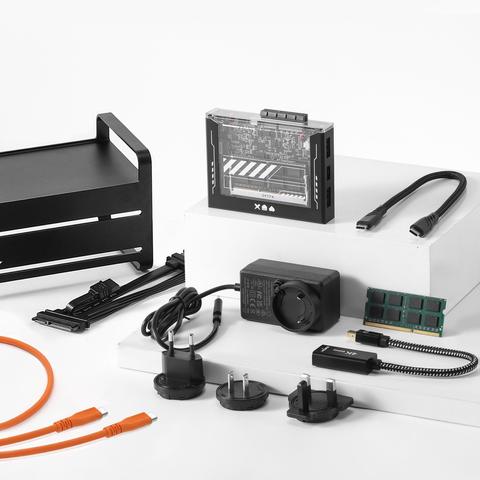
@NiwlCraft I used a Zima Blade for a bit, offers pretty good specs for the price (up to 16gb ram, passive-cooled) but has some limitations.

You can set it up to use as a NAS-like, but I'd recommend not attaching large-capacity HDD as it seems like it can't handle the power draw (SSDs should be fine).

EDIT: This is the kit that has the higher-end specs, which I'd recommend.
https://shop.zimaspace.com/products/zimablade-deskbuild-nas-kit

ZimaBlade 7700 DeskBuild NAS Kit: X86 4-Core DIY NAS with One-Click Apps

@NiwlCraft Raspberry Pi 4 and newer are reliable. I've had a CM4 on an IO board + PCIe x1 SATA card with 2 NAS disks as my off-site back-up server for a couple of years. (Currently off-line.)

The older PIs were a problem though as the network card shared the USB bus with any USB connected harddrives = using external USB drives could timeout your internet connection.

But as PIs are expensive now it's most likely better to find something used for cheaper.