 Marcus M. 滅拉 マルクス🐧
 Tito Swineflu
Holy shit. I only use chrome when I have to for work, and these assholes...
https://www.thatprivacyguy.com/blog/chrome-silent-nano-install/
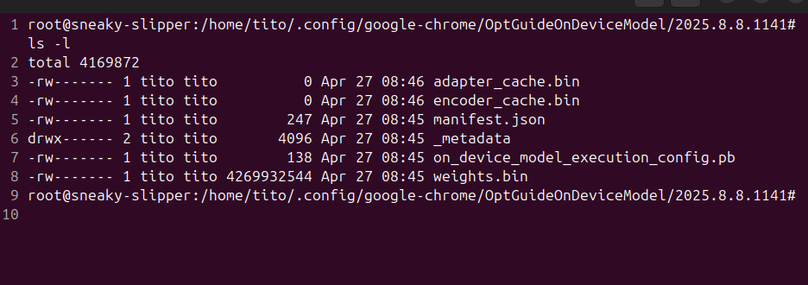
Holy shit. I only use chrome when I have to for work, and these assholes...
https://www.thatprivacyguy.com/blog/chrome-silent-nano-install/
@tito_swineflu cat /dev/null >! weights.bin; sudo chown 0:0 weights.bin
… if the best option is somehow not an option.
@iris @tito_swineflu I'll have to check if my Vivaldi is affected.
If I had this issue, I'd try creating an empty weights.bin file and then locking down the permissions.
FWIW, my instance of Vivaldi (7.9.3970.60 (Official Build) (64-bit)) on AVLinux (AVL_MXe-25_x64 Ease November 27 2025 base: Debian GNU/Linux 13 (trixie)) does not include that enormous file (yet?). There's something similar in the config as shown. I don't know what it is, but it's much smaller and differently named.

@odjbo @iris @tito_swineflu I do know Vivaldi takes intentional steps to remove chromium's spyware, so this tracks, but you never know. Thanks for checking.
The other file you found looks legit. It's only 7MB.
@corbden @iris @tito_swineflu
For UNIX/Linux environments, something like:
1. Stop Chrome
2. Execute:
sudo -i
SUDO_HOME="$( eval echo "~${SUDO_USER}" )"
for TARG in $( find ${SUDO_HOME} -name weights.bin 2> /dev/null ); do
   rm "${TARG}"
   install -bDm 0600 -o root -g root /dev/null "${TARG}"
done
Ought to work?sudo version, explicitly setting SUDO_HOME might be unnecessary@tito_swineflu
I only use chrome when absolutely necessary. This is in my bashrc. In launches when I need it then wipes all traces from my account when I'm done.
function _chrome {
/opt/google/chrome/chrome --no-first-run >& /dev/null &
wait $!
rm -rf ${HOME}/.config/google-chrome ${HOME}/.cache/fontconfig ${HOME}/.cache/google-chrome ${HOME}/.cache/mesa_shader_cache
}
alias chrome='_chrome &'
@tito_swineflu Fair. I was mostly just sharing that for the thread.
FWIW, I also have a setup where the browser runs in another account and shared camera and mic for video calls etc. At least that limits the blast radius to the alternate account.
Regardless, we shouldn't have to play these games to defend ourselves against the tools we're forced to use.
Does this happen with chromium and other chrome-based browsers?
@tito_swineflu Holy crap. Even on linux machines.
Glad I use Vivaldi. Sorry you have to use the chrome thing for work...
 J$
J$ Bobo_PK 🦄
 Oriel Jutty
 Becca
Becca Iris Young (he/they/she) (PhD)
 Mx. Luna Corbden 🐸
 db
db ferricoxide
 Simon B
 kamstrup
 Kurt Nelson
 Allpoints
 Number6
 fdr
fdr Paul - Antifa. LGBTQ+ safe.
 Scorpion