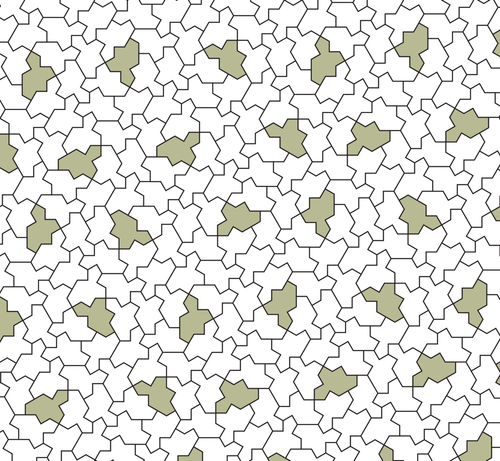
I have decided to do something very stupid…

Trying to create a tiled surface of spectre aperiodic chiral monotiles, in code. Generating svg…

I sure others have, but trying to solve it myself.

I am pondering a coordinate system that is a sum of integer multiples of 0.5 plus integer multiples of sin60.

https://en.wikipedia.org/wiki/Einstein_problem#/media/File%3AMonotilePolygon.svg

Einstein problem - Wikipedia

OK I cannot simply place tiles randomly touching existing tiles as they can leave non tile shaped gaps.

I have to work out allowed ways to place tiles somehow.

Back to drawing board.

@revk I know you're working it out for yourself, but if you get stuck, Simon Tatham (@simontatham) has written in detail about some of the algorithms used for aperiodic tilings on his home page: https://www.chiark.greenend.org.uk/~sgtatham/
Simon Tatham's Home Page

@darkling @simontatham Yeh, I am getting to the point I need to read up and maybe code that...

Shame.

@revk @simontatham There was also a Penrose-tiling screensaver in xscreensaver, which showed it filling in the plane as it went. You could see that it did a lot of backtracking if it determined that it had backed itself into a corner. Watching that may be of some help, too.
@darkling @simontatham All good, until I get to this - until now all angles multiples of 30 degrees, so easy to make a sort of complex int*sin60+int*cos60 system, but this appears to be 15 degrees. Arrrg!

@revk @darkling only because I rotated the Spectre to that angle for aesthetic purposes, so that it was possible to have a Spectre with its head pointing directly upwards.

All the edges in a Spectre tiling are at angles that are multiples of 30° relative to each other. In that picture I show them at odd multiples of 15°, but you can make them even multiples just as easily.

Sorry – it hadn't occurred to me that that would be confusing!

@simontatham @darkling OK I'll see if this is a simple misunderstanding then, sorry.

Thanks for commenting. That means I may be able to get the hang of it...

Close to having code to make this myself.

Stupid question, how do I work out the actual orientation of these mappings from that, sorry to be thick. I see the origin mapping point.

Oh, and struggling to map the spectre unit length to length between hex meta tiles.

@revk @darkling "how do I work out the actual orientation of these mappings" – you mean the relative orientation of the hexagon and the Spectre? There is no right orientation. It doesn't matter at all. You can choose any relative orientation you like.

The same goes for the mapping between lengths in the hexagon tiling and lengths in the Spectre tiling. Pick whatever you want. It won't matter.

With these combinatorial algorithms, the idea is that once you've finished implementing, the code never has to actually work out any coordinates or lengths in the hexagon tiling. For each Spectre tile, you store a sequence of its parent hexagons with child indices, but you never need to work out where in the plane those hexagons live, unless you actually want to plot them as an extra output diagram.

@simontatham @darkling OK I'll try and get my head around tomorrow.

But things do matter, if the lowest level has a unit length of 1mm for the tile, what is now the length between each next level meta tile. I do not see that in the paper, and obviously need to know to position tiles.

Same for orientation, if a meta tile has a tile - where exactly, and in what orientation, do I place that. If wrong, all the tiles will be rotated and not touch each other properly.

Sorry if I am being thick.

@simontatham @darkling This is coding, not putting tiles on a floor, so yes, I need to know these things 🙂

@simontatham @darkling

I mean "The same goes for the mapping between lengths in the hexagon tiling and lengths in the Spectre tiling. Pick whatever you want. It won't matter."

Ok so I pick 1000 times unit length between hex meta tiles, and now none of my tiles touch each other.

It clearly "matters" and the exact value needs to be known?

I hope I am not being thick here.

@revk @darkling it is counterintuitive! But you don't work out the location of a Spectre tile based on the location of its parent hexagon. You work it out based on the tile you're putting it next to.

In each run of the recursive transition algorithm, you start with a Spectre that has some list of parent hexagons, and you ask what's on the other side of one of its edges. For example:

"I have a Spectre which is child #0 of a G hexagon, which is child #2 of a Y hexagon, which is child #1 of a P hexagon. What's on the other side of edge #7 of that Spectre?"

The algorithm recurses up and down consulting its lookup tables, and answers:

"The tile on the other side of that edge is a Spectre which is the only child of an X hexagon, which is child #7 of an S, which is child #3 of the same second-level P. Edge #7 of your original Spectre meets edge #12 of the new one."

Now you place the new Spectre in your output diagram by lining up its edge #12 with edge #7 of the one you already had. You don't need to calculate it based on the coordinates of the parent tiles. Every tile you place is the neighbour of one you already had, so you place it next to that neighbour.

@simontatham @darkling OK, but I am, doing so. I want to know where to put the tile(s) in the meta hexagon and what size and orientation. That is a simple way to code this.

And ultimately the whole process must have a defined ratio of unit length spectre to until spacing next level meta hex, and then unit length meta hex level above. That is a fixed constant, and must be a known value.

Same with orientation and origin of the tiles.

I'm just trying to code this...

(thanks for help)

@revk @darkling the thing is, as you go up the levels of metatiles, everything gets distorted. The nth-order expansion of a hexagon doesn't look very hexagonal at all. In the limit the tiles end up with some weird fractal shapes.

There _are_ ways that you can calculate exact coordinates for every level of the hierarchy so that everything matches up precisely. But they aren't simple. They involve pretending the tiles are in four dimensions; doing linear algebra on vectors of two complex numbers; and discarding those simple hexagonal metatile shapes in favour of more Spectres and a much more complicated mapping between their edges.

It really is _easier_ to ignore the coordinates of higher-level tiles, and just put each Spectre next to its neighbour. That's why I chose to do it this way in the first place!

@simontatham @darkling Arg, OK, wow.

So not really hexagonal at all.

OK that is going to be a major re-coding to do that.

I may have to leave that until tomorrow...

Thanks for feedback on this.

I may have to code from bottom up - pick a tile type (including G double) and then pick what meta tile it is part of at higher level (at random) and fill out from there.

I was doing top down. Sounds like bottom up is needed.

@simontatham @darkling on the plus side, I wanted to make this a coding challenge, and now it is, is so many ways.

@revk yes, "bottom up" is exactly right. You invent each higher-order tile at random as you find you need it, going upwards from the lowest layer rather than down from the top. Literally, make it up as you go along. :-)

(PS @darkling do you still want to be on CC for all this? I'm sure we can drop you if you're not interested)

@simontatham @darkling This will be challenging code, but I see the logic.

@simontatham @revk I'm unlikely to be doing an implementation any time soon, but it's interesting to watch the discussion. Keep me on.

Thanks for asking, though.

@simontatham @darkling OK I am starting by trying to make the overall hex grid before substituting the tiles in to it.

But I am struggling to understand "Transitions between hexagons". You show, say G, maps to 7 sub meta tiles. But you show a dot at top of G and side of P in that set. So I am unsure or orientation.

e.g. G left of S, so the 7 tiles in G, are they orientated as shown? And the S is 60 degrees left rotated from show, and they slot together. Like this?

...

@simontatham @darkling Or have I got the orientation totally wrong?

I am not understanding the Large blob by P, or the X.X numbering, sorry.

Can you provide say an example of a whole G meta tile expanded to meta tiles, in the same orientation, and then expanded again to meta tiles showing how these component meta tiles of a G are themselves arranged and orientated?

@simontatham @darkling I may help if I explain what I think is the scheme to spot if I have misunderstood.

There are 9 hexagonal meta tiles, and being hexagonal each can be in one of 6 orientations.

Each can be substituted for a specific pattern of hexagonal meta tiles, each with a type and orientation. And even though the pattern of these 7 or 8 sub tiles is not itself a hexagonal unit, they do fit together. This can be done recursively.

@simontatham @darkling Finally these each can be substituted for a spectre (or two). And again, they fit together.

Is that right.

My issue is the orientation and relative position of these sub meta tiles is not entirely obvious.

When writing code I should be able to know that each block of 7 or 8 sub tiles has a specific position and orientation so that it does fit and cover a hex grid of sub tiles.

Same when it get to the spectre pieces.

Then I can code it!

Is that right?

@simontatham @darkling what I would love to see is a single meta tile, expanded to a set of 7 or 8 meta tiles, expanded to a grid of meta tiles perhaps with heavy line around the groups. And then finally that expanded to spectre tiles.

@revk @darkling yes, everything you say there is right as far as I can see.

The way to match up the patches of hexagons is using the X.Y numbers on the external edges. In each of the expansion diagrams from one parent hexagon to 7 or 8 child hexagons, each X.Y label on an edge of the expansion means that that edge corresponds to part of edge Y of the parent hexagon.

As an example, you asked about how the G and S patches fit together. You can see in the expansion diagrams that edge 4 of a G hexagon always meets edge 0 of an S. Therefore, when you put the G and S patches together, the edges labelled 0.4, 1.4, 2.4, 3.4 and 4.4 in the G expansion must meet the edges labelled 4.0, 3.0, 2.0, 1.0 and 0.0 in the S expansion. So you should rotate the S right by 60°, and put it below the G.

But if you were putting a _D_ next to a G, then that's different, because edge 3 of the G meets edge 1 of the D, so you want to arrange that edges 0.3,…,4.3 of the G patch meet edges 4.1,…,0.1 of the D patch. And for that, you would rotate the D patch 60° left and put it on the right side of the G patch. (In fact that looks like what you did in your diagram, because that looks more like a G+D to me than a G+S.)

@simontatham @darkling OK I'll look again.

If doing by hand, one could place a tile and say, oh that matches there. Like the interventions you added on sides of hex tiles for example.

From a programatic point of view, I simply need to know "When expanding a G, where does each of the sub tiles go exactly relative the the reference point (centre) of the original G hex tile" and so on.

It is that lack of precise offset and rotation that is, in my view, very unclear in your paper.

...

@simontatham @darkling But I appreciate your time, and will persevere.

If I work out the answers I may do a new paper/blog showing how one does this programatically.

Thanks again for your time.

Actually, assuming I do crack this, I'll publish C code anyway, but maybe do a paper on programmatically spectre tiling referencing yours. Would be delighted for you to review if I do.

My plan is code making SVG covering a defined area with specified unit size, colours, overall angle, and much more.

@revk @darkling the reason I didn't give that information is that it in the algorithm I _intended_ to describe – and certainly in the one I implemented – it isn't needed at all. You say you _need_ to know how to place the subtiles of a G relative to a reference point in the original G: I say, no, you don't _need_ to know it. It isn't even necessary to remember which orientation supertiles are in.

I'm not sure whether you haven't yet _understood_ how it's possible to compute the required answers without knowing those positions and orientations, or whether you do understand it but are choosing to do something a bit different from what I did.

@simontatham @darkling Well, I am choosing the way that seems simplest too me that is that I have a meta tile and want to make 7 or 8 new smaller meta tiles from that, where exactly do I put them, x/y offset from the original and new orientation. Simple as that.

There are other ways to try and do this, I am sure. I have already moved from simple Cartesian to co-ordinates that are integer multiples of sin60 and cos60 to make it all line up nicely when finally output as SVG.

@simontatham @darkling I understand not needing to remember supertitle orientation as the new subtitles have their new absolute orientation from that, I agree on that one.

But I sort of need to know where to put them, especially relative to the other adjacent supertitles. I have to set an x/y co-ordinate for each such that they will align with the sub tiles of the adjacent supertitle.

Well, I think so!

@darkling @simontatham my biggest confusion reading the paper is you show the translation with diagrams. And obviously a reader might initially see that as what you are saying. But in face there is no actual visual mapping like that. On big clue is on the above diagram the numbers are counter clockwise in the hex tile and clockwise on the spectre! So not even close to a visual substitution. Ultimately it is just a table of tile A side X is placed against tile B side Y, and same at logical hexes.

@revk @darkling yes, exactly – the visual diagrams end up being treated as just a lookup table.

The reflecting property of the Spectre tiling is very weird, yes! It's not true of the hat tiling, even though they're closely related. In the hat tiling everything stays the same way round. But, as you say, as long as you treat the higher layers as purely abstract, you don't really need to think about it.

@simontatham @darkling well I do have it working now, thanks for your help. I’m just sorting “coverage” now, as I want to tile a rectangle using random choices, but have to work out when to stop (ie no spaces left within the rectangle). Not too hard to work out thought, I’ll code that after I’ve had a coffee. Then to pretty the tiles up a bit with some shading.

Pondering 4 colour option, but maybe later as don’t actually need that for what I am doing. May then open source it.

@revk @darkling well done! I'm sorry if my writeup was more confusing than necessary.
@simontatham @darkling you do explain a lot in there, but the visuals probably make it worse to be honest. Once I realised they are a distraction it all came together quickly. It has been a fun learning exercise overall.
@revk Hmm, @Unprovable knows a thing or two about tilings :)
@henryk @revk oh this is fun. Use deBruijn's approach for Penrose tilings - he solved some major problems by looking at permitted corners :) if you code those into your loop, you generate the right tiling. Probably. :)
@henryk @revk I think I last achieved anything like this with JavaScript embedded in the SVG. I do wonder if there's a pure markup way of doing it?

@Unprovable @henryk I am going for C to make SVG.

I'll publish if/when I do crack it.