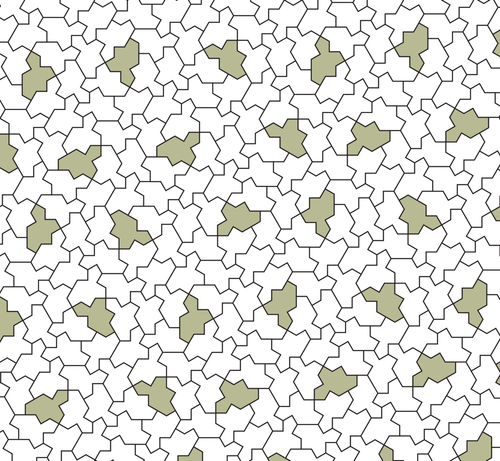
I have decided to do something very stupid…

Trying to create a tiled surface of spectre aperiodic chiral monotiles, in code. Generating svg…

I sure others have, but trying to solve it myself.

I am pondering a coordinate system that is a sum of integer multiples of 0.5 plus integer multiples of sin60.

https://en.wikipedia.org/wiki/Einstein_problem#/media/File%3AMonotilePolygon.svg

Einstein problem - Wikipedia

OK I cannot simply place tiles randomly touching existing tiles as they can leave non tile shaped gaps.

I have to work out allowed ways to place tiles somehow.

Back to drawing board.

@revk I know you're working it out for yourself, but if you get stuck, Simon Tatham (@simontatham) has written in detail about some of the algorithms used for aperiodic tilings on his home page: https://www.chiark.greenend.org.uk/~sgtatham/
Simon Tatham's Home Page

@darkling @simontatham All good, until I get to this - until now all angles multiples of 30 degrees, so easy to make a sort of complex int*sin60+int*cos60 system, but this appears to be 15 degrees. Arrrg!

@revk @darkling only because I rotated the Spectre to that angle for aesthetic purposes, so that it was possible to have a Spectre with its head pointing directly upwards.

All the edges in a Spectre tiling are at angles that are multiples of 30° relative to each other. In that picture I show them at odd multiples of 15°, but you can make them even multiples just as easily.

Sorry – it hadn't occurred to me that that would be confusing!

@simontatham @darkling OK I'll see if this is a simple misunderstanding then, sorry.

Thanks for commenting. That means I may be able to get the hang of it...

Close to having code to make this myself.

Stupid question, how do I work out the actual orientation of these mappings from that, sorry to be thick. I see the origin mapping point.

Oh, and struggling to map the spectre unit length to length between hex meta tiles.

@revk @darkling "how do I work out the actual orientation of these mappings" – you mean the relative orientation of the hexagon and the Spectre? There is no right orientation. It doesn't matter at all. You can choose any relative orientation you like.

The same goes for the mapping between lengths in the hexagon tiling and lengths in the Spectre tiling. Pick whatever you want. It won't matter.

With these combinatorial algorithms, the idea is that once you've finished implementing, the code never has to actually work out any coordinates or lengths in the hexagon tiling. For each Spectre tile, you store a sequence of its parent hexagons with child indices, but you never need to work out where in the plane those hexagons live, unless you actually want to plot them as an extra output diagram.

@simontatham @darkling

I mean "The same goes for the mapping between lengths in the hexagon tiling and lengths in the Spectre tiling. Pick whatever you want. It won't matter."

Ok so I pick 1000 times unit length between hex meta tiles, and now none of my tiles touch each other.

It clearly "matters" and the exact value needs to be known?

I hope I am not being thick here.

@revk @darkling it is counterintuitive! But you don't work out the location of a Spectre tile based on the location of its parent hexagon. You work it out based on the tile you're putting it next to.

In each run of the recursive transition algorithm, you start with a Spectre that has some list of parent hexagons, and you ask what's on the other side of one of its edges. For example:

"I have a Spectre which is child #0 of a G hexagon, which is child #2 of a Y hexagon, which is child #1 of a P hexagon. What's on the other side of edge #7 of that Spectre?"

The algorithm recurses up and down consulting its lookup tables, and answers:

"The tile on the other side of that edge is a Spectre which is the only child of an X hexagon, which is child #7 of an S, which is child #3 of the same second-level P. Edge #7 of your original Spectre meets edge #12 of the new one."

Now you place the new Spectre in your output diagram by lining up its edge #12 with edge #7 of the one you already had. You don't need to calculate it based on the coordinates of the parent tiles. Every tile you place is the neighbour of one you already had, so you place it next to that neighbour.
@simontatham @darkling OK, but I am, doing so. I want to know where to put the tile(s) in the meta hexagon and what size and orientation. That is a simple way to code this.

And ultimately the whole process must have a defined ratio of unit length spectre to until spacing next level meta hex, and then unit length meta hex level above. That is a fixed constant, and must be a known value.

Same with orientation and origin of the tiles.

I'm just trying to code this...

(thanks for help)

@revk @darkling the thing is, as you go up the levels of metatiles, everything gets distorted. The nth-order expansion of a hexagon doesn't look very hexagonal at all. In the limit the tiles end up with some weird fractal shapes.

There _are_ ways that you can calculate exact coordinates for every level of the hierarchy so that everything matches up precisely. But they aren't simple. They involve pretending the tiles are in four dimensions; doing linear algebra on vectors of two complex numbers; and discarding those simple hexagonal metatile shapes in favour of more Spectres and a much more complicated mapping between their edges.

It really is _easier_ to ignore the coordinates of higher-level tiles, and just put each Spectre next to its neighbour. That's why I chose to do it this way in the first place!

@simontatham @darkling Arg, OK, wow.

So not really hexagonal at all.

OK that is going to be a major re-coding to do that.

I may have to leave that until tomorrow...

Thanks for feedback on this.

I may have to code from bottom up - pick a tile type (including G double) and then pick what meta tile it is part of at higher level (at random) and fill out from there.

I was doing top down. Sounds like bottom up is needed.

@revk yes, "bottom up" is exactly right. You invent each higher-order tile at random as you find you need it, going upwards from the lowest layer rather than down from the top. Literally, make it up as you go along. :-)

(PS @darkling do you still want to be on CC for all this? I'm sure we can drop you if you're not interested)

@simontatham @darkling This will be challenging code, but I see the logic.