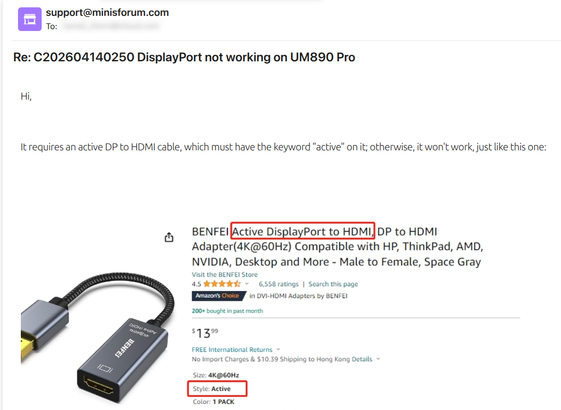
I couldn't get the DP-HDMI cord to work on either display, but I was able to get the second display working when I connected with a USB4-HDMI cord.
What the heck is is the DP port on my computer for if it won't connect to a display!?

@RachelThornSub
I've only one USB-C cord that works between the netbook (Linux Mint) USB-C DP port and the screen. No others work.
I bought a USB cable tester. Turns out that all of the other USB-C <-> USB-C cables (even ones sold as USB-3.x) are all variations of USB 2.0 wiring. My USB 3.x USB-A -> USB-C cables are all USB 3.0 but no use for DP.
Two different USB-C DP HDMI adaptors do seem to work with everything, but they can be a problem.
Also not all actual full size DP to HDMI work.
@RachelThornSub
Also I can't leave the USB-C DP HDMI adaptor plugged in on the larger laptop or the battery goes flat. The power can't be turned off for that port, even in BIOS, on that Lenovo.
It's a mess. Each newer piece of gear is more annoying.
I have Netbook (ex-ChromeBook), Laptop & workstation all with Linux Mint & two screens. Though mostly 1 on the netbook. Big laptop 2x external QHD via HDMI & USB-C DP HDMI adaptor..
@RachelThornSub Hrmm...a few things I can think of to try.
First I would probably start with running "xrandr --listmonitors" to see if the second monitor is even visible to the system. If it's detected but just not enabled, you might just need to enable it. The command would be something like "xrandr --output HDMI-1 --auto" assuming the second monitor shows up as "HDMI-1" in the first command run (replace that with whatever your system says the name of the second display is).
Let me know if that works for you...there are a few other things to be tried if not.
Can I ask what the fix was?
Do you know if the DP end of the cable is input or output? This is what I started jumping up and down about reading your post. If I recall correctly, the cables for source->DPI->HDMI->monitor are completely different from ones going the other way.
And-stretching here-one of those conversions requires power and active circuitry. The other doesnβt.
Now can I remember which? Oh goodness gracious me NO.
Hoping this leads somewhere actually useful.