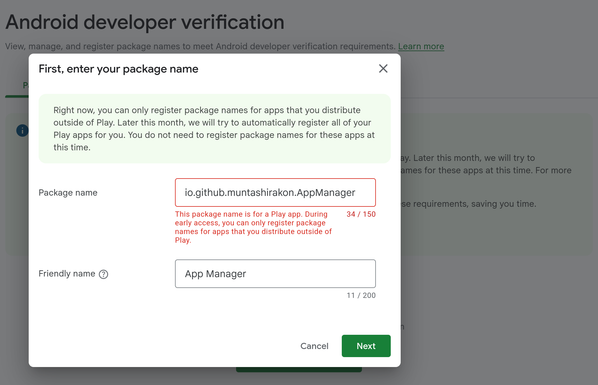
It appears one or more impersonators have already registered some of the #Android applications that I maintained, including @appmanager. I've reported this to #Google, but not sure what's going to happen. The Android developer verification is still in beta, and it doesn't have a lot of features now to deal with this kind of problems.
Another issue is the 50% download requirements. Traditionally, most people would download the apps from #FDroid which historically used their own signing keys to sign the apps. Since most people have used #FDroid instead of other methods, only that signing key shows up there, and currently, it doesn't offer an option to choose a different key.
Also, since I do not have access to the signing keys used by F-Droid, it's effectively a dead-end. Taking down apps from F-Droid (and move to IzzyOnDroid completely) potentially forfeiting all the users who rely on updates from F-Droid.

Apps subjected to potential impersonation attack:
- App Manager
- Captive Portal Controller

Apps with F-Droid priorities:
- SetEdit
- UnApkm
- Metro (since this app is exclusive to F-Droid)

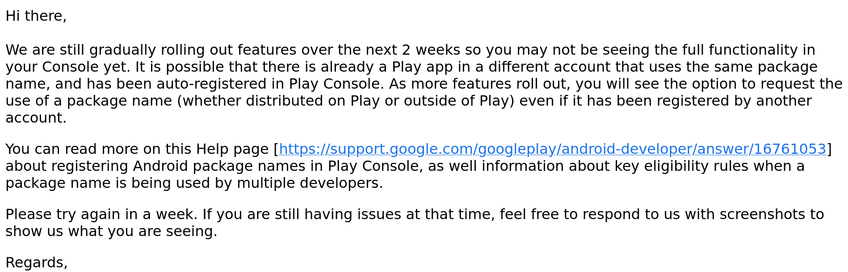
Today I've received the following generic-looking response from "Android developer verification support":
UPDATE: #Google seems to have fixed the issue anyway. I was able to register both App Manager and Captive Portal Controller in the Android developer verification console.
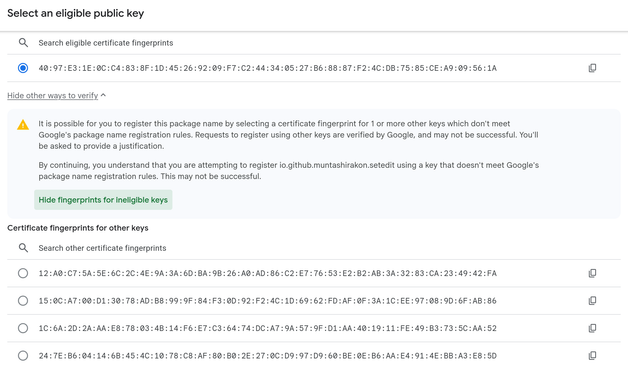
Google has added an “other ways to verify” option now. So, now it may be possible to bypass the 50% rule.
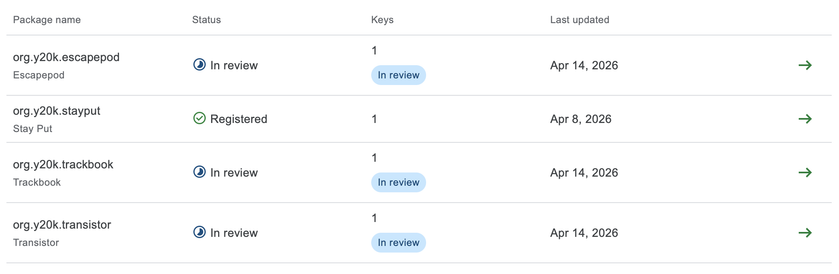
@muntashir Same here. I am the developer of a couple of small apps that are only distributed via F-Droid. I registered an account at the Android Developer Console, only to find out that my apps had been claimed by another party. That was a shock at first. Then I found out that the keys associated with my apps belong to F-Droid. 😅
@muntashir But still, this is a dilemma. I want users to be able to install my apps without any issues when they download them directly from the repository. Therefore, I will try to claim my apps when the Android Developer Console offers a way to do so. On the other hand, I want F-Droid users to be able to install my apps without the 24-hour penalty. I am not sure what I can do to keep my apps available through F-Droid and through my repository.
@y20k I think a potential solution is creating a verifiable build by pushing `adi-registration.properties` file into the version control system. Once it's published on F-Droid, you can add that signature as an additional key in the Android developer verification page.
@muntashir That sounds reasonable. I will try that.
@y20k
The big issue still is that users can't use F-Droid itself (and most other apps there) without going through the advanced 24h flow. Independent app distribution will become a lot more fringe than it already is, even if your own app is registered.
@muntashir

@grote @y20k This issue can be addressed in several different ways depending how the app was published on F-Droid.

For apps published with the explicit consent from the maintainer: F-Droid can ask the maintainer to include an `adi-registration.properties` with the maintainer's own unique key if the developer has an account with Android developer verification program. Otherwise, they can ask the maintainer to use F-Droid's own key and let F-Droid claim the package ID instead.

If the developer doesn't care, inactive, or no explicit consent has been given, F-Droid can claim it using an skeleton package (https://github.com/android/security-samples/tree/main/AndroidDeveloperVerificationAPKSigningExample) for verification. But this can be complicated depending on the package ID. If F-Droid uses a different package ID, it should be easy. If not, F-Droid needs to ask Google to explicitly allow them to use the same package ID since Google wants to reduce collision as much as possible.

security-samples/AndroidDeveloperVerificationAPKSigningExample at main · android/security-samples

Multiple samples showing the best practices in security APIs on Android. - android/security-samples

GitHub
@muntashir @grote For now I am trying to claim my package names. After all, I think it is best if Google accepts my key as the legit key for my apps. It does not hurt to keep an `adi-registration.properties` in my repo if that enables F-Droid to continue to distribute my apps.
@y20k Once F-Droid makes a successful build, you can add the key to your existing package ID and upload the APK built by F-Droid for verification. After that, Play Protect will stop complaining about the app if it's installed from F-Droid.
@y20k If you see the warning like in the screenshot, it means someone else has claimed the package ID, not F-Droid. For me, it was easy since the domain name that I use (muntashirakon.github.io) has already been verified.