 Marcus Adams
So I think moving forward I'm switching to #AGE for file #encryption instead of #PGP. I occasionally make backup archives of various things and use passphrase encryption with #GPG to encrypt them before storing them. However, GPG is very slow for bigger files, and in some testing recently I discovered AGE is multiple times faster. Also, with their latest release they now support hybrid post #quantum assymmetric key pairs. So for encryption it can fully replace GPG.
I may sit down and do some more thorough comparisons between the two; symmetric and asymmetric encryption speed, output file size, ease of use, etc. Then do a write up.
 Wiktor Kwapisiewicz
Please keep us posted when you have more concrete results. I’m considering the available options. 👋
@wiktor Alright, I've got some test files laid out and as soon as my desktop isn't encoding this video file I'll do some testing. Honestly though, since AGE supports hybrid post quantum keys for asymmetric encryption, if you don't care that it doesn't do digital signatures, I'd probably stick with it. The one down-side is that GPG is far more integrated with modern GNU/Linux systems where you can just right click a file and click "Encrypt" or "Decrypt". AGE is terminal only right now AFAIK.
So it seems that at least part of the slow-down I experienced with #GPG is because, by default, it gzip compresses the encrypted files. This can be disabled in the command line if you're encrypting an already compressed archive for pretty substantial improvements in encrypt/decrypt speeds. AGE was still faster, but nearly as much.
On a large zst (38.9 GB) archive of my Documents folder, here's some encrypt times.
AGE: 0:28
GPG (w/ compression): 8:12
GPG (w/o compression): 1:19
It's Friday so I finally got time to sit down and do some of these benchmarks for comparing #GPG and #AGE for #encryption speed. Here's the results so far on an uncompressed .tar file, and an already compressed .tar.zst file. Gonna try to add SequoiaPGP to the list, if I can figure out how to do symmetric/password encryption with it.
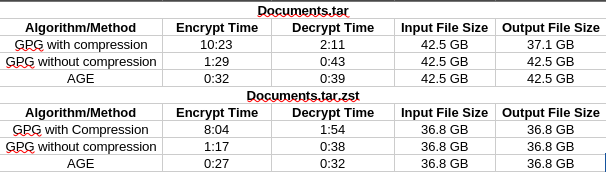
Apparently SequoiaPGP, at least the version I have from the Debian repos, does not support symmetric encryption without the use of a public key, and I can't find any mention of that functionality on their website, so it won't be included in my testing. Anyway, here's a couple of charts.
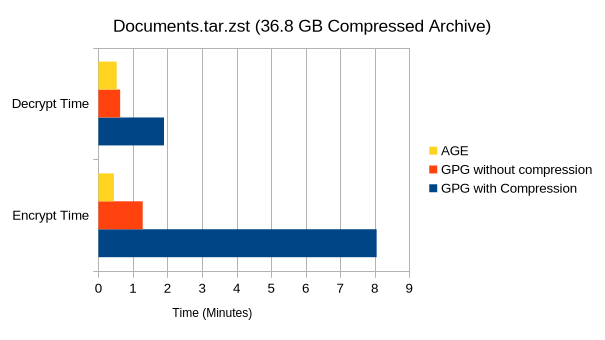
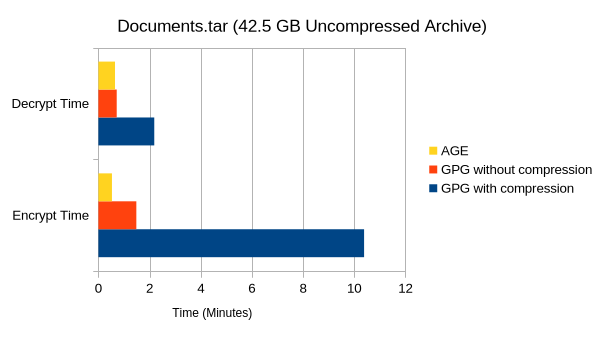
 Bruce Walzer 🇨🇦
@gerowen For GPG, does the platform have AES-NI instructions? Is GPG doing OCB, OCFB-MDC or OCFB mode?
@upofadown I finished writing everything down and have posted it here. GPG, as far as I can tell, doesn't explicitly tell you what mode it's using. All I ever see it say is "AES256", though I believe it defaults to CFB these days. I'm not a cryptographer though, so you can probably glean more information than I just by looking at my setup and results.
Link: https://open.substack.com/pub/gerowen/p/age-vs-gpg-pgp-encryption

@gerowen You can apparently force OCB on. So:
gpg --force-ocb --no-compress -c totc.txt
I used pgpdump to look at the result and it said the mode was 20, which sounds right for GPG OCB. GPG should really let you know what mode you are using as there are now different non-interoperable versions of OCB around due to the standards schism.
I found it interesting that GPG encryption took longer than GPG decryption. CFB mode doesn't parallelize for encryption but can be done in parallel for decryption. I wonder if that is coming out here. Having something better than CFB mode for performance is an important reason OCB mode exists.
@upofadown And yes, the CPU has hardware accelerated AES instruction sets available, and listed in /proc/cpuinfo.
https://www.amd.com/en/products/processors/laptop/ryzen/8000-series/amd-ryzen-9-8945hs.html