
[Edit: I'm okay on this for now, thanks!]

I have a handful of images in this style, but I only scans of physical media; the original files are lost or inaccessible. I’d like to have SVGs of these, but all the converters I’ve tried produce very poor results. Given the geometric style, it seems like it should be easy-ish to trace in Inkscape or whatnot.

Are there people I can pay to do this conversion? How do I find them, and what should I expect it to cost? Better yet: are *you* this person?
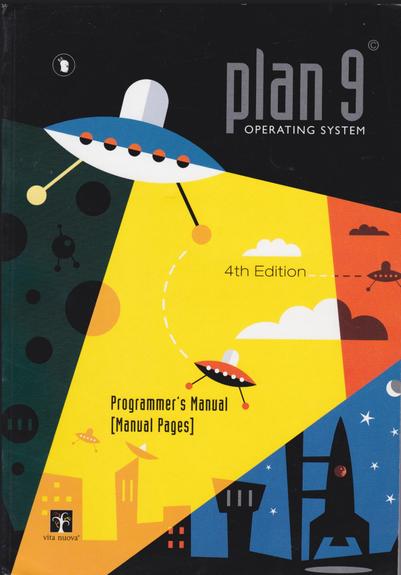

(When I say the converters give poor results, it’s entirely possible I just don’t know how to use the more complicated ones, like all the options in Inkscape, properly. No shade intended at the makers of those things; it’s a hard job to do in the general case.)
@a Nope. Autotrace is just as bad as you experience it.
@vektorgarten @a theoretically AI also should be able to do that. But I fear the result might be not this at all.
@kielkontrovers @vektorgarten I will not be giving this problem to AI.
@kielkontrovers @a AI is built into all the autotracing algorithms of the major apps and web services (except Inkscape). It did improve them, but still they lack a ton of actual intelligence.
I spent some time on this in Inkscape yesterday, and I’m 90% sure that, at least for me, I could get there faster doing the SVG by hand then learning inscape well enough, although I’m not sure which is better for me long-term.
After spending a little time on it in Inkscape yesterday, I'm trying doing the SVG by hand yesterday, and this is definitely the faster route for me. And just like HTML, I really wish they had proper macros in here.

@a I love writing SVGs by hand. In fact, I took a stab at yours. This is obviously not the complete image, and there are some changes I would make if I were going to finish it (like stacking the background color panels instead of just having them line up edge to edge).

I just wanted to give an idea of where it could go. If you end up wanting to just tackle these by hand yourself, that's awesome; like I said, I love doing that. But if you don't, I'd be willing to give it a go.

https://gist.github.com/TRezendes/6a56a3a4b8b11f1ae76aef5060e58b0e

@TheADHDM Hey, neat! I actually started this today, too; I figured it was a good way to finally learn SVG a bit better. You're a bit farther along than me (I got a bit more of the text but hadn't done the saucer yet). I think I'm going to give it a shot. Are you up for some "howto" questions?

@a Sure! I'd be happy to help

Everything I know I've learned from MDN, Stack Overflow, and trial and error. I've bounced hard off every vector image editor I've tried, but I've been writing HTML by hand for 30+ years, so I feel very at home in the markup.

SVG: Scalable Vector Graphics | MDN

Scalable Vector Graphics (SVG) is an XML-based markup language for describing two-dimensional based vector graphics.

MDN Web Docs

@TheADHDM Yes, I've been spending a lot of time on MDN today. :-)

I'm sure I'll run into other things, but my biggest uncertainty right now is how to deal with the shapes, like planets and the buildings, which span color regions. They *look* like color blends, but I don't think they're "real" blends, just manual fills. I'm not sure how to specify that.

@a You could try using an alpha channel to actually blend the colors, but I think what you really need to do is create two different shapes—either one on top of the other, or just butted up against each other—each with their own fill color.

You could also define the shape once, then it twice with a different clip-path on each one.

@a The version of the Plan 9 image I did actually has all three techniques.

  • The saucer is two paths that line up next to each other.
  • The saucer dome is the gray half-dome sitting on top of the white full dome
  • The saucer windows are each made from two identical circles that are then clipped by the same paths that I used for the top and bottom half of the saucer so that only half of each circle gets drawn.
@TheADHDM Ah, yeah, the clipping method is what I was thinking of; I’ll have to take a closer look at that this afternoon.
@a I tried with QuiverAI's SVG-generation model, and the results were not great. It seems to struggle most with text, as do many image generators.

@a I’ve done a lot of this type of stuff in a previous life, and pre-AI, and the human eye really is the best path forward. Someone who knows what is actually happening there can break it down in to different layers and how they interact and make it much better than an AI could.

That said, I have no idea where to find useful humans for the conversion work.

@a you might reach more likely people with you request if you add the #inkscape tag
How many images do you have? I might could do this.
@thedaemon i’m not sure, exactly; I have to finish going through my physical media and scanning things. Roughly half a dozen.
@a @doctormo do you have access to, or at least know the proper names of the type faces used? This is the short of technical art I can do, but if I have to fully recreate the type, it might be too hard to feel worth it. Send a DM if you would like to discuss further.
@a
Hi Anthony. I've just created this account so I don´t know much about Mastodon but I think I can do the job U need with those images. I'm a Graphic Designer... So I don't see any problem. Let me know if you're interested.
@a Is this one of the worst operating systems of all time?

@JigmeDatse The best¹!

¹ Some restrictions apply.