 lee
leeI've slowly been adding tutorials and examples pages, ported from p5.js and Processing (and thanks to a CC-BY-NC-SA license), but adapted for L5.
It'll take me some time but I plan on adding many more.
I've slowly been adding tutorials and examples pages, ported from p5.js and Processing (and thanks to a CC-BY-NC-SA license), but adapted for L5.
It'll take me some time but I plan on adding many more.
I'm looking for some suggestions about the https://L5lua.org documentation site for L5.
At first I tried to optimize the site for small page load, focusing on making all images webp files.
Question 1: Is there some html or css only option that allows "falling back" from webp to loading jpg instead if needed for browsers that can't load webp?
Question 2: For example code that shows interaction or animation i'm showing animated gifs. These gifs can be quite large! I want L5 and the website to be able to work on lower-powered and lower-bandwidth computers, even ones without JS. Could my use of gifs be improved?
I'm currently recording the window with SimpleScreenRecorder at low fps as a mp4, then using imagemagick to convert to gif. On a tip, I found ezgif.com converts even smaller. Anyone know their 'recipe'? I would love to automate the process in the command line.
Question 3: Any other tips for how I can make the site work better, particularly for low bandwidth and offline browsing?
Boosts ok! Politely written responses appreciated!
I just added downloadable offline documentation for L5. You can download the entire L5 website for offline use, easily, with or without images. Added to the download page.
I've been adding lots of examples to the L5 documentation site, including implementations of 10print and Conway's Game of Life written in L5. I also adapted some tutorials and examples from p5.js (thanks to Creative Commons licensing!).
https://l5lua.org/examples/conways-life/
I still need to add more tutorials and to build some better "getting started" materials that show exactly how to get a Mac and Windows machine set up specifically for a cozy coding environment with L5.
It took me two days. After a comprehensive review of my own intro coding notes for p5.js and reviewing many other creative commons licensed sources I selected and then very liberally adapted and built off the Happy Coding Tutorials to create an 11 part comprehensive:
A complete introduction to programming with L5
I am still interested in developing a few more useful tutorials on setting up for various systems (Mac, Windows particularly) for a variety of code editors. Open to suggestions and contributions!
Also want to clean up and build out the working with video tutorial and create a new one on breaking out to the wider system with Lua's os.execute()
In the process of working on the tutorials I found minor inconsistencies between L5 and p5.js in key and mouse handling, so I patched it so they have parity.
I'm wondering where the right place to set up "discussions" should be for L5. There is a robust Discord and Discourse forum for Processing and p5.js, and yet I'm not on those things. There is also a subreddit, but again I'm not on that.
Maybe I could add a github discussions 'forum' since the repos are already there? But do i want to enable capture within the Microsoft system there? Alternatively, maybe join the Discourse forum and have a L5 forum heading? But I don't know. I do think these things matter and help spread the word about the library and {code, documentation} contribution. I'm just not keen on getting deeper into other "social media" and related.
Separately: I added @oppen 's Walking Lines example to the examples page. I'd love to have more community-contributed examples and tutorials by the way!
I made a little Cadavre Exquis code sketch for breakfast today, implemented in L5. The original images from 1926 - 27 should be public domain in the US.
after installing a new hard drive (and having to reinstall my Void Linux distro on the new drive), i decided to re-install the OS on my parents' unused 2014 macbook. i thought about putting linux on there but the goal is to have an old Mac to test L5 programs on. I installed Love2d and L5, tested a bug I had found on iOS and also found it on the Mac. It's a minor bug that when going to fullscreen, if you had set up a background color in setup() it doesn't persist when going to fullscreen. Somehow the Mac side it clears/resets the drawing buffers. Not present on Linux. Need a Windows machine to test and see if it persists. I noted the bug here, in case anyone wants to test on other eras of macOS or on Windows until I get my own old windows machine.
https://github.com/L5lua/L5/issues/3
I also tested to see if it had the same shader error reported earlier from the 2009 Windows machine but it didn't. It worked fine for shader code.
Thanks to a contributed code suggestion from the community, patched the save() function in L5 so that if the current directory is not writeable then it will save to the default directory and print a warning and location of the save.
Day 3 of #Genuary2026 and I'm using #L5
prompt: Fibonacci sequence
Day 4 of #Genuary2026
prompt: Lowres. An image or graphic with low resolution, where details are simplified or pixelated.
This one feels in my wheelhouse much more than the previous ones. So I started having some fun and made something I'm excited about. I think I will use it as a 'filter' to create a music video for some no-input mixing board mixes I want to put online.
Little test here. I was having too much fun so this is a larger video file with my own music recorded with my collaborator ZZZelin. I'll upload some screenshots too.
and here's the code for that one:
```
--genuary 2026 day 4
require "L5"
function setup()
fullscreen()
img = {}
for i = 1, 9 do
img[i] = loadImage('assets/graff/'..i..'.jpg')
end
mouseDragged() --pick an image to start
end
function draw()
buffer_w = map(mouseX, 0, width, 15, 200)
buffer_h = map(mouseY, 0, height, 15, 200)
pg = createGraphics(buffer_w, buffer_h)
pg:beginDraw()
image(current_img, 0, 0, buffer_w, buffer_h)
pg:endDraw()
translate(width, height)
rotate(PI)
image(pg:getCanvas(), 0, 0, width, height)
end
function mouseDragged()
current_img = random(img)
end
```
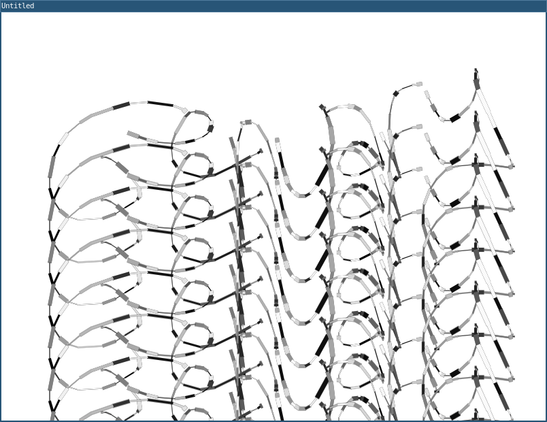
Day5 of #Genuary2026 in #L5. The prompt is to write Genuary in some way without a font. I made this little drawing thing and drew the title, using an offscreen buffer that continuously repeats my drawing
--genuary 2026 day 5
require("L5")
function setup()
background(255)
blocksize = 250
-- Create offscreen canvas
offscreenCanvas = createGraphics(800, 600)
end
function mouseDragged()
background(frameCount % 255)
offscreenCanvas:beginDraw()
strokeWeight(random(7))
stroke(random(255))
line(mouseX,mouseY,pmouseX,pmouseY)
offscreenCanvas:endDraw()
end
function mouseReleased()
for y=1,height,blocksize/4 do
push()
translate(0, y)
image(offscreenCanvas:getCanvas(), 0, 0)
pop()
end
end
Day7 of #Genuary2026 and today's prompt was something related to booleans. Programmed in #L5
(Hmm, on upload, i see the video gets upscaled! it should only be 100 pixels wide! that's why this looks so pixelated).
Also, on reflection, this doesn't look like generative art as such, but it was still fun to program and i'm ready for bed! :)
--genuary 2026 day 7
require("L5")
function setup()
windowTitle('Genuary day 7: Boolean play')
total = 0
val = {
{0,0,0,0,0,0,0,0,0,0},
{0,0,0,0,0,0,0,0,0,0},
{0,0,0,0,0,0,0,0,0,0},
{0,0,0,0,0,0,0,0,0,0},
{0,0,0,0,0,0,0,0,0,0},
{0,0,0,0,0,0,0,0,0,0},
{0,0,0,0,0,0,0,0,0,0},
{0,0,0,0,0,0,0,0,0,0},
{0,0,0,0,0,0,0,0,0,0},
{0,0,0,0,0,0,0,0,0,0},
}
size(110,200)
textAlign(CENTER, CENTER)
describe('a grid of values that can be toggled between 0 and 1 when clicked.')
end
function draw()
background(0)
textSize(80)
fill(255,0,0)
text(total,width/2,height-50)
fill(255)
textSize(10)
total = 0
for y = 1,#val do
for x = 1,#val[1] do
text(val[y][x], x* 10 , y * 10)
if val[y][x] == 1 then
total = total + 1
end
end
end
end
function mouseDragged()
local _x = floor(mouseX/10)
local _y = floor(mouseY/10)
local total = 0
if val[_y][_x] == 1 then
val[_y][_x] = 0
else
val[_y][_x] = 1
end
end
I added a web-based survey for L5 (there is the option to fill it out, then send it via email). I had tried to do it with just HTML and CSS but the mailto link didn't copy the info correctly so there is now a minimal javascript to send the info correctly. There is also a link to a google form, as well as a <noscript>-wrapped text that explains what to copy an paste and send in an email. I tested on Netsurf, Dillo, Brave, Firefox, w3m and offpunk.
I also tightened up some info on the L5 landing page.
The biggest recent site change I made was that I added a downloadable zip folder as the recommended L5 Starter project, based on feedback from Gottfried, who filled out the survey! This should make it easier for folks to begin using L5.
I put out a local call in my network in NYC to meet up to work on L5 next week as a group to document installation and test on old Macs and PCs and more than 10 folks responded! I'm now looking for a room for us all to meet next Tuesday afternoon and wrote to a couple friends looking for space suggestions.
Although Genuary is still going on I felt drawn to work on something without the prompts today. I started working on something with scrolling marquee text, but printing out an excerpt from my daily journal entry. Obvious references are the works of Barbara Kruger and Jon Rubin, but I wasn't thinking of that at the time, and this is much simpler, made in about 20 minutes. Just came out of me. Coded in #L5.
CW: mentions violence, political news
require("L5")
function setup()
windowTitle("Thinking out loud")
textSize(100)
fill(0)
noStroke()
fullscreen()
describe("scrolling text from top to bottom, alternating direction, vaguely reminiscent of a flag, with thoughts on today.")
messages = loadStrings('thoughts.txt')
--print(messagePos[1])
--print(#messagePos)
--messagePos = {
messagePos = {}
for i=1,#messages do
messagePos[#messagePos + 1]=
{x = random(width), y = 100 * i - 50, delta = 1, bg = 'red', c = 'white'}
--even or odd?
if (i % 2 == 0) then
messagePos[#messagePos].bg = 'white'
messagePos[#messagePos].c = 'red'
else
end
end
fill(0)
end
function draw()
background(255)
for i=1,#messagePos do
fill(messagePos[i].bg)
rect(0, messagePos[i].y - 100, width, 100)
fill(messagePos[i].c)
text(messages[i], messagePos[i].x,messagePos[i].y)
messagePos[i].x = messagePos[i].x + messagePos[i].delta
-- check offscreen
if messagePos[i].x > width or messagePos[i].x < -width then
messagePos[i].delta = messagePos[i].delta * -1
end
end
end
I switched from Genuary projects back to working on #L5. I am doing testing of alternative implementations of filter() with fallbacks for older machines that can't handle some aspects of shader code. My research shows me that some GPU stuff is needed for Love2d to work at all, so i tried to match the minimum requirements. Will be doing testing this month on a variety of older machines and OSes.
The L5 community survey I put out has only gotten a few responses so far but they've been extremely helpful and led to some fixes and better documentation and starter. From one person's survey I learned of some more synthesis options in Love2d, so I am feeling much more confident we could match most of the functionality of Processing's Sound Library or p5.sound. I've mapped out the Processing Sound API and ways to replicate with Love2d native and adding in a lightweight lovefft library. I have other stuff to work on for the next few months but will definitely put time into this in the spring.
A report on the first L5 Contributors Meetup, held today in Brooklyn.
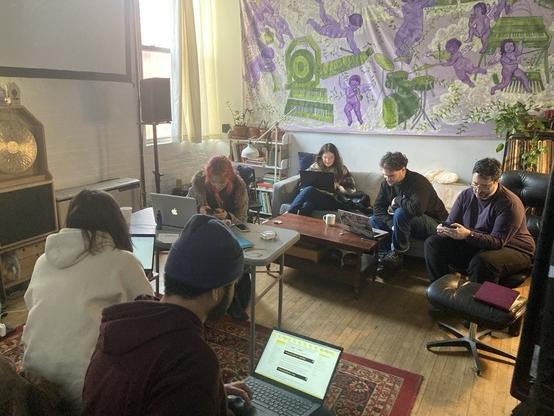
Met with Jessica to do some brainstorming to build out documentation for those interested in contributing to L5. we talked about ease of use of p5.js but it’s still a fairly extensive development environment to set up or contribute documentation to. i had an online meeting with a team of students interested in doing usability testing of L5 for beginners and we talked about some ideas of how that could be done. there’s a big bottleneck, or a barrier is more accurate, that the easiest way for beginners to get started coding is to drag their directory holding their project with code on top of love2d, but that won’t print out “print()” function code, which instead requires command line set up currently. i want to complete a L5 mode for the processing pde but not sure how long that will take.
had an alternate idea. what if we override the Lua print command so that all print statements display (in white text?) in the render window as well as print out in cli? this would help beginners and provide an onscreen console for debugging, separate from the window error messages. but it does mean always rendering and maybe you don’t want that. maybe there is a printDebug() or printScreen() function that you place in setup() that turns on the print render, and that we add to the L5-starter example. this could work like printing in pico-8, rendering from top to bottom with an L5_env.printY that tracks the y-position for the next print(). pico-8 is smart and changes the text color based on the underlying pixels.
I implemented this in a test branch! Took me some time.
Documented in this github issue:
https://github.com/L5lua/L5/issues/7
The branch is here:
https://github.com/L5lua/L5/tree/print-in-window
To use, add the showPrint() command to your skech, and it will now display all debug print statements in the window.
The goal is to make #L5 easier to use for those not using the command line.
I'd love some feedback on this! Should this be added to L5 officially? (And where should these kinds of discussions be held?)
Worked more on this today.
showPrint() now uses the default font no matter what other user fonts are loaded. The default size of the onscreen text is 16, but you can now specify an optional textsize argument.
Download L5 from the print-in-window branch and add showPrint() to you setup() to test:
https://github.com/L5lua/L5/tree/print-in-window
I think this is a big improvement especially for beginner users but would love feedback.
There's now an L5 category on the Processing Foundation's forum? Still not sure where else to start or create a forum for L5 (still thinking Cerca might be nice!) but thought it's a good idea to post there as well.
https://discourse.processing.org/t/about-the-l5-category/47800/2

Hi! Thanks for starting this thread. I’m Lee. I initiated L5 this fall/winter. L5 is a Lua-based creative coding library that should feel like home to those coming from p5.js or Processing. L5 is only 6MB, works on older computers and is lightning-fast on recent ones. It’s built on top the software framework Love2d, and was designed with concepts of permacomputing in mind. L5 is cross-platform, and already has a lot of tutorials, a full reference, and some new approaches to documentation. For ...
wow i was way too excited and stayed up another hour. shader tests i've done have worked! neeed to document more and test the complete API. basically we are running love2d 11.3 instead of 11.5 so it's possible some things could break due to this?? not sure.
I also merged the shader-fallback code branch and the new printToScreen() branch I developed and been testing this week. Feeling good! Now to sleep.
Also exciting: Jessica wrote a Contributors guide intro https://l5lua.org/contributing/
and I've now merged code or tutorials or typos, bug fixes from at least 10 folks I think.
Added a Mac install guide for beginners. Fixed some bugs.
https://l5lua.org/tutorials/install-mac/
Corrected printToScreen() so that color and fill state are saved and restored after printing print() text to screen (which is optional and can be turned on with new printToScreen() function ). Also, printed text is drawn on top of filter() if one is applied to the canvas window.
Huge overhaul of install instructions and many improvements to the https://L5lua.org website today.
Worked with a friend and carried on in the evening before bed.
Added step-by-step install instructions for Mac, Windows, Linux.
Added GUI and cli instructions for running programs.
Improved some tutorials, adding printToScreen() functionality/description.
Added photos to Mac install instructions.
Created new getting-started page for after install.
And more subtle improvements.
Added to my weekend project list:
Test if I can get L5 library to run with this Love2d implementation for Windows XP.
New blog post:
What's cooking with L5? New events, documentation and printToScreen - February 2026
Added a new example to the L5 website's examples:
https://l5lua.org/examples/min-span-tree/
An example of a minimum spanning tree, which I learned about today from watching a video about implementing generating pathways between rooms for a roguelike game

I'm giving a talk on L5 this coming Thursday for WordHack at Wonderville in Brooklyn, NYC.
Tonight I wrote my presentation as well as the slideshow software, in L5.
A little preview.
(Music from Biesentales 102 on Cashmere Radio, hosted by @jayrope )
I added a development branch HOTRELOAD for testing out new hot reloading functionality in L5.
More info and how to install for testing:
https://github.com/L5lua/L5/issues/10
Looking for feedback, bug-testing, etc.
mostly engaged in academic stuff this week, though i did go to my friend's experimental turntablism concert tonight! On the L5 front we received a pull request to improve the efficiency of drawing text to screen; i am in-process improving the custom shape functions, and i continue to test hot-reloading on a test branch. Also fixed a typo on a reference page title on the website.
In free time I was hacking around on an exercise tracking app but it's very ugly (see screenshot) so far.
I'm also formulating a larger idea about the languag that I am thinking may be useful to codify: just as p5.js has the "access statement" that all features/development of p5.js will only be taken if it increases access, maybe we want a similar statement for L5 that the language features only get developed if they support concepts relating to permacomputing, broadly writ. Still brainstorming on this and the implications and doing some behind the scenes expository writing to work it out.

Lots of L5 work but it's behind the scenes
Met with Usability Studies teams from University of Washington to get feedback on website and L5 itself. Lots of useful info came back. I immediately put it to use and fixed some parts on the Mac install instructions. But i still need to implement more navigation fixes. I added a video tutorial for Mac users on how to install L5.
Merged code and received advice from other contributors fixing some bugs, improving efficiency, and adding missing functionality.
Spoke with prospective fellows who want to work on a L5sound and L5video libraries this summer. I created some code examples on how these could work and explained "idiomatic Lua" with functions and tables rather than a OOP library approach.
The biggest bear is the least obvious one: finished and submitted huge
academic article that was due Thursday and took most of my time over the past three weeks. I have one more due next week.
I led an hour workshop on L5 for CCFest today. It was held online. We recorded it. If it's any good maybe it can be put up on the website. Next week is Algorithmic Art Assembly v3 for a more in-depth workshop on computational poetry and art with L5, at Grey Area.
This thread is turning into a monster. The Usability studies from University of Washington are completed and super useful. Next steps will be to turn them into a series of action items, but I'm currently bogged down in other work! Linked from this thread: https://discourse.processing.org/t/l5-usability-testing-for-creative-coders-coming-from-processing-and-p5-js/47903/5
I participated with a workshop and a talk at Algorithmic Art Assembly at Grey Area in San Francisco. I had a lot of fun attending other talks and performances and meeting lots of folks, including online friends I had never met irl before.
Continuing behind-the-scenes L5 documentation work. Trying to finish something up by end of week.
Was also brainstorming how to share L5 sketches that people make. It would be nice to have a gallery. One that I like is from livecoding library Hydra by @ojack where you can submit your sketch through a form, there's moderation/approval, and then it goes live on the garden page https://hydra.ojack.xyz/garden/
That's one approach.
I talked with a collaborator about a possibly decentralized idea, partly inspired by @rostiger 's ocular, @m15o 's Neon Kiosk and other projects. In this approach, you would submit your sketch via an RSS feed.
Why do it that way? One of the topics we've been discussing is a usecase of L5 of helping folks (particularly those coming from p5.js) to understand how computers work, how networking works. I still think some moderation is probably needed to prevent spam.
Anyway...just an idea for now.
There's also another approach, for example, Decker has a forum on itch.io where people can ask questions and get support and share their own work.
https://internet-janitor.itch.io/decker/community Though i'm wary of non-self-hosted solutions. For example, previous problems with itch de-platforming or de-indexing folks.
We're currently using Discourse for a forum, unfortunately I find just a bit clunky/bland. We're piggybacking on Processing self-hosted infrastructure. I think it "works" but I wonder how to get more engagement/make it more useful for folks in the growing community.
i still need to post the code sketch that is slideshow software and the slide content from my talk for the berlin permacomputing meetup. i will try to do this tomorrow. in the meantime, here are my quick notes of questions and suggestions from the audience (overly summarized. there were so many good ideas):
geany + installer script as a minimal starter ide system
vs code extension
jpg tricks (low resolution) instead of webp (wider support older machines)
L5 package with love2d dependency, maybe also a program launcher
minimal IDE made in L5 itself
tutorial showing how L5 works and can be modified
add comments for all functions for autodocumentation
tool to export L5 sketch as a self contained rom (like a p8.png, bundled oldskool processing applet, or embedded html snippet)
more exposing of the seams
i am unfortunately probably leaving out some great ideas right now . will add more potentiolly later.
how to share "code sketches" / little programs made in L5:
maybe just the code is listed and users have to copy and run locally. or maybe a gif or screenshot shown.
(also a joke idea i had earlier about converting to p5 behind the scenes to show on a website).
there was also a suggestion to package a whole web VM with love (running windows vista? can't remember what was stated) as a way of sharing online!!!
also discussed how the Uxn JS emulator says it's NOT permacomputing !
L5 was included in the State of LibreGraphics 2026 in Nuremberg this week (I wasn't there but sent in slides to be presented)
https://media.ccc.de/v/lgm-2026-110659-state-of-libre-graphics#t=1275 (video link)

My talk on the L5 creative coding library I initiated, at Algorithmic Art Assembly v3.0 last month at Grey Area, is online here:

NEW: ADDED mask() to L5. Thanks to @tomasteck for asking about it!
Latest download has it implemented.
And I've added a new reference page:
https://l5lua.org/reference/mask
I followed a p5.js-like (alpha channel) implementation in Love2d rather than use shaders or Processing's blue channel. If you spot any bugs, let me know.
I've just finished a number of big deadlines and the semester of teaching is winding down, so expect more L5 library improvements, tooling, examples, and documentation to come this summer.
Coming soon:
hot-reloading.
Soon-ish: pushMatrix to hold styles (to align with Processing/p5).
Some debugging of fullscreen and screen resizing also.
I will also update library comments so that folks using auto-complete in VSCode-likes have better autocomplete examples.
y mucho mas
And here's the new example up on the L5 examples page. Thanks to @tomasteck
I've just published a blog post covering all the recent work on the L5 creative coding library from this spring, including work and feedback from a huge amount of contributors. Many thanks!
to keep this megathread going or not? maybe i'll retire it on the one year anniversary of starting L5 (in july). in any case, sometimes i forget to add L5 doings to this thread anyway.
Today I particpated in Flip Table at Hex House (artist studios/tech-art peeps/DIY space) in Bushwick.
> Flip Table is an open-to-all celebration of "weird" databases: things that can read and write data, but with a twist of some kind.
people saved data to photos, to apple's alarm clock, to wifi network names, and the like.
i didn't have time to write a backend database in code so instead i used morse code to "save" data to an audience listening, a kind of "oral history" database. There were ham/amateur radio operators in the audience, but sadlly none of them knew morse code so i had to demonstrate decoding myself.
although i didn't win most blessed or cursed i had fun and people enjoyed it. at least one person said i got robbed of an award :) it was a fun event and i enjoyed meeting people there.
a first attempt at sizecoding in L5, in prep for #TweetTweetJam coming up in a couple days.
I tried to make a minimal 10print.
require'L5'function draw()textSize(48)c=frameCount text(random()>.5 and"\\"or"/",c%40*20,floor(c/40)*48)end
It is ALMOST elegant compared to BASIC, no? (maybe not).
One disadvantage of using L5 compared to Pico-8 for tweetcode: currently requiring L5 is required and setup() OR draw() are required to run L5. (Pico-8 does not need the equivalent). Have thought through some approaches to mitigat this by modifying the L5 library but i don't think that's a good idea since it's not at all important for core functionality of the library!

#tweettweetjam has started today and I've made something bad that i don't want to share! i have used almost the max amount of chars to make a crappy semi-3d driving-ish game inspired by bill gates' horrible donkey.bas
https://en.wikipedia.org/wiki/DONKEY.BAS
but due to our underlying codebase from Love2d we don't have access to emoji or most unicode, so i can't figure out how to make interesting sprites and the @ symbol doesn't cut it. emoticons???? :)
Starting working with Sam on their fellowship working on L5 with me this summer.
We're going to launch a L5 blog on Itch this summer. we also tried out an alternative, adding the blog to our L5 site directly but our ssg required more plugins than we wanted to fiddle with. i even tried hand coding the blog generator but i don't want to go too deep on that as it adds complexity for others that may want to contribute to the L5 documentation site.
trying out blogging / devlog'ing on Itch will go hand in hand with another little pilot this summer. we will use Itch as another place to host L5 and maybe even a mini forum, which i see practiced as well by decker and several fantasy consoles. we will be piggy backing on itch infrastructure.
We will also this week host a workshop and jam this thursday at ITP Camp together. We'll do an intro to L5 workshop and then a 1 hour jam to code little programs inspired by slime mold.
i made some example programs in the afternoon and evening to test out prior to the workshop.
L5 is now on Itch ( @itchio )
Find L5 here:
https://notapipe.itch.io/l5
In addition to the regular L5 website https://l5lua.org we thought Itch was a good place to find friends, keep a devlog, share projects and host jams. We'll be trying it out this summer.
Our Hello World blog post:
https://notapipe.itch.io/l5/devlog/1541314/hello-world-itch
Other likeminded tools and coding libraries we love on Itch include Decker by Internet Janitor, @bitsy by @ldx ,
cel7 by rxi, Bitty Engine and GBBasic by Tony Wang, Electric Zine Maker by @alienmelon and MANY MORE super cool tools, libraries, assets and more!
We love Itch and think it will be another great place to make friends.
I've also written a Welcome (b)log post for Sam, our paid summer of code contributor, with a bit about them and what they'll be working on.
https://notapipe.itch.io/l5/devlog/1542318/welcoming-sam-our-summer-of-code-contributor
figured out the RSS feed for L5 devlog on itch.io is:
in fun #L5 project coding i ignored fleeting thoughts of going to bed at a reasonable hour and instead pursued a late night idea i have for Noise Jam 3 to build a kind of noisy instrumnt idea in my head
little prototype I coded in L5 tonight. i should add some of this as example code of how to load a directory of images or sound files easily
working title for this is `smuba und lower contra bass bondjo'
the visuals will likely dramatically change. this is just a starting point. i'm thinking the idea is an instrument gets 'generated' / glitched out and is accompanied by sqonks of samples from my Alto Verona plugged into my modular synth. maybe i'll make a bunch of sound samples that can be played back.
here's the jam. 4 days left:
https://itch.io/jam/noise-jam-3
(audio sample is from Rotting Remains by Wolf Eyes)
update a couple minutes later. it's a joke only band kids will get. but the idea is to make a noise music "jamey abersold". like maybe it has a playlist of songs and you can select one to play and there's a noisestrument you play to accompany it as a solosit. or alternately maybe a Rock Band game with similar idea and you have to squonk (with up, down, left, right to control the instrument, i must have a makey makey around here somewhere).
hehe ok now i'm thinking it creates random sample skronks and a random noise track to accompany. it starts playing and periodically random difficult combos are thrown up on screen but it's more like a graphic score and it doesn't check if you follow with the right keys? not sure.
anyway, theme should be glitchy...
i worked on this quite a lot today at home and during coworking at @ridgewoodcommons.nyc today. and feeling good about it, and also had good feedback and conversations with friends on this and other sound hacking.
A random backing noise track is selected and title displayed at the bottom of the screen. Right arrow to advance to another song.
Each key on the keyboard gets assigned a random playable sound sample at start, so you get 36 or so possible sounds to perform with to accompany each song.
while my main laptop (7 years old) is in process of repair currently (needs a keyboard replacement), i've switched to a 2014 macbook air that i'm typing this on. seems to work fine but i got the dumb/bright idea to install homebrew and then install vim-classic and now the fans have come on as it compiles!
i just downloaded L5 to the machine and love 11.5 already installed and thankfully commited my L5 Studies project folder to tildegit last night so i just cloned that folder and i'm good to go working on the noise jam3 project. in fact, i'm just playing with it as an instrument now. maybe last thing i'll do with it before bed.
@catilac Kit and I have a paper partly on this topic in the works.
At this point, my brain 'thinks' in Processing, thus i find its paradigms a bit easier to wrap my head around. In L5's case i'm juggling Lua, Processing API/paradigm and LOVE API/paradigm.
Since Lua is a language of mechanisms ("There are 0 ways to do it.")
see slides 29 to 34
https://hisham.hm/papers/talks/hisham-lap-luaconf2017.pdf
I think it's mostly fairly easy to build what's needed and I'm not really 'fighting' Lua or asking it to do something non-idiomatic (i don't think! But ask a real computer scientist what they think!)
In fact, Lua is a minimal language where you grab your batteries to use with it.
https://andregarzia.com/2021/01/lua-a-misunderstood-language.html
Or in my case, I'm using LOVE for batteries, and then creating L5, my additional batteries for other people to get started and make the art they want to make.
(Hopefully this answer makes some sense)
@aparrish i learned about it from the announcements at the last permacomputing meetup!
Theo (and collaborators) are adding events to the Red Calendar. Particularly good things in the "Rebel Tech" category
http://cal.red/plain

@exquisitecorp thanks for trying. LoveDOS is not really my project, I just adopted and tweaked it a little after the original author abandoned it. And I'm far from fluent in Lua.
But I love to see the P5 stack of languages grow (having ported p5js to MS-DOS text and VESA graphics myself) 🥰





 Nathalie Lawhead (alienmelon)
 moon
moon Jack Rusher
 allison
 SuperIlu