 Sagaliciouzzz
If I do a dual boot of some kind of Ubuntu and Windows, do I get to keep the Windows part as it is now or is it a new installation of Windows? And if I want to make the full switch to Ubuntu, do I then get to keep the installation from the dual boot or do I have to install Ubuntu anew?
Okay, please help me. #TechSupport #Linux I installed pop_OS as a dual boot together with Windows. Now when I go to the file viewer and click "OS" I get an error saying "Error mounting /dev/sdb3 at /media/sagaliciouzzz/OS: wrong fs type, bad option, bad superblock on /dev/sdb3, missing codepage or helper program, or other error"
I'm guessing I should be able to click OS without an error message. Did I make the wrong choices when I partitioned my drive? How do I solve it?
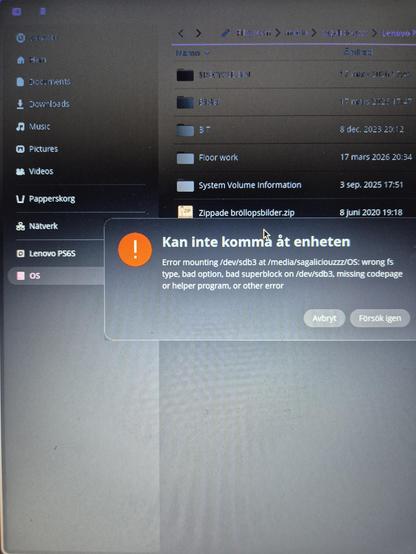
Hah! By fiddling around in the Disks app I managed to get it working :3
Okay, the next addition to "Saga does Linux": yesterday my Bluetooth mouse stopped working. Something about the Bluez daemon not running? After trying to do rfkill and unblock in terminal I read online that it was a known hardware problem with Asus. I did a cold boot and it worked again. Then I got problems with my wifi. Is that because both Bluetooth and my network are on 2.4ghz? My computer was quite far from the router at the time.
 ArchiveScribe
@Sagaliciouzzz Do you have GNOME Tweaks and GNOME Extension Manager installed? If so, then the first thing you should do is go into Extension Manager, search, install, & enable User Themes. Double check to make sure after you installed it that it’s enabled. Then you should be able to go into GNOME Tweaks, Appearance, & change the Theme shell (assuming you have new themes to install on it).
Of course, there are other ways to do this, but that is the least painful way to get what you want.
@archivescribe It said that User Themes was not supported by my OS :(
@Sagaliciouzzz My apologies. I was thinking of Ubuntu because Pop is Ubuntu-based. I’ve not extensively tested (newer) COSMIC desktop version of Pop! OS in a while. In my last tests a year ago, theming was in Settings➡️Appearance.
If it’s an older version (22.04 & older), I would log out of Pop! OS & log back in again to restart my session.
Oh, yes, make sure your theme is in the ~/.themes folder (it is usually hidden in folder view by default).
@archivescribe No need to apologize, I'm very thankful that you want to help :3
I've been looking for .themes, but I haven't found it. How do I un-hide it?
@Sagaliciouzzz On GNOME, the best way is to go into your home folder (the one on the menu/taskbar), & once you get in look at the top for the hamburger lines (those three lines). Once you see those three lines, click on it, & you should see a box to click on that says something like Show Hidden Files. Once you do that, your hidden files will be there. Themes is usually one of those folders (the file path should be /home/yourusername/.themes or ~themes).
@archivescribe Thank you! I managed to change the icons, but the settings only let me change between light and dark themes. There is a button to import themes, but I can't find any selecable files in the folders of my downloaded themes.
@Sagaliciouzzz I see. Have you tried using GNOME Tweaks and then Appearance? Hopefully, it will allow you to switch the icon theme and even legacy/GTK there. In Legacy Applications, you should (hopefully) be able to see the folder and it should appear in the menu. Another thing, I’ve been reading about problems some folks in GNOME apps are having with the “new” Libadwaita ignoring the themes folder, but I have yet to run into that.
@archivescribe Okay, yeah, it did work! I just didn't notice the change first 😂 Thanks for helping me!
I seem to be having a different problem now: when I try to start a program from the menu it doesn't actually start, excepy for Firefox, but when I start it from the Cosmic Store it works. Any thought on that?
@Sagaliciouzzz OK. The last time I had an issue like this (on GNOME store, not COSMIC), I restarted the launcher. The store looks like it’s having issues launching, esp. if it’s cross-platform (like a Flatpak). Go into the terminal, & for COSMIC the command should be something like ‘pkill cosmic-launcher.’ I’m certain that’s it because it’s similar in GNOME store. Once you type pkill cosmic-launcher in your terminal, it will kill & then automatically relaunch the launcher.
@Sagaliciouzzz Part 2: If by chance it this does not relaunch the COSMIC store, just press the Super Key (AKA, the Windows/Command key) or click the App Launcher icon, and that action will force it to wake back up.
@archivescribe I'll try that later, thank you! :3
@archivescribe Okay, I tried it now, but nothing seemed to happen.
@Sagaliciouzzz Arghh. If that’s the case, I fear it’s a communication issue between the COSMIC store & your software, esp. if they’re Flatpaks (that’s what happened to me in a similar case w/GNOME). I’m going to assume Firefox is probably a native app (.deb file), which is why it’s running. BTW, when you say the menu, do you mean the app library icon or are you typing the name of the app in the search bar (the launcher)? I’m going to reinstall PopOS! to test this out.
@archivescribe Yeah, Firefox was pre-installed! The ones I have trouble with are flatpak-installs. I have tried both from the app library icon and the launcher, no response from either.
But when I type pkill cosmic-launcher, should I get some kind of feedback that it was executed?
@archivescribe I managed to solve it by downloading and installing it via snapd instead of the Cosmic Store (where I could only find the Flatpak-version).