If you want Cherry MX keyswitches for future use, you might want to stock up. Cherry announced last year that production was moving to China, but today Mouser Electronics sent me an obsolescence notice for Cherry MX Blue.
:-(
#MechanicalKeyboard #CherryMX #CherryMXBlue

EDIT: sorry if I caused any alarm. As several people have informed me, just replace the MX1A prefix with MX2A.

@brouhaha Isn't that because Cherry are now producing the new MX2A switches? I've just bought some browns and they're great.
@jgrg
I don't know. The obsolescence notice was for MX1A-E1NW and did not give any details or replacement information.

@brouhaha @jgrg they did on digikey, replacment part numbers are the same just replacing 1 with the 2, they link them on the old product pages.

MX2A-E1NW
https://www.digikey.com/en/products/detail/cherry-americas-llc/MX2A-E1NW/21738396
https://www.mouser.com/ProductDetail/CHERRY/MX2A-E1NW?qs=P%2FxahI%252BVehmT092ODsZ10w%3D%3D

@raptor85 @jgrg
Good to know. Thanks!
@brouhaha @raptor85 @jgrg
I wonder if there's a way to tell Cherry switches made in Germany vs made in China apart - and when exactly they started producing there and if there was a time where they produced in both countries
@brouhaha Is there any remaining justification to buy real Cherry MX switches instead of one of the many less expensive knockoffs? For that matter, was there ever a justification?
@NF6X
I dunno. I like MX Blue pretty well. There probably is a knock-off that I'd find acceptable, but I haven't searched.

@NF6X @brouhaha

Personally, I prefer any of the Outemu silent tactiles.

@resuna @brouhaha I had not heard of that brand before. I'm planning to use some Gateron silent brown tactile switches in a Color Computer 3 keyboard upgrade.
@NF6X @resuna
If you make a keyboard PCB for the CC3, I'd like to buy one.
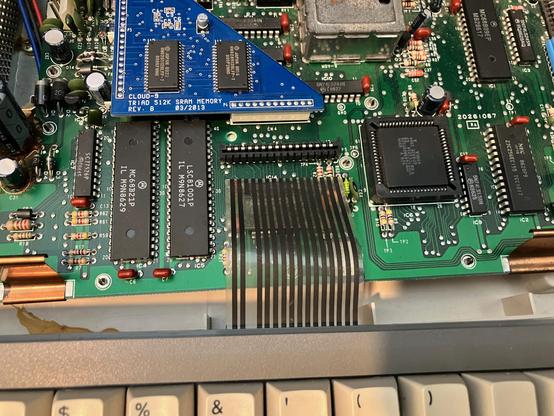
@brouhaha @resuna Cool! I’m still debating how to tackle connecting it to the computer. I don’t find any suitable pre-made flex cables available that would fit. How would you feel about desoldering the flex receptacle on the main board to replace it with a pin header?
@NF6X @resuna
Well, I'd prefer to be easily reversible, but it wouldn't be a disaster.
Do the cheap PCB companies in China not do cheap flex circuit? I haven't had occasion to look.
@brouhaha @NF6X you can get pre-made flexible flat cable and just have an adapter on your PCB.
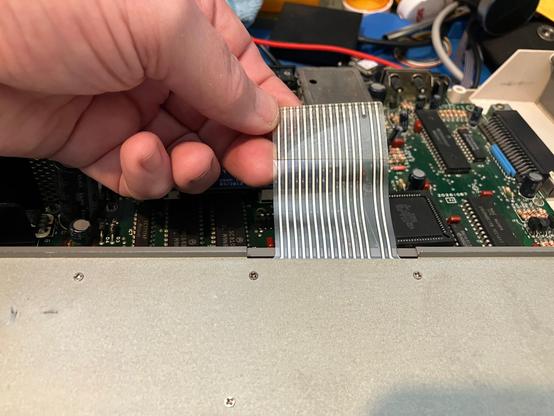
@resuna The problem is that I do not see anybody stocking pre made flat flex cable jumpers with the pin count and pitch to match the flex socket on the CoCo motherboard (16 pin, 100 mil pitch). Thus, this discussion mod modifying the CoCo motherboard. The raw cable stock appears to be available, but I don’t ’know about stripping the ends as a home player. It’s usually done with a laser, I gather.
@NF6X I just repaired a keyboard where somebody had screwed up a section of flat flexible cable and there are an amazing number of options online for straight through or crossed flat flexible cables with 4 or 5 connectors on up. It can't hurt to look. Also, I managed to get a connection working by scraping the end of the cable with a pen knife and sticking a bit of heavy duty duct tape on the back, when I was waiting for the correct cable to be delivered.
@resuna @NF6X
The one for the Color Computer keyboard is very coarse pitch compared to the stuff made now. Maybe 100 mil pitch? I haven't looked at one in years. It seems unlikely that there's anything suitable off-the-shelf.

@brouhaha @NF6X

Molex advertises 2.54mm pitch FFC on their site.

I think you could trim this cable to work:

https://www.molex.com/en-us/products/part-detail/211000012

@resuna @brouhaha The same page shows that 0 are in stock, samples are not available, and the minimum order quantity (MOQ) is 1000 pieces.

@NF6X @brouhaha

Oh bother.

@resuna @brouhaha Yup! If this was a 0.5mm or 1mm pitch FFC then there would be tons of options available in single quantity. I don’t think 2.54mm pitch is commonly used enough any more for distributors to stock the pre made cables.
@brouhaha @resuna They do make flex circuits, but I don’t know how cheaply they could be made in small quantity. It’s worth looking into.
@NF6X @resuna
Let me know. If it's expensive but not insanely expensive, maybe we can come up with a joint venture or something.
@brouhaha Apparently JLC do those and they're about the same price as standard PCBs. @NF6X @resuna
@colin_mcmillen @NF6X @resuna
Do they offer lamination of a stiffener for the connection end(s)? I know, I'm being lazy. I should just look it up myself.
@brouhaha @colin_mcmillen @resuna I took a lazy peek at PCBway this morning, and it looks like it might be practical to make the flex cables in small quantity. They do appear to offer stiffeners. I am not familiar with JLC's offerings, but I assume they're pretty similar.
@brouhaha @colin_mcmillen @resuna I'm not sure if a stiffener will be necessary on the end. If I recall correctly, the mylar tails of the CoCo 2/3 membrane keyboards do not have stiffeners. I'll take measurements when I have a chance.
@NF6X @colin_mcmillen @resuna
Remember that when you remove the FFC from the socket, insert a very thin shim on the contact side, to protect the exposed cable conductors, so that the socket contacts don't scrape them.
You're likely already fully aware of that, but I learned it the hard way back in the late 1980s with a very expensive to replace flex circuit.
@brouhaha @colin_mcmillen @resuna My memory was incorrect. There is a stiffener for the final inch of the mylar tail. The mylar thickness is 3 mils, and the stiffener increases the thickness of the mating end to just under 16 mils. The tail has top side contacts, which face the rear of the CoCo when plugged in.
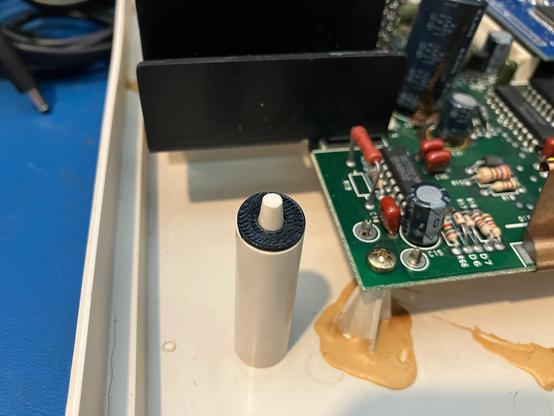
@brouhaha @colin_mcmillen @resuna Incidentally, this weekend I finally tried printing with TPU filament for the first time. One of the rubber washers on the rear keyboard mounting posts had crumbled, so I printed replacements for both of the washers. Everything worked out well. The only complications were me fumbling about because it was my first time using the AMS bypass path in my Bambu X1C, so I fumbled a bit with both the printer and the slicer.
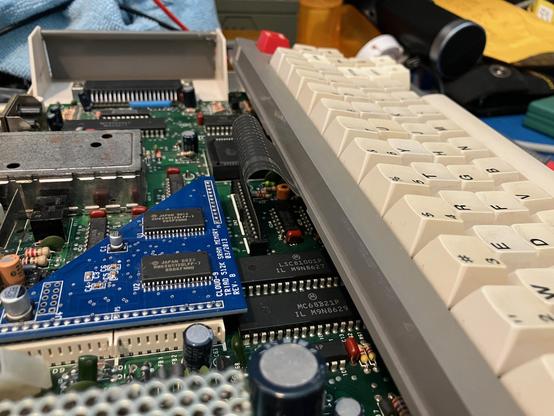
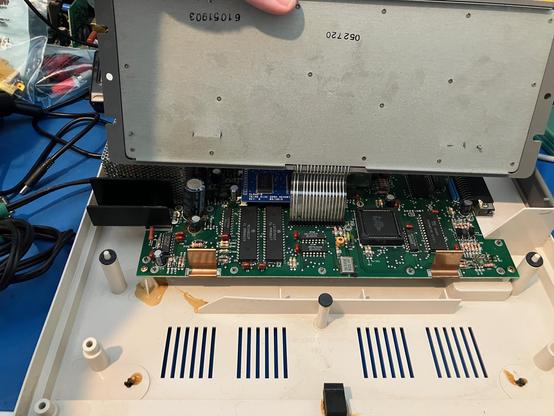
@brouhaha @colin_mcmillen @resuna I assume that I may find that the grounding fingers which normally contact the keyboard's bottom plate may interfere with the sockets on the bottom of a hot swap mechanical keyboard PCB. The fingers are just clipped onto the main PCB, and they will pop right off if necessary. It's interesting that they glued the base of the lower left main PCB mounting post preemptively. Maybe they were discovered to be a weak point that broke in shipping?
@brouhaha the news prompted me to go look up how to change the switches on a mechanical keyboard. I have one keyboard with Cherry switches. I figured out I can replace them but I'd need to desolder the original ones. So, don't worry about the false alarm... at least from my POV, I learned something useful as a result of your original post.

@brouhaha if you're interested in the Model M - https://www.pckeyboard.com/page/category/UKBD.

They have made them for decades now. Iirc they bought the rights to it. I have one. I love it although I haven't (ironically) used it in years as I just use the laptop to connect to other systems.

Unicomp GA LLC: Unicomp Keyboards

@xexyl
I like the earlier Model F a lot more than the Model M, but either are vastly superior to "normal" keyboards.
@brouhaha I don't know if I've used the Model F but I'd agree they're amongst the best keyboards made.

@brouhaha

What's the particular advantage to Cherry branded switches made in Germany?

Also, wasn't the blue switch basically obsolete as soon as keyboards started using microprocessors and doing debouncing in software?

@resuna
I don't know how Cherry's Chinese-made compare to their German-made. Could be the same. But I don't think any of the MX switches are functionally obsolete. There are many alternatives, and many are less expensive, and maybe some are as good or even better, but with MX you always know exactly what you're getting. The force profile and tactile feedback (for models that provide it) are fairly precisely specified and consistent.

@brouhaha

Well, they're consistent, but none of the big three are particularly *good*. Blue is some kind of weird nostalgia trip, red is soft and mushy with basically no feedback until you bottom out, and the brown is kind of tentatively tactile at best.

But blue is particularly weird. The whole "click" thing was a mechanical debouncing design that made sense back in the 80s when keyboards were all random logic or if they had a microprocessor it was a rotten potato.

@resuna
I personally prefer MX Clear, but some of my friends prefer MX Blue. I'm not inclined to tell them they're wrong.
@brouhaha People have all kinds of attachments to retro game consoles too.