In the latest Insider builds, we're working on adding the ability to set a custom user folder name during setup / OOBE.

Thanks everyone that's shared feedback about this over the years 🙏
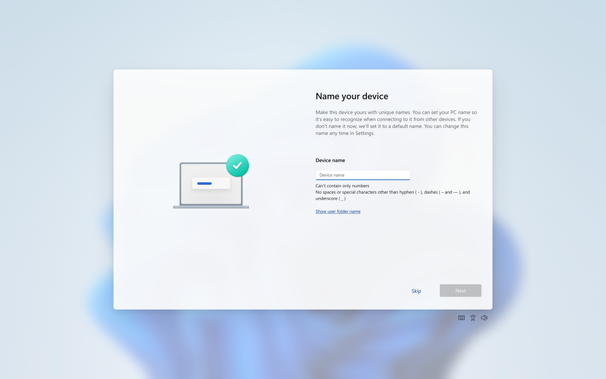
https://blogs.windows.com/windows-insider/2026/03/13/announcing-windows-11-insider-preview-build-26220-8062-beta-channel/

#Windows

For those who don't know what your user folder is, it's basically what you see for your account when you go to c:\users. For example, c:\users\jennifer

@JenMsft

I'm pretty sure even in Windows Powershell, this works:

cd ~
pwd

@JenMsft Are we changing directory separators to "/"? 😄

Great to see!

@seanddotmedotuk @JenMsft Those have worked ever since directories were implemented in DOS 2.0 (as long as you don't use NT native paths).
@jernej__s @JenMsft Interesting. Shall play around with this. Thanks.
@JenMsft Can also be accessed by typing . (dot) into the Run box.
@JenMsft For a URL/CLI-freak like me, the easiest way to go there is Windows+R, %userprofile%, Enter 😊
@menelion @JenMsft I say my way is even quicker, muahahahaha.
Windows R, the dot ., enter!
@johann @JenMsft wow, 28 years with Windows and I've never known this. Are there any other shortcuts like this?
@menelion @JenMsft A backslash will take you to the root of your c: drive.
The only other quick thing I know.
Go home on Windows

People from the Linux/ UNIX/ MacOS world wonder about the HOME on Windows and this came up in a Twitter thread recently.

@JenMsft

Does that mean the five character limit for username folders is going to be fixed?

@JenMsft Well, everyone who's working on that feature deserves a big bear hug!

But in lieu of distance... and the social norms against strangers giving hugs, here is a photo of my dog being very interested in this feature as thanks

@JenMsft @newplagiarist To this day I still create a local account to get the capitalisation on the folder correct…
@JenMsft Maybe now you can stop hiding it? It should be as prominent and accessible as Documents or Music is. Deserves its own icon too.