
In the latest Insider builds, we're working on adding the ability to set a custom user folder name during setup / OOBE.

Thanks everyone that's shared feedback about this over the years 🙏
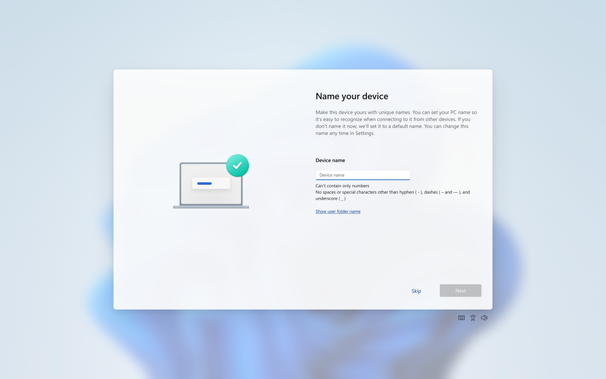
https://blogs.windows.com/windows-insider/2026/03/13/announcing-windows-11-insider-preview-build-26220-8062-beta-channel/

#Windows

For those who don't know what your user folder is, it's basically what you see for your account when you go to c:\users. For example, c:\users\jennifer

@JenMsft

I'm pretty sure even in Windows Powershell, this works:

cd ~
pwd

@JenMsft Are we changing directory separators to "/"? 😄

Great to see!

@seanddotmedotuk @JenMsft Those have worked ever since directories were implemented in DOS 2.0 (as long as you don't use NT native paths).
@jernej__s @JenMsft Interesting. Shall play around with this. Thanks.
@JenMsft Can also be accessed by typing . (dot) into the Run box.
@JenMsft For a URL/CLI-freak like me, the easiest way to go there is Windows+R, %userprofile%, Enter 😊
@menelion @JenMsft I say my way is even quicker, muahahahaha.
Windows R, the dot ., enter!
@johann @JenMsft wow, 28 years with Windows and I've never known this. Are there any other shortcuts like this?
@menelion @JenMsft A backslash will take you to the root of your c: drive.
The only other quick thing I know.
Go home on Windows

People from the Linux/ UNIX/ MacOS world wonder about the HOME on Windows and this came up in a Twitter thread recently.

@JenMsft

Does that mean the five character limit for username folders is going to be fixed?

@JenMsft Well, everyone who's working on that feature deserves a big bear hug!

But in lieu of distance... and the social norms against strangers giving hugs, here is a photo of my dog being very interested in this feature as thanks

@JenMsft @newplagiarist To this day I still create a local account to get the capitalisation on the folder correct…
@JenMsft Maybe now you can stop hiding it? It should be as prominent and accessible as Documents or Music is. Deserves its own icon too.
@JenMsft I'd love a feature that meows at me. Lol.
@JenMsft Soo you mean adding a GUI page for the option that currently is only exposed through Sysprep and (Auto)unattended.xml to change C:\Users into something else?
@agowa338 We'd already added a command line option anyone could use to do this late last year in the insider builds, so yeah, this part is adding UI

@JenMsft is there a blog for when all this stuff makes it to general release? It's great that insiders get all this info, but no one tells everyone else, who are 99% of users?

Or rather that is left to third party blogs and sites. It would be good to have an official blog from Microsoft

@Quentin We do have release notes for retail too when stuff rolls out, yeah. Also a roadmap
@JenMsft oh great! Do you know where it is hidden? Last time I asked someone at Microsoft they weren't aware of anything.

@Quentin the general release notes are here - features like this tend to go out in the optional updates (those are the ones later in the month) https://support.microsoft.com/en-us/topic/windows-11-version-24h2-update-history-0929c747-1815-4543-8461-0160d16f15e5

The roadmap with things being worked on is here: https://www.microsoft.com/en-us/windows/business/roadmap

Windows 11, version 24H2 update history - Microsoft Support

@JenMsft Thank you! Is it possible to subscribe to these via email? It would be great to get these in an email when they come out rather than having to look for them.