 lefty7283
NGC 2403 in HaLRGB
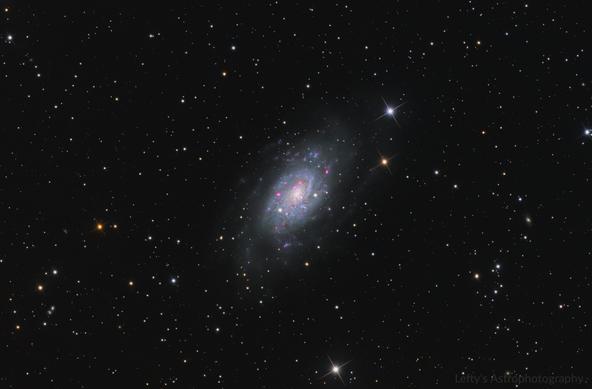
So I originally shot this back in 2020 from my in-law’s house in a Bortle 4 area. Only got a handful of LRGB subs because my guide cam did not wanna talk to my laptop for most of the session back then. Recently I decided to shoot some Ha from my B9 apartment and give it a reprocess in HaLRGB. Overall I’m very pleased with this improvement after 6 years! Captured captured in February 2020 and December 2025 from bortle 4 and 9, respectively.
Places where I host my other images:
TPO 6" F/4 Imaging Newtonian
Orion Sirius EQ-G
ZWO ASI1600MM-Pro
Skywatcher Quattro Coma Corrector
ZWO EFW 8x1.25"/31mm
Astronomik LRGB+CLS Filters- 31mm
Astrodon 31mm Ha 5nm, Oiii 3nm, Sii 5nm
Agena 50mm Deluxe Straight-Through Guide Scope
ZWO ASI-290mc for guiding
Moonlite Autofocuser
Acquisition: 9 hours 55 minutes (Camera at unity gain, -15°C)
Ha - 48x600"
L - 12x300"
R - 4x300"
G - 4x300"
B - 3x300"
Darks- 30
Flats- 30 per filter
Capture Software:
PixInsight Preprocessing:
BatchPreProcessing
StarAlignment
Blink
ImageIntegration per channel
DrizzleIntegration (2x, Var β=1.5)
Dynamic Crop
DynamicBackgroundExtraction
duplicated each image and removed stars via StarXterminator. Ran DBE with a shitload of points to generate background model. model subtracted from original pic using the following PixelMath (math courtesy of /u/jimmythechicken1)
$T * med(model) / model
Luminance linear:
BlurXterminator
StarXterminator to completely remove stars (extracted stars processed separately)
STF applied via HistogramTransformation to stretch nonlinear
Ha Processing:
StarX to remove stars
Subtracted red continuum to create a ‘clean’ Ha image using pixelmath
Pixelmath to combine the clean Ha image into the RGB image
largely following this advanced narrowband combination guide, also made by jimmy
RGB Linear:
Channelcombination to make color image from RGB stacks
SpectrophotometricColorCalibration
StarX to remove stars (to be used for star addition later)
PixelMath per the advanced narrowband guide to add Ha into the red and blue channels
ArcsinhStretch + HistogramTransformation to stretch nonlinear
Slight curves saturation boost and histogram adjustments
Stars only image:
BlurXterminator for discortion correction and some mild star reduction
HSV repair
ArcsinhStretch + HistogramTransformation to stretch nonlinear (less aggressive stretch)
Slight curve adjustments
Nonlinear Processing
LRGBCombination to combine stretched RGB and L images
DeepSNR Noise reduction
Shitloads of curve transformations to adjust luminance, contrast, saturation, etc
More curves
LocalHistogramTransformation
Pixelmath to add in the stretched stars only image from earlier
This basically re-linearizes the two images, adds them together, and then stretches them back to before. More info on it here
mtf(.005,
mtf(.995,Stars)+
mtf(.995,Starless))
NoiseXTerminator for some small scale chrominance noise reduction
Resample to 70%
DynamicCrop in on just the galaxy (not a whole lot going on in the background)
Annotation
Great image and thanks for sharing all the details too.
I’m always curious about how does one decide the number of images of the various filters. They’re never 1:1:1…
 Gnomie