
@firefox, the “last privacy-respecting browser” now nags you with in-browser pop-ups to let AI generate “key points” when you long-press links.

Mozilla CEO: “AI should always be a choice – something people can easily turn off”

Then why the fuck is it off by default? Why the fuck am I getting pop-ups asking me to try features I didn’t ask for? That’s not a choice. That’s opt-out with a fucking marketing budget.

What the fuck happened to you, Mozilla.

They spent WEEKS in damage control promising an "AI kill switch" and then shipped it fucking disabled. That is the most gaslit UX I have ever seen in my life.

"Help me @librewolf - you're my only hope."

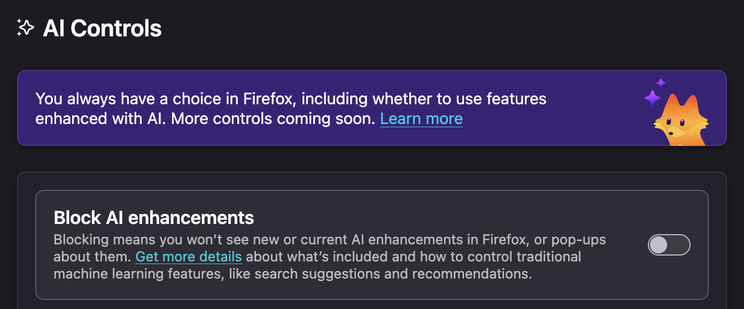
Settings > AI Controls > Block AI enhancements. Do it now, because they won't do it for you.

—

Edit: a few corrections thanks to @Feyd:

“Hover over links”

  • It’s a long-press / context menu action, not a passive hover. That’s a meaningful distinction because hover implies it’s happening constantly without intent, which is way more invasive than what’s actually happening.

“Sending page content to ML models”

  • the default link preview (before you enable key points) just reads the Open Graph meta tags – the same og:title / og:description metadata that generates link cards in Slack, Discord, iMessage, etc. That’s not AI, that’s just HTML parsing.
  • even when you DO opt into the AI key points feature, it runs a local on-device model, not shipping your page content off to some cloud endpoint.

#Firefox #Mozilla #AI #InfoSec #Privacy #Fediverse #OpenWeb

I agree with not wanting link previews, but there is some misinformation here:

when you hover over links

It is a 1 second hold or a context menu option.

is sending page content to ML models

Unless you’ve specifically enabled the key points feature, it just shows the open graph tag content (ogp.me). This is also what is used to display a card when you put a link in a chat app.

If you do enable the key points feature, it is not sending page content over the network like you imply.

It uses a local model and it doesn’t even download that model until the first time you ask for the key points.

I encourage you to keep complaining about things you would like you be different, but you should really keep your complaints factual, because you weaken your points when you mix them with misinformation.

support.mozilla.org/…/use-link-previews-firefox

Open Graph protocol

The Open Graph protocol enables any web page to become a rich object in a social graph.

@Feyd Fair corrections, thank you. The hover thing was sloppy on my part -- it's a long-press/context menu, not passive. And the key points feature does run a local model, not cloud inference. I'll edit the post.

The default-on nag UX is still bullshit but you're right that mixing valid complaints with inaccurate claims just gives people a reason to dismiss the whole thing.

What nag are you talking about?

  • I haven’t seen any sort of nag that occurs before activating a link preview
  • After activating a link preview there is a cog button that takes you directly to the settings where you can disable link previews entirely, in case you used it by accident or tried and decided you didn’t like it.
  • The key points part of the UI has a toggle to hide it, and it stays hidden for every subsequent link preview, even through restarts of the browser.