 k3ym𖺀
k3ym𖺀@firefox, the “last privacy-respecting browser” now nags you with in-browser pop-ups to let AI generate “key points” when you long-press links.
Mozilla CEO: “AI should always be a choice – something people can easily turn off”
Then why the fuck is it off by default? Why the fuck am I getting pop-ups asking me to try features I didn’t ask for? That’s not a choice. That’s opt-out with a fucking marketing budget.
What the fuck happened to you, Mozilla.
They spent WEEKS in damage control promising an "AI kill switch" and then shipped it fucking disabled. That is the most gaslit UX I have ever seen in my life.
"Help me @librewolf - you're my only hope."
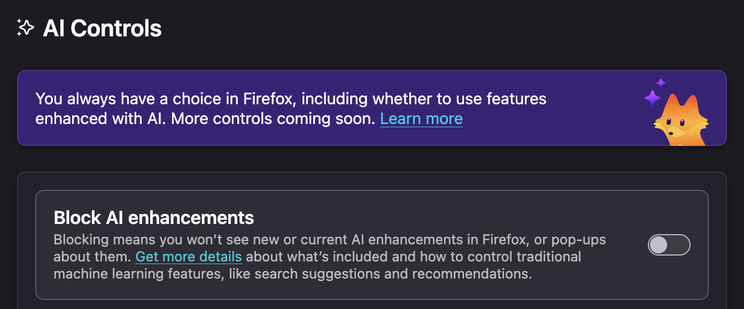
Settings > AI Controls > Block AI enhancements. Do it now, because they won't do it for you.
—
Edit: a few corrections thanks to @Feyd:
“Hover over links”
- It’s a long-press / context menu action, not a passive hover. That’s a meaningful distinction because hover implies it’s happening constantly without intent, which is way more invasive than what’s actually happening.
“Sending page content to ML models”
- the default link preview (before you enable key points) just reads the Open Graph meta tags – the same og:title / og:description metadata that generates link cards in Slack, Discord, iMessage, etc. That’s not AI, that’s just HTML parsing.
- even when you DO opt into the AI key points feature, it runs a local on-device model, not shipping your page content off to some cloud endpoint.
 grainfed