
Not that you asked about… word processing in 2026 but:

🥚LibreOffice now speaks markdown! But it strips out comments, as there isn’t a standard

🥚Word does not yet speak markdown, but does support ODT files

🥚Google Docs can now export markdown and makes comments into footnotes

🥚LibreOffice supports password-protected ODT files, but nothing else reads them

🥚Password-protected .docx files are supported by LibreOffice and Google Docs either offers “Preview” or strips the encryption for editing, while TextEdit shows AES encryption noise

🥚BBEdit can open .docx files, though they are not exactly user-friendly

🥚Collabora and OnlyOffice (Sveiki!) reportedly support encrypted .docx files

(I rarely use file-level encryption but it has its place and readability is important)

🥚Word mail merge is very broken while LibreOffice’s worked quite well (used for the BSDCan 2025 badges)

🥚I hope the spreadsheets aren’t making up numbers and I fear the interoperability of presentations

🐣Converted documents will gladly jump from say, 128KB to 1.2M with the exact same content. Consider copy/paste to the format of choice.

🐣RTF has no T.

😐It’s 2026 and I still don’t know how best to sit down and make a to do list that is available on my phone and desktop.

Of course you want a console-based word processor! I have some good news and some bad news…

The good: WordGrinder!

The bad: “DEPRECATED: broken since 2023, maintainer AWOL”

https://www.freshports.org/editors/wordgrinder/

FreshPorts -- editors/wordgrinder: Simple Unicode-aware console and X11-based word processor

WordGrinder is an ultra-clean and uncluttered word processor that runs in a terminal or an X11 window. The author made WordGrinder to have something to write novels on. It supports just enough character and paragraph style support to let you get the job done, while not enough to let you waste time configuring them.

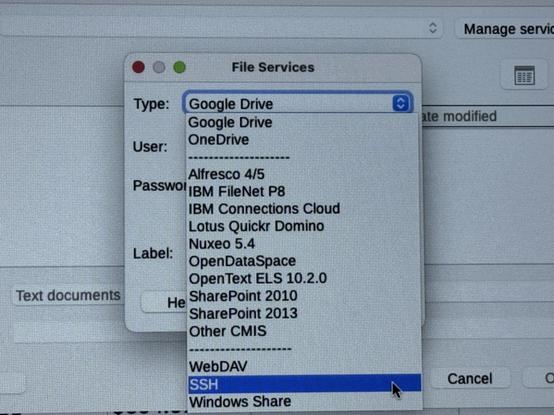
So. Who has used LibreOffice Remote Files?

Might they support the collaborative editing of Collabora and those listed platforms? Because that would be Awesome.

Hmm… this might be a teaser feature, not wired up on several operating systems?

Updated on this thread, which is hopefully threaded...

I put my password-protected .odt and .docx files into a colleague's Collabora instance and they round-tripped successfully! It prompts for a password on open and allowed me to download a modified version, preserving the password. (Google Docs strips it out)

Oh @antranigv ...

@dexter Oh boy CMIS. SOAP XML that was so not standardized that it broke whole documents all the time... Might work today though.

@dexter

Honorable mention:
https://wordtsar.ca/

WordTsar – A Wordstar clone

@dexter well, could Typst in Vim count as a console-based word processor? Not really WYSIWYG, but the rendered output is exactly what we’d expect.
@dexter I miss my very first editor in DOS: qedit

@dexter WordGrinder is definately still under development. Latest release 2025. Might be a roll your own for FreeBSD.

https://github.com/davidgiven/wordgrinder

@kianryan How are you defining “definitely”?

@dexter

Apologies. Not speaking for the dev. However, last release 2025, commits 8 months ago, and answering issues 4 months ago.

In other words, while development may have slowed down, I wouldn't consider it an abandoned project.

@dexter > to do list

drafted email in my case

@dexter
>>jump the size...
Preferences, Embed only the used font, save (Libre).
GDocs likes to embed all sorts of fonts when exporting to odf.
@po3mah That was one nice feature of opening the .docx in a text editor… seeing font files.
@dexter I saw this https://jotty.page last week, it looks ideal and (for me) will replace a mix of hedgedoc & todoist app subscription. Does it look useful?
jotty·page - Self-Host your Checklists & Notes

A simple, self-hosted app for your checklists and notes. Your lightweight, private alternative, formerly rwmarkable.

@dch @dexter I did not know I needed this, but this looks a lot like something I want A LOT... Thx for sharing
@fellmoon haven’t got it to compile on FreeBSD yet I will try a Linux jail
@fellmoon @dch @dexter is it possible to use it offline - like using the phone in airplane mode? I liked Joplin because of that when I tried it.
@joel @fellmoon @dch @dexter I'm a fan of self-hosted Joplin too, which does markdown and to-do lists just fine. I needed to compile nginx from ports on FreeBSD 15.0 to support the webdav features it uses,, but otherwise it's pretty painless.

@dexter
Nextcloud.

Not great in that it turns them into calendar events but it will sync.

https://apps.nextcloud.com/apps/tasks

Tasks - Apps - App Store - Nextcloud

The Nextcloud App Store - Upload your apps and install new apps onto your Nextcloud

@dexter

Windows 11 notepad opens/understands (and saves) markdown. 🤷

What do you want your to do list to do (hah!) that Google Keep can't?