So who knows stuff about the #commodore64 light pen?

Was there an amplification circuit for the light sensor input?

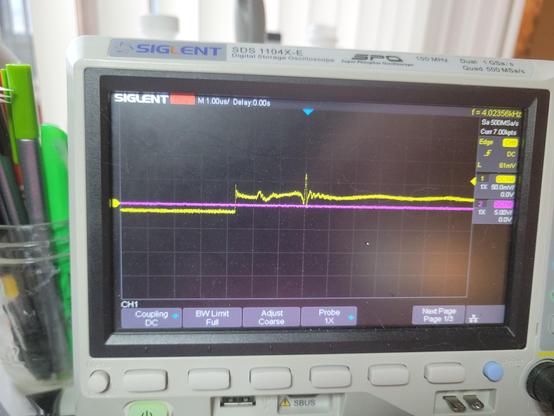
It clearly is responding when I point it up at my task light, but it's barely 30mV. Just no idea if that's what I should be seeing. Also no idea why the 'floor' goes negative...

One button is 5V high and properly drops to 0 when pressed as expected. the other button doesn't seem to work, but the CGA only supported one button anyway.

#retrocomputing

@gloriouscow Oh wow, you just brought back a memory. I built a light pen for the c64 when I was a kid from a book, it was one of my first electronics projects. It was little more than a photo transistor and a joystick connector. Not sure what the official one is like.. mine keyed off of the refresh rate of the CRT.

Going to see if I can find that book. It was green, with a ring binder

@cmars let me know what you find! I think this requires a pull-up.

@gloriouscow This _might_ be a scan from it. It had to have been pretty simple like this.

https://www.lemon64.com/forum/viewtopic.php?t=77067

@gloriouscow

Not an expert but tried to do some sleuthing.

The Vic-II chip datasheet http://cini.classiccmp.org/pdf/Commodore/ds_6567.pdf doesn't say anything special about the light pen input, so I would expect it to be a logic level input. Input high level 2.0 volts minimum.

Does the commodore 64 PCB amplify the signal? https://www.zimmers.net/anonftp/pub/cbm/schematics/computers/c64/250469-rev.A.pdf No, not that I can find. On page 3 in grid E3/4 a series inductor L3 is shown, without a value.

https://www.c64-wiki.com/wiki/Light_pen shows a typical schematic of a light pen. The light sensing device functions as a PNP transistor. (It's shown upside down in that diagram compared to a typical schematic! And the connections are unlabeled. Ugh. 6 is "button1", 7 is +5V and 8 is gnd) When it is DARK, the transistor does not conduct, so the pull up R1 produces a voltage of close to +5V.

When it is illuminated, the light produces a base current and conduction occurs. In this case, the voltage should drop to close to 0V.

Since you are seeing low voltages but not high voltages, check that the pull-up is present and has a plausible value; and that +5V is present.

@stylus thanks for the info, I was just about to try adding a pullup on the strobe line.

to be clear, there is no commodore 64 actually involved here, I just have the pen, and I'm givijg it 5V from my bench supply.

The goal is to see if I can get it working with my IBM CGA card...

@stylus if the pullup is supposed to be in the pen itself, it definitely isn't working. This pen is ultrasonically welded or something, I don't see any visible seam or way to open it to get at the components and I'd rather not damage it
@gloriouscow Woah, the C64 had a light penβ€½ Light pens feel like a decade or two older. Did much software use them?

@thalia light pens are actually pretty damn old, dating back as far as the 60's, but only really died off in the early 80's, so the commodore 64 existed comfortably in that window where people thought they were an important peripheral to have support for when designing early home computers.

Not a whole lot of software used them, because for the most part they were terrible in their home computer incarnations. Too inaccurate for drawing, so they were basically best used for selecting things or navigating menus.

It turns out holding your hand up to poke at your monitor for extended periods of time actually is very uncomfortable, leading to a condition called 'gorilla arm' in publications of the time.

Then the mouse came along and pretty much made the light pen instantly irrelevant. It was precise, accurate, and most importantly, comfortable to use.

@thalia by far the best application of the light pen I have personally used is the chess program, Sargon III, for the IBM PC.
Selecting pieces is easy since the squares are large, and it is very intuitive. Tap the piece you want to move, tap where you want to move it to.
It works, and in the absence of mouse support, it might actually be the best way to play.

@thalia I've seen one other application that used the light pen on PC, Micrografx PC-Draw. This lets you draw various shapes like lines, rectangles, circles and such with the light pen, overcoming the inherent inaccuracies via a 'nudge' ui - you get the coarse positioning with the pen, then you can tap on arrows to fine tune the result.

You realize very quickly that you would be much more efficient just using the keyboard.

The PCjr has light pen support as well, even considering the incredible efforts to shave every dollar off the thing, but that's mostly due to rather terrible light pen support being pretty much free to implement via the Motorola 6845 CRTC chip as long as you are willing to add a header for it somewhere.

IBM never made or sold an official pen, so that's part of the reason barely anyone bothered with it. But in the PCjr BIOS diagnostics, there is a test that borders on an Easter egg - the light pen test is a very simple paint program, all in ROM!

@gloriouscow I'm familiar with the '60s light pen use, such as the CAD circuit placement with a light pen in "The Incredible Machine" (1968) at Bell Labs, but I'd never seen it for home computers. Those are all such cool uses! I'm doing a local demo in two weeks, letting people use my teletypes, C64, and CoCos, and it would be fun to get a C64 light pen, since none of them would have seen, let alone used one.

@thalia

here's a recording of me playing a bit of chess after I added light pen support to MartyPC.

I was able to emulate the light pen without ever using one, but it's probably a better experience than the real thing would be as I can track it perfectly and allow it to trigger even perfectly black areas.

There's a bunch of C64 light pens on ebay looks like, looks like they go for about $50-$100. I got very lucky to snag this one at a VCF consignment for $5, it was just sitting there in a ziploc baggie, unlabelled. Light pen support has been something of a running joke between me and 640KB, the author of GLaBIOS, since he added light pen support and nothing to test it with.

I met him at that VCF and I was joking that i'd add light pen support to MartyPC if I found a light pen - and there it was.

@thalia here's a screenshot of PC-Draw. The "nudge" interface can be seen in the upper right
@thalia And finally, here is the light pen test from the IBM PCjr BIOS diagnostics.

@gloriouscow Are you testing it while connected to the C64, or just rigged up to a bench power supply?

I don't know anything about the light pen specifically, except that it connects the light detector to the same pin as the joystick fire button, which is a digital input.

On a joystick that pin is either NC or shorted to 5V (or maybe GND? I can't remember for sure). So I assume there's a pull-down (or pull-up) resistor internal to the C64.

So for a light pen I'd expect one of the following pairs: +5V/NC, GND/NC, or +5V/GND.

I would also hazard a guess that the light pen buttons ought to be connected to pin 3 (Joy A2/Left) and pin 4 (Joy A3/Right) because that's what a paddle's buttons are connected to.

@gloriouscow To clarify, I mean on a joystick that pin is NC normally, and shorted to some other pin when the fire button is pressed. The same is true for the up/down/left/right pins.

@whimsy it's just wired up to my power supply at the moment. I don't actually own a c64 to use it with.

Its not even 100% certain this light pen is for the c64 but I sort of ruled out it being for anything else...

@gloriouscow Got it.

I just double checked and on a joystick the digital pins are shorted to GND when the corresponding switch is enabled. The joystick doesn't actually use the +5V pin at all.

So on a light pen the light detection pin is most likely NC when no light is detected, and shorted to GND when light is detected.

I think taking ambient noise into account that explains the readings you're getting?

@gloriouscow (probably also the second button *does* work, but it uses the same NC/GND setup, and for whatever reason ~5V is leaking into the "working" one when it's NC).

@whimsy Could be. Could probably check that with a weak pull-down?

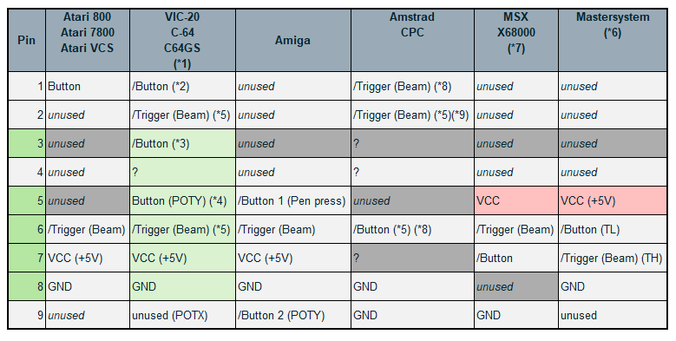
here was my process-of-elimination chart

@gloriouscow If my understanding is correct you want a pull-up on pins 3, 4 and 6.

AIUI the C64 has a pull-up resistor on pins 1, 2, 3, 4 and 6, so from the programmer's point of view they are active low.

There is a DIY guide to make a light pen for the C64 or Atari computers here: https://www.atariarchives.org/ecp/chapter_6.php

That seems to confirm my understanding, except the DIY light pen has a switch inline with the light sensor.

So it's possible you need to be pressing one of the switches to get any reading from the light pen. Or possibly you have to push the tip hard enough against a surface to activate an internal microswitch.

Electronic Computer Projects - Chapter 6

@whimsy

there's no microswitch, and i did try fussing with the buttons while holding it up to the light.

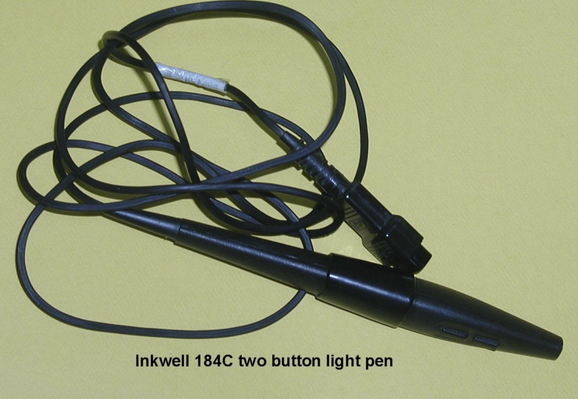
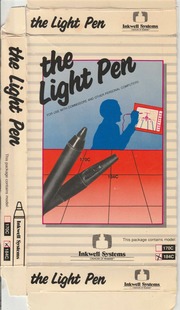
if it helps, this appears to be the pen i have, an "Inkwell 184C"

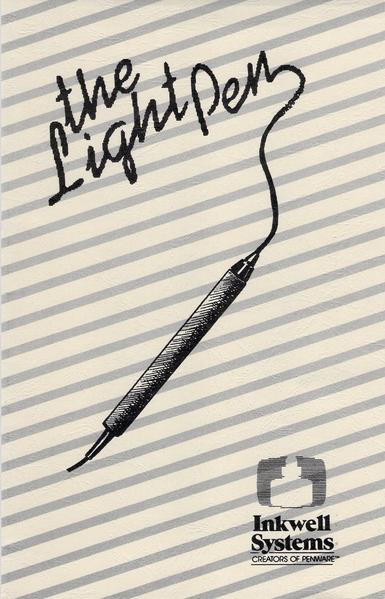
Hardware Requirements - InkWell Systems The LightPen Manual [Page 10]

InkWell Systems The LightPen Manual Online: Hardware Requirements. The Light Pen is joystick Port I compatible with Commodore 64, 64C, SX64, and 128 computers. To program for The Light Pen you will need: β€’ A COMPUTER WITH SUITABLE LIGHT PEN INTERFACE β€’ COMPATIBLE DISK DRIVE β€’ TV OR...

ManualsLib
The Light Pen Operations Manual Inkwell Systems : Free Download, Borrow, and Streaming : Internet Archive

Light Pen by Inkwell Systems and it comes with a demo disk! Enjoy!

Internet Archive

@whimsy

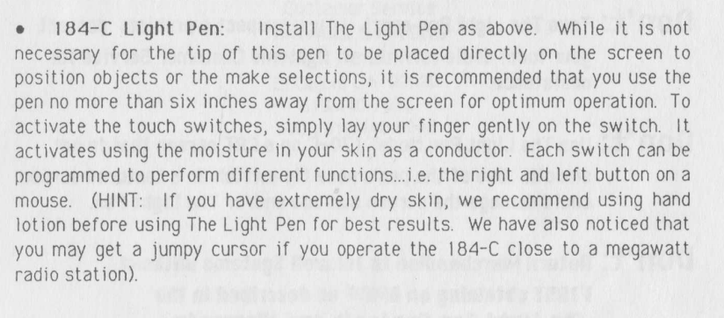
you know in my entire life of using computers and reading manuals, I have never before been advised to moisturize myself

@whimsy the capacitive buttons were a bad call. you really miss the tactile feedback of a switch. it feels crummy to not be able to just rest your finger on it either
@gloriouscow yeah that's awful πŸ˜•. It wouldn't even have occurred to me that someone would make such a thing in the 80s.

@gloriouscow So FWIW I've confirmed the C64 does indeed have pull-up resistors on the digital pins of the joystick ports (pins 1, 2, 3, 4 and 6).

To be more specific, the MOS 6526 CIA has internal pull-ups on its IO pins, and the digital joystick pins are connected directly to IO pins on the CIA.

(https://web.archive.org/web/20181126000922if_/http://archive.6502.org/datasheets/mos_6526_cia_recreated.pdf page 5)

The analog pins (5 and 9, not used by light pen) are connected to the SID!

@whimsy Thanks, this is helpful. I checked the CGA schematics, and they expect an active low strobe and button/switch input, but the card itself has no pullups, so there were clearly platform implementation differences to account for.
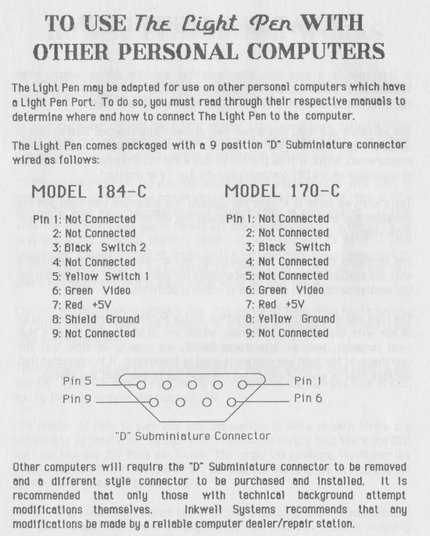
@whimsy They also send both +5 and +12V up the light pen header. I wonder if there were many 12V light pens...

@whimsy

you'd never see anything like this in a consumer product today.

"You can use our product with other computers but you'll probably have to cut the end of it off and do other stuff. Hope you know what you're doing."

It was a different era.

@gloriouscow Yeah, I saw that too!
I have a few old computers and peripherals whose manuals have pinouts for all the ports in the back. I miss that.
@gloriouscow as far as is remember, it should detect the electon beam in the CRT. the timing where the actual point is lit, tells the computer where the pen was pointing. (same principle as the pen for the amstrad computer in this time)

@gummilover right - i know the theory of operation, enough to have emulated the IBM PC light pen even, just needed to sort out the electrical specifics.

I think we've got it sorted but i'll have to mess with it more tomorrow.

@gloriouscow Is this a case of it just needing biasing?