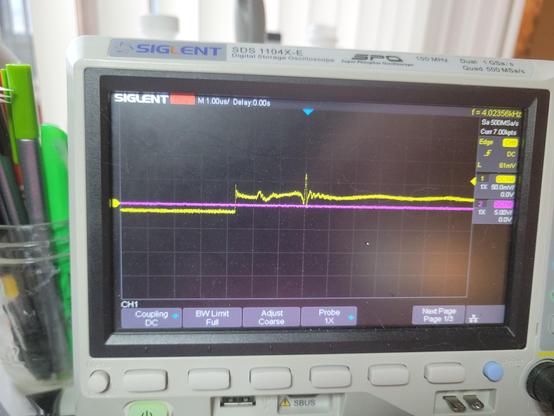
So who knows stuff about the #commodore64 light pen?

Was there an amplification circuit for the light sensor input?

It clearly is responding when I point it up at my task light, but it's barely 30mV. Just no idea if that's what I should be seeing. Also no idea why the 'floor' goes negative...

One button is 5V high and properly drops to 0 when pressed as expected. the other button doesn't seem to work, but the CGA only supported one button anyway.

#retrocomputing

@gloriouscow Woah, the C64 had a light pen‽ Light pens feel like a decade or two older. Did much software use them?

@thalia light pens are actually pretty damn old, dating back as far as the 60's, but only really died off in the early 80's, so the commodore 64 existed comfortably in that window where people thought they were an important peripheral to have support for when designing early home computers.

Not a whole lot of software used them, because for the most part they were terrible in their home computer incarnations. Too inaccurate for drawing, so they were basically best used for selecting things or navigating menus.

It turns out holding your hand up to poke at your monitor for extended periods of time actually is very uncomfortable, leading to a condition called 'gorilla arm' in publications of the time.

Then the mouse came along and pretty much made the light pen instantly irrelevant. It was precise, accurate, and most importantly, comfortable to use.

@thalia by far the best application of the light pen I have personally used is the chess program, Sargon III, for the IBM PC.
Selecting pieces is easy since the squares are large, and it is very intuitive. Tap the piece you want to move, tap where you want to move it to.
It works, and in the absence of mouse support, it might actually be the best way to play.

@thalia I've seen one other application that used the light pen on PC, Micrografx PC-Draw. This lets you draw various shapes like lines, rectangles, circles and such with the light pen, overcoming the inherent inaccuracies via a 'nudge' ui - you get the coarse positioning with the pen, then you can tap on arrows to fine tune the result.

You realize very quickly that you would be much more efficient just using the keyboard.

The PCjr has light pen support as well, even considering the incredible efforts to shave every dollar off the thing, but that's mostly due to rather terrible light pen support being pretty much free to implement via the Motorola 6845 CRTC chip as long as you are willing to add a header for it somewhere.

IBM never made or sold an official pen, so that's part of the reason barely anyone bothered with it. But in the PCjr BIOS diagnostics, there is a test that borders on an Easter egg - the light pen test is a very simple paint program, all in ROM!

@gloriouscow I'm familiar with the '60s light pen use, such as the CAD circuit placement with a light pen in "The Incredible Machine" (1968) at Bell Labs, but I'd never seen it for home computers. Those are all such cool uses! I'm doing a local demo in two weeks, letting people use my teletypes, C64, and CoCos, and it would be fun to get a C64 light pen, since none of them would have seen, let alone used one.

@thalia

here's a recording of me playing a bit of chess after I added light pen support to MartyPC.

I was able to emulate the light pen without ever using one, but it's probably a better experience than the real thing would be as I can track it perfectly and allow it to trigger even perfectly black areas.

There's a bunch of C64 light pens on ebay looks like, looks like they go for about $50-$100. I got very lucky to snag this one at a VCF consignment for $5, it was just sitting there in a ziploc baggie, unlabelled. Light pen support has been something of a running joke between me and 640KB, the author of GLaBIOS, since he added light pen support and nothing to test it with.

I met him at that VCF and I was joking that i'd add light pen support to MartyPC if I found a light pen - and there it was.

@thalia here's a screenshot of PC-Draw. The "nudge" interface can be seen in the upper right
@thalia And finally, here is the light pen test from the IBM PCjr BIOS diagnostics.