You just provisioned a fresh Linux server. Within minutes, the SSH brute-force bots will arrive.

There are too many ways to build a firewall in Linux. I wrote a practical guide to the four major tools: iptables, nftables, firewalld, and ufw, including their mental models and deployable configs.

Also includes a deep dive into the "Docker Trap" (why Docker silently bypasses your default-deny rules) and how to fix it.

(And yes, I still spend the intro and conclusion reminding everyone that FreeBSD's PF is the undisputed king of packet filtering. Let's argue in the replies.)

Read it here: https://blog.hofstede.it/linux-firewalls-how-to-actually-secure-a-cloud-server-iptables-nftables-firewalld-ufw/

#Linux #Sysadmin #DevOps #Security #Netfilter #Docker #Networking

Linux Firewalls: How to Actually Secure a Cloud Server (iptables, nftables, firewalld, ufw)

A practical guide to the four major Linux firewall technologies - iptables, nftables, firewalld, and ufw. Covers real-world cloud server hardening with concrete examples, from locking down SSH to b...

Larvitz Blog

@Larvitz
Please bear in mind that nft is a userland interface to the nftables kernelland interface to netfilter. You can configure netfilter via nftables with iptables.

Thanks for sharing ๐Ÿซฐ

@Larvitz One of the "hidden" problems I run into on cloud servers is half open SYN attacks on port 80. Disparate providers and regions, no connections between servers I'm running.

For whatever reasons, it appears the Brazilian telco systems are... compromised? (not sure) - I'm up to 33 .br subnets (/19 to /22 size) having been dropped for targeting all my random servers with port 80 SYN floods. The process is currently manual - when on a server, look at `ss -tn` then cull subnets out of whois.

@Larvitz I went a different direction. I have #OpenVPN on my servers and only allow SSH from OpenVPN connected hosts. I originally started with #WireGuard, but too many public Wifi block WireGuard.
@Larvitz My favourite solution is port knocking. It's the best log cleaning money can buy. Anything that shows up in your logs is of interest.
GitHub - facebook/bpfilter: eBPF-based packet filtering framework

eBPF-based packet filtering framework. Contribute to facebook/bpfilter development by creating an account on GitHub.

GitHub
why?
why go through all that? to block ssh brute-force bots? is it about using less resources? i just don't bother and don't understand why i should block bots
@nathanael That was just an example use case. The blog article is a general overview into Packet filters/firewalls in Linux. They're not limited to that single use-case :-)
@Larvitz `ssh` should not be facing the Internet these days for the vast majority of users, even though by default it usually makes secure choices (like, no root user and keys instead of passwords). Your VPS should come with console access, which can be used for initial configuration and emergency access. You can then choose to set up management access via some separate network, probably a VPN.
@yojimbo Often, yes. But in the scope of my Blog post, that's just a prominent example. The conent is more about linux packet filters and firewall technologies in general. And there's many more potential use-cases for that.

@Larvitz You're not wrong; and an exposed ssh port has been ubiquitous for many yeahs, so it makes for a good example.

These days I tend to argue the other way around - the host firewall should be involved in blocking outbound traffic as it's primary job. There's no need to block inbound traffic, as there should be no services on "unwanted" ports. Network-level firewalling is a different beast though.

@Larvitz "There are too many ways to build a firewall in Linux."
@Larvitz I think your explanation of the docker behavior is incorrect. Port publishing using `-p` starts a docker-proxy userspace program on the host that listens on the specified port (effecting the input chain) and forwards the traffic to the container (using the output chain).
Using forwarding (with prerouting nat) instead could be faster.
The docker-proxy behavior enables port configurations like `127.0.0.1:80:8080`.
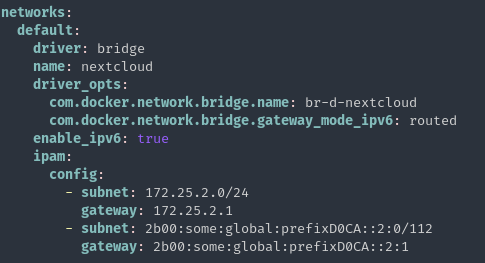
@Larvitz If you actually want to use docker, I highly recommend naming the container bridge interface. You can do that with the undocumented driver_opts setting: "com.docker.network.bridge.name"
With that, you can filter in nftables using `iffname br-d-*`.
@Larvitz Thank you for the nftables set / update examples!
@Larvitz Pretty interesting read, as I've never set up the firewall on a Linux host. And I have to admit, firewalld looks pretty neat. ๐Ÿ˜
@Larvitz I don't even know if I should worry about this.