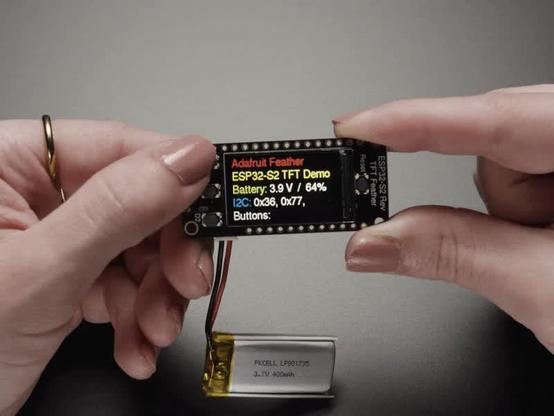
EDIT: Solved! Thanks to @projectgus and @mnl for pointing me in the right direction. https://mastodon.social/@joeycastillo/116178688050493057

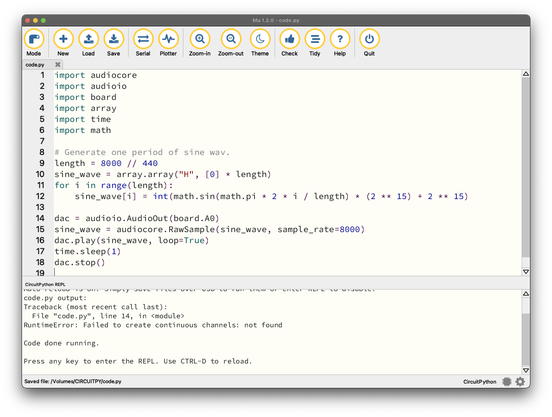
PREVIOUSLY: desperate plea for help from any #circuitpython oriented folks: I've purchased a bunch of ESP32-S2 Reverse TFT Feather boards (S2, not S3) for my students' assignment 3, but any attempt to initialize audioio.AudioOut, even for the most basic example, is met with an error:

RuntimeError: Failed to create continuous channels: not found
@joeycastillo I don't know CircuitPython very well, but ESP32-S2 only has two DAC pins, IO17 and IO18 - does pin "board.A0" map to one of those?

https://docs.espressif.com/projects/esp-idf/en/stable/esp32s2/api-reference/peripherals/dac.html

Digital To Analog Converter (DAC) - ESP32-S2 - — ESP-IDF Programming Guide v5.5.3 documentation

@joeycastillo ah nvm, I checked https://learn.adafruit.com/esp32-s2-reverse-tft-feather/pinouts and it does indeed! Sorry for the noise.
Adafruit ESP32-S2 Reverse TFT Feather

The Reverse TFT Feather comes with the 240x135 color TFT display on the back-side not the front-side. That makes it great for panel-mounted projects, especially with the included buttons. It's like an all-in-one display interface development board, powered by the fantastic ESP32-S2 WiFi module.

Adafruit Learning System
@projectgus no worries, good to check these things! A look at the board definition confirms it, A0 is GPIO18, and looking further at the internals, this message seems to come from dac_continuous_new_channels returning ESP_ERR_NOT_FOUND, so I'm chasing into Espressif internals next. https://github.com/adafruit/circuitpython/blob/77c17696e5be01d40b78d5cbe157539d733af73a/ports/espressif/common-hal/audioio/AudioOut.c#L480

@joeycastillo yeah I just had a peek too (the power of procrastination), and saw the same.

Out of interest, do you get the same error if you specify both a left and right channel (i.e. board.A0 & board.A1)?

EDIT: Nvm, I saw @mnl's reply which gets to the heart of it!

@projectgus @joeycastillo I think you are actually getting closer to it, I was just grepping around. A hunch is that (I don't know esp32-s2 at all) apparently it has one DMA channel, and I could imagine it being hard allocated to the display.

I also have to do other things now, but apparently joey still has a week! easy! 😭

@mnl @projectgus Thanks for y'alls help, this pointed me 100% in the right direction. Flashing the non-TFT version, I am able to use the DAC, which points to something about the display and DMA. But also the errata note suggests that I can salvage the assignment with pwmio and more beepy output while I look into the DMA issues. THANK YOU BOTH!!!
@joeycastillo @projectgus 🥳 so glad! love your work, i hope your students have fun.
@joeycastillo @mnl @projectgus Yes, you can use “pwmio” for simple tones. Use the “simpleio” library to give you an easy function for that: https://docs.circuitpython.org/projects/simpleio/en/latest/api.html#simpleio.tone
Unfortunately, the only way I’ve had good luck with CircuitPython ESP32 audio is with an outboard I2S DAC module and the built-in “audiobusio” library (even when you can get the built-in DAC to work, it’s pretty low-quality 8-bit)
API Reference — Adafruit CircuitPython SimpleIO Library 1.0 documentation

@todbot @mnl @projectgus Thanks so much for y'alls help, I've confirmed pwmio beeps and bloops work great, and if I use the non-TFT version of the firmware, I can actually use the DAC (which as you point out isn't the best quality at 8 bits, but does give the students options for which direction they want to go). Assignment saved!
@joeycastillo @mnl @projectgus Awesome! And as I’m sure you know, you can set up the display by hand on the non-display firmware, sorta like this: https://gist.github.com/todbot/a23c8cb28e5925dfa79e6dba5c9d0962
show how to use LILYGO T display RP2040 board in CircuitPython w/o explicit board support

show how to use LILYGO T display RP2040 board in CircuitPython w/o explicit board support - lilygo_t_display_rp2040_demo.py

Gist
@todbot Thanks! Yea unfortunately it seems like an either/or on the TFT Feathers, at least for the S2. Setting up the TFT first, the DAC fails as above; setting up the DAC first, I get "RuntimeError: SPI configuration failed." I'm guessing this probably hasn't come up yet, since the DAC wasn't available at all on the S2 until recently. Either way the good news: on the standard firmware build, doing a `displayio.release_displays()` before setting up AudioOut is a one-line fix, so it's all good :)

@joeycastillo @projectgus that means I think that all DMA channels were allocated, indeed the esp-idf version used by circuitpython now supports continuous mode. Maybe the board setup already allocates them already (for the display?)

Anyway, before I go too deep from my armchair peanut gallery, let me know if you want to hash this out maybe with gus too (the more the merrier)

@mnl @joeycastillo I do love a rabbit hole (a little too much), but I have to go do other things. Sorry, best of luck!