EDIT: Solved! Thanks to @projectgus and @mnl for pointing me in the right direction. https://mastodon.social/@joeycastillo/116178688050493057

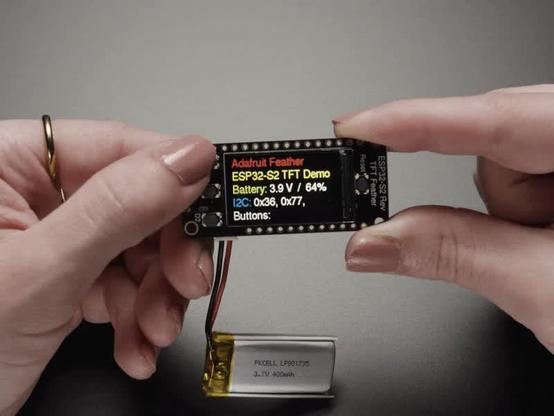
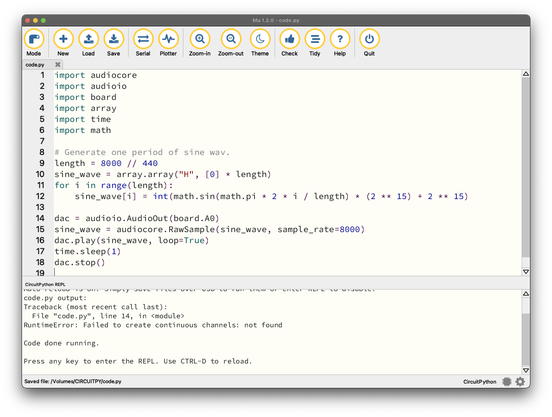
PREVIOUSLY: desperate plea for help from any #circuitpython oriented folks: I've purchased a bunch of ESP32-S2 Reverse TFT Feather boards (S2, not S3) for my students' assignment 3, but any attempt to initialize audioio.AudioOut, even for the most basic example, is met with an error:

RuntimeError: Failed to create continuous channels: not found
@joeycastillo I don't know CircuitPython very well, but ESP32-S2 only has two DAC pins, IO17 and IO18 - does pin "board.A0" map to one of those?

https://docs.espressif.com/projects/esp-idf/en/stable/esp32s2/api-reference/peripherals/dac.html

Digital To Analog Converter (DAC) - ESP32-S2 - — ESP-IDF Programming Guide v5.5.3 documentation

@joeycastillo ah nvm, I checked https://learn.adafruit.com/esp32-s2-reverse-tft-feather/pinouts and it does indeed! Sorry for the noise.
Adafruit ESP32-S2 Reverse TFT Feather

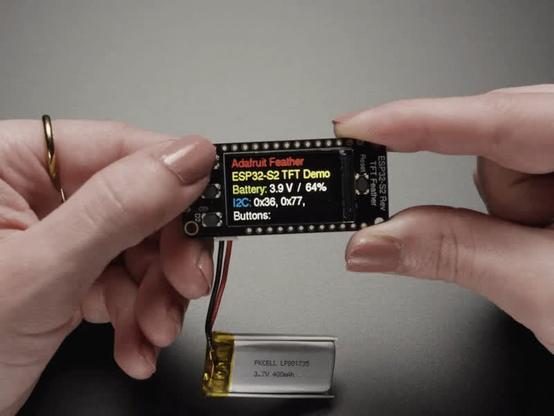
The Reverse TFT Feather comes with the 240x135 color TFT display on the back-side not the front-side. That makes it great for panel-mounted projects, especially with the included buttons. It's like an all-in-one display interface development board, powered by the fantastic ESP32-S2 WiFi module.

Adafruit Learning System
@projectgus no worries, good to check these things! A look at the board definition confirms it, A0 is GPIO18, and looking further at the internals, this message seems to come from dac_continuous_new_channels returning ESP_ERR_NOT_FOUND, so I'm chasing into Espressif internals next. https://github.com/adafruit/circuitpython/blob/77c17696e5be01d40b78d5cbe157539d733af73a/ports/espressif/common-hal/audioio/AudioOut.c#L480

@joeycastillo yeah I just had a peek too (the power of procrastination), and saw the same.

Out of interest, do you get the same error if you specify both a left and right channel (i.e. board.A0 & board.A1)?

EDIT: Nvm, I saw @mnl's reply which gets to the heart of it!

@projectgus @joeycastillo I think you are actually getting closer to it, I was just grepping around. A hunch is that (I don't know esp32-s2 at all) apparently it has one DMA channel, and I could imagine it being hard allocated to the display.

I also have to do other things now, but apparently joey still has a week! easy! 😭

@mnl @projectgus Thanks for y'alls help, this pointed me 100% in the right direction. Flashing the non-TFT version, I am able to use the DAC, which points to something about the display and DMA. But also the errata note suggests that I can salvage the assignment with pwmio and more beepy output while I look into the DMA issues. THANK YOU BOTH!!!
@joeycastillo @projectgus 🥳 so glad! love your work, i hope your students have fun.
@joeycastillo @mnl @projectgus Yes, you can use “pwmio” for simple tones. Use the “simpleio” library to give you an easy function for that: https://docs.circuitpython.org/projects/simpleio/en/latest/api.html#simpleio.tone
Unfortunately, the only way I’ve had good luck with CircuitPython ESP32 audio is with an outboard I2S DAC module and the built-in “audiobusio” library (even when you can get the built-in DAC to work, it’s pretty low-quality 8-bit)
API Reference — Adafruit CircuitPython SimpleIO Library 1.0 documentation

@todbot @mnl @projectgus Thanks so much for y'alls help, I've confirmed pwmio beeps and bloops work great, and if I use the non-TFT version of the firmware, I can actually use the DAC (which as you point out isn't the best quality at 8 bits, but does give the students options for which direction they want to go). Assignment saved!
@joeycastillo @mnl @projectgus Awesome! And as I’m sure you know, you can set up the display by hand on the non-display firmware, sorta like this: https://gist.github.com/todbot/a23c8cb28e5925dfa79e6dba5c9d0962
show how to use LILYGO T display RP2040 board in CircuitPython w/o explicit board support

show how to use LILYGO T display RP2040 board in CircuitPython w/o explicit board support - lilygo_t_display_rp2040_demo.py

Gist
@todbot Thanks! Yea unfortunately it seems like an either/or on the TFT Feathers, at least for the S2. Setting up the TFT first, the DAC fails as above; setting up the DAC first, I get "RuntimeError: SPI configuration failed." I'm guessing this probably hasn't come up yet, since the DAC wasn't available at all on the S2 until recently. Either way the good news: on the standard firmware build, doing a `displayio.release_displays()` before setting up AudioOut is a one-line fix, so it's all good :)

@joeycastillo @projectgus that means I think that all DMA channels were allocated, indeed the esp-idf version used by circuitpython now supports continuous mode. Maybe the board setup already allocates them already (for the display?)

Anyway, before I go too deep from my armchair peanut gallery, let me know if you want to hash this out maybe with gus too (the more the merrier)

@mnl @joeycastillo I do love a rabbit hole (a little too much), but I have to go do other things. Sorry, best of luck!

@projectgus Reminds me of the time I couldn’t get a pin to work as a digital input with pullup on my Arduino Nano, and it turned out A6 and A7 are analog only, and the official Arduino documentation is wrong (it says all analog pins also work as digital GPIO.)

Then I spent time making a comprehensive PR listing all affected models, and they never looked at it.

Then they got bought by assholes and I redacted the PR to oblivion.
@joeycastillo

@oscherler @joeycastillo Ah, a tale as old as time!

@joeycastillo dang I don't have S2s and they seem to be in very limited supply on amazon.

I think maybe this is the issue: https://learn.adafruit.com/esp32-s2-reverse-tft-feather/esp32-s2-bugs-and-limitations ?

"No DAC-based audio output

Current versions of the ESP-IDF SDK do not have the required APIs for DAC-based audio output. Once a future version of ESP-IDF that adds it, it will be possible to implement DAC-based AudioOut in CircuitPython."

I've been doing a lot with esp-idf lately and this aligns with my skillset, it seems that newer ESP-IDF does support continuous mode for S2. Maybe DM me to see if I can still help and potentially provide a patch?

Adafruit ESP32-S2 Reverse TFT Feather

The Reverse TFT Feather comes with the 240x135 color TFT display on the back-side not the front-side. That makes it great for panel-mounted projects, especially with the included buttons. It's like an all-in-one display interface development board, powered by the fantastic ESP32-S2 WiFi module.

Adafruit Learning System
@joeycastillo I asked todbot and he pointed me at this Bugs & Limitations page that says No DAC-based audio output: https://learn.adafruit.com/esp32-s2-reverse-tft-feather/esp32-s2-bugs-and-limitations
Adafruit ESP32-S2 Reverse TFT Feather

The Reverse TFT Feather comes with the 240x135 color TFT display on the back-side not the front-side. That makes it great for panel-mounted projects, especially with the included buttons. It's like an all-in-one display interface development board, powered by the fantastic ESP32-S2 WiFi module.

Adafruit Learning System