I just resumed using #1Password after several years of being away and also just started migrating my family from Bitwarden to 1Password Families.
I decided to move my family to 1Password because Bitwarden has gotten extraordinarily buggy. Based on past experience with 1Password, I thought it would be better.
I may have been wrong. In the short time since I've resumed using 1Password I've encountered a lot of significant issues.
I'm going to chronicle 1Password issues here in a running 🧵.
#1Password's SSO implementation, which we're using at work to integrate 1Password login with Okta, is immature and has a lot of UX issues. Generally speaking, it does not appear to be particularly robust from a UX point of view (I have no reason to doubt it's robustness security-wise).
For example: if you try to log into #1Password via SSO on a new device, it's supposed to display a prompt on existing devices to approve the login. However, if you have a linked personal account that's unlocked while your work account is locked, you won't see the prompt or any instructions for how to retrieve it until it occurs to you to unlock your work account. This is shitty UX.
#1Password is integrated with only one email masking service, Fastmail. In contrast, Bitwarden has integrations with numerous services, including the one I use, #Addyio. Until 1Password gets around to adding an integration with Addy.io (which I'm not holding my breath for; people have been asking for this for a while), I guess I have to use the separate Addy.io extension for this. Definitely not a great UX.
There's no way to tell the #1Password browser extension not to prompt to save passwords on a particular website. Again, I'm not holding my breath that they're going to fix this any time soon because people have been asking for it for a long time. This is another area where 1Password lags behind Bitwarden.
Significant bug: the #1Password CLI allows you to retrieve items as JSON using the item title or unique ID. You're supposed to be able to then edit it and upload the edited JSON via the CLI to save the changes. However, when you retrieve an item from your "Private" vault using its title instead of its ID, the resulting JSON file calls the vault "Personal" rather than "Private", and then when you try to upload the changes the JSON is rejected because of the vault name mismatch.
The #1Password desktop app has robust export functionality, which I'm pretty sure is new since my last stint using 1Password. Good for them for adding this! Data portability is important.
Unfortunately, it's only available in the app, not in the browser extension or on the website.
More unfortunately (significant bug), it doesn't appear to work on Linux. The export command is there, but when I enter my password and click the button to do the export, nothing happens.
It works fine on macOS.
Another bug:
The #1Password browser extension is supposed to integrate with the app, so that e.g. you can unlock the extension by unlocking the app and when you ask the extension to edit the item it opens it for editing in the app automatically.
This works fine for me on macOS. It does not work on Linux. Support claims it's supposed to work but hasn't yet told me how to fix it. We'll see if/when they are able to address this. It should work out-of-the-box or tell the user why it's not working.
When you change your #1Password password while the desktop app is locked, the next time you go to unlock it you need to enter your _old_ password, but it doesn't tell you this. Bitwarden's behavior is superior and obviously correct: the Bitwarden app logs you out and requires you to log in with your new password.
If you don't use the app for a long time and when you go to use it you can't remember your old password, you have to reset the app using a reset button buried deep in the settings.
Similarly, when you change your #1Password password while the extension is locked, the next time you unlock it has to be with your old password. However, that's not the end of it. At least for me, after I unlocked the extension with my old password, it immediately locked again _and wouldn't accept either my old or new password_.
I had to turn off browser sync to not mess my other browsers, remove the extension, reinstall it, log back in, put all my settings back, and turn browser sync back on.
There is one vault in #1Password Families called "Shared" which is automatically accessible to all family members. It is impossible to create other vaults with that behavior. It should be, since vaults are not just used to manage permissions, they are also used to logically separate items. For example, I would like to be able to create a separate vault called "Streaming", accessible to everyone in our family, with all of our streaming logins in it.
Can't do it. Bad UX.
The #1Password desktop app seems to occasionally ask me to reauthenticate with two-factor authentication for no discernible reason.
Sometimes it asks me to do this twice in a row.
Sometimes when I change my password so I have to enter the new one into the desktop app, it prompts me for the password twice even though I entered it properly the first time.
I've reported all of these issues to #1Password support and will continue to report new issues as I encounter them. I do not expect to see any of them fixed soon (except maybe the app/browser integration since that's supposed to work).
Bitwarden isn't much better than 1Password, and 1Password is free as long as I stay in a job where it's used, and it's convenient to only have to use one password manager extension at work, so I suppose I'll stick with it despite all these issues.
Another significant #1Password bug: the browser extension does not actually remember all of the passwords and PIN codes you generate in the generator history. I'm not sure which ones it remembers—maybe just the ones you copy?—but I generated a PIN code recently, then entered it into a phone call I was in the middle of to activate a new debit card, then went back to the generator to pull it out of the history to save it, and it wasn't there. This is bad.
An annoying but minor #1Password functional issue: when the 1Password extension is locked and you click the 1Password icon to in a login field to autofill it, 1Password should automatically pop up an unlock prompt rather than just displaying a little notice that you need to unlock the extension, unnecessarily forcing the user to do the extra work of moving the mouse over to the extension icon and clicking on it. Bitwarden gets this right.
#1Password support says they are unable to reproduce this issue. I have responded with a Python script that demonstrates the issue by calling the 1Password CLI, along with the output I see when I run that script to show that I have described the behavior accurately. We'll see what they say next.
https://federate.social/@jik/115913209997600186
As explained by #1Password support, this is because the 1Password app refuses to export data unless the kernel parameter `kernel.yama.ptrace_scope` is non-zero.
I don't think individual apps should get to dictate the security settings I'm required to deploy across my entire computer, but if they insist on doing that, they need to tell the user that's what's wrong instead of failing silently, especially since many Linux distros set `ptrace_scope` to 0 by default.
https://federate.social/@jik/115913220365573788
As explained by #1Password, this is because Vivaldi isn't trusted by default by the 1Password app on Linux, so I have to go edit a custom config file to tell the app to trust it (https://support.1password.com/additional-browsers/?linux#connect-an-additional-browser-to-1password). It's unclear why Vivaldi is trusted on macOS but not Linux. And, again, if this is the problem, then the extension or app should _tell me_ this is the problem instead of just silently failing and forcing me to contact support for assistance.
https://federate.social/@jik/115913231258279403
#1Password support claims the behavior I saw here is not supposed to be that way and they were unable to reproduce the problem. Great, I'm happy for them. 🤷🤦
https://federate.social/@jik/115913248047562072
#1Password support pointed out that when the browser extension is successfully integrated with the app and it's locked, when you click on the 1Password icon in a form field the app automatically prompts you to unlock.
That's nice, dear, but I want the extension to be user-friendly even when the user chooses not to use the app. It seems like pretty obvious UX that when the app isn't available, the extension unlock prompt should pop up instead of the app unlock prompt.
https://federate.social/@jik/115928070616549460
Snark aside, I will give #1Password credit where credit is due: their technical support is and has always been good, and they deserve props for telling me how to solve the problems that there are solutions for and engaging with me in constructive discussion about the others. A lot of companies don't do that anymore or never did.
(This doesn't excuse the fact that there shouldn't be so many problems that I need to contact them about, but that's not technical support's fault.)
Today I attempted to archive some old #1Password items in the browser extension in Vivaldi. I searched for the items I wanted to archive, selected each one, and selected the "Archive" menu command. Nothing appeared to happen. Each one should have disappeared from view as I archived it but they didn't.
I tried archiving one of them again, and I got "an error occurred."
I looked in the desktop app and found that some of them had been archived successfully and others hadn't.
(continued)
(continued from last post)
I archived the rest of them in the desktop app. They all continued to remain visible in the browser extension. I quit and restarted the browser and then they were finally no longer visible in the extension.
This is not good!
#1Password
Today I noticed a Watchtower alert in the #1Password browser extension about two-factor authentication. I expanded the alert and it told me I could store 2FA info in 1Password for this site, and had an "Edit item" button to start doing that. The button should open the item for editing (as it says right there on the button), but when I click the button it does nothing. D'oh.
If you are using the #1Password app and browser extension, and the extension's set to integrate with the app, and you tell the extension that you want to edit an item, it opens it in the app for editing.
However, if you already have another item open for editing in the app, that's what you see, rather than the item you told the extension you wanted to edit.
You must close the item you have open for editing in the app and then tell the extension again what you want to edit.
This is poor UX.
If you have two #1Password accounts configured in the app, and one of them is locked, and you tell the browser extension that you want to unlock it, then it correctly opens the app to do the unlocking, but once you've unlocked the account in the app the extension pop-up still says that it's locked. To make that go away you have to close and reopen the pop-up.
More poor UX.
This is not good: https://social.tchncs.de/@case2tv/116178301731104106
As @case2tv reports, you can disable #1Password's travel mode without needing to reauthenticate in any way, as long as the browser extension is unlocked. So, e.g., a border patrol agent can make you unlock your laptop and then turn off travel mode and get into all your vaults, even the ones not marked safe for travel.
@case2tv says he's already reported this to 1Password; I've reported it as well and I'll report back with what they say.
When you create a #1Password account, an item containing your 1Password username, password, and secret key is created automatically in your private vault. When you change your password, this item is automatically updated with the new one.
I think this is dubious behavior security-wise—I don't think this info should be stored in your vault unless you choose to put it there—but leaving that aside, this vault item is special in two other ways which I think are both wrong:
(continued)
(continued from last post)
1) The timestamp on this vault item is not correct. E.g., I changed my 1Password password last week, but the timestamp on the item says "Last edited Sunday, January 26, 2020 at 4:46:13 PM".
2) 1Password does not save historical versions of this item, unlike most items where you can see and revert to previous versions.
I don't think there should be "magic" items in your vault that behave weirdly like this.

RE: https://federate.social/@jik/116178488378191618

Well, @case2tv, I got an answer from #1Password, and it's not good:
"This behavior is expected. Travel Mode is meant to keep your selected vaults viewable to you but there isn't a way to prevent users from accessing your data is your device has been compromised or handed over to someone. If you believe someone will ask you to unlock 1Password during your travels, I recommend removing the browser extension completely before you travel."
(1/3)

Here's what I sent back:
This is nonsense. Here is what your webpage hyping Travel Mode <https://1password.com/features/travel-mode/> says:

"If you regularly travel to far-flung destinations, you might be worried about the possibility of a customs or border official asking you to unlock your phone.”

"If a police officer or customs agent asks you to unlock your phone, they will only see the vaults you’ve marked as safe to travel.”
(2/3)

How To Travel Safely Using 1Password's Travel Mode | 1Password

Worried about a nosy border control agent looking through your phone? Turn on Travel Mode to keep your data secure in 1Password.

1Password

In other words, that page EXPLICITLY SAYS that the purpose of travel mode is to protect your sensitive vaults from people who get their hands on your devices even if they are still able to see your other vaults.

Your answer above directly contradicts what the referenced page says is the purpose of Travel Mode.

That page claims a level of protection which the feature simply does not provide.

I do not appreciate the prevarication.
(3/3)

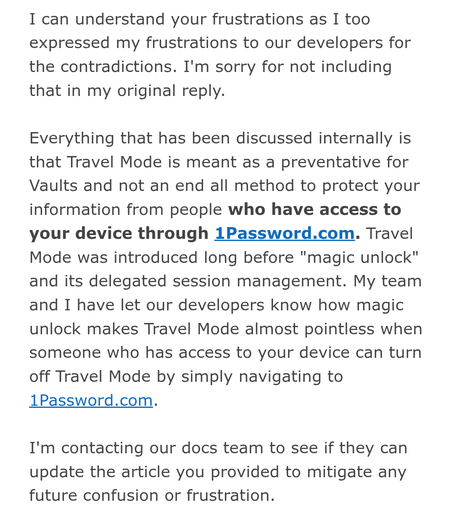
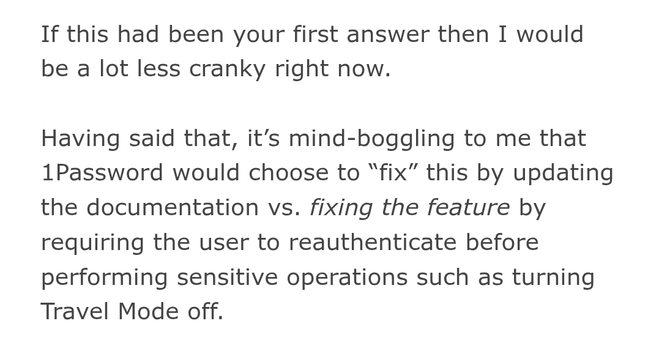
I got back a second response from #1Password that was much better than the first. Here's their second response and what I sent back.
The #1Password app on #Linux has a configuration setting you can enable to tell it to start on login, and it works… sometimes. And sometimes it doesn't, and you have to launch the app by hand after you log in.
(I'm running into this issue on GNOME on Debian Testing.)
I've reported the problem to 1Password. 🤷
#TechIsShitDispatch
This is what happens in the #1Password web app when I click the "Manage access" button while viewing the contents of a vault. Specifically, it pops up an incompletely rendered modal which is supposed to be the access management modal, and it stays there, incompletely rendered, forever. Sweet.
#TechIsShitDispatch
@jik Well that’s not right at all. So sorry about this, Jonathan. I will look into this and forward it on to the team.
@jik Just following up on this one: we’ve also been able to reproduce this bug. We’ve filed a ticket for it and will look into it. Thanks for the report!
@jik nice that you get more detailed feedback than me. But as you stated - there needs to be a solution. We don’t really need some fancy stuff like magic unlock and so on. And we don’t need updated documentation when travel now stays useless as it is actually.
I want a secure vault. That’s it.
@jik I had similar interaction when migrating from 1Password 7 to 8 and every time the reply to the issue was "it's expected behavior". I have been meaning to change password manager for a while, but inertia wins every time