
So ... I've discovered by accident that AppleTalk is working over a WiFi connection with a BlueSCSI (rev 2024.01a + PicoW board). I can browse the Chooser, connect to #globaltalk shares, and print. I thought this was only possible over hardwired connections. Is my network special somehow? Or has this always been available? My network's AIR router is a virtual Quadra 800 courtesy of @WOzFest running under UTM on a Mac mini. The test computer here is a Classic II w/ System 7.1. #marchintosh. WiFi widget courtesy of @jcs
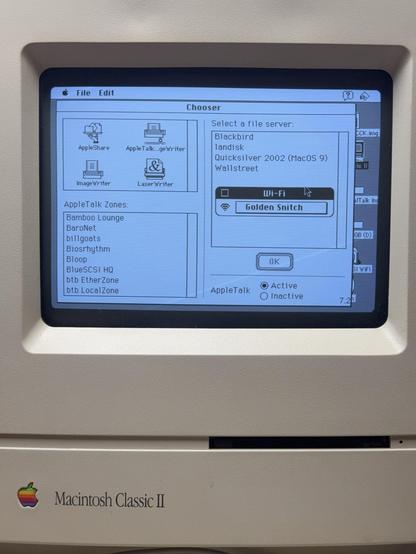
It’s been possible since WiFi became supported on BlueSCSI. It’s a bit slow is all.
@ericsedge did you try the new firmware with the DaynaPORT emulation fixes? Should be faster..
@twvd I haven’t. All of my GlobalTalk computers are hard wired.
@ericsedge @twvd it’s surprisingly speedy. I was doing large file transfers and for some reason it feels speedier than my hard wired iMac. It may be a HDD/OS8 oddity making the iMac slow.
@ericsedge yeah, it depends on the networking hardware – for example, later Airport routers don’t support it for later Macs (is my understanding – I only have hardwired or virtual devices on #GlobalTalk).
@europlus @ericsedge: I have an Asus RT-AX88U Pro with the ASUSWRT-Merlin modded firmware. Unclear if this router simply supports LocalTalk natively over WiFi, or if the mod enabled it, or if I activated some obscure setting.

@theirongiant @europlus @ericsedge all globaltalk in this house runs through an off the shelf $90 Asus router. The Orinoco cards work fine on a no-password guest network that is allowed to see the rest of the network. Luck of the draw on Asus!

To the Mac with the fancy bluescsi, it isn't really seeing WiFi, it is just thinking there is a Dayna SCSI Ethernet adapter on one of the SCSI IDs.

@likesoldmacs @europlus @ericsedge - Yes, I'm aware that it is talking to an emulated DaynaPoint "Ethernet" adapter. I just didn't think the underlying signals and traffic for AppleTalk were functional over WiFi. So it was a pleasant surprise.