TIL this doc is inaccurate https://rocm.docs.amd.com/en/latest/compatibility/compatibility-matrix.html#compatibility-matrix

I can’t even install graphics drivers for RDNA4 on #Ubuntu #linux 22.04.5. The required minor revisions of certain libraries are simply not available to install, so far as I can find.

It’s a real pain because the generic display driver provided is somehow much, much slower than even window’s generic display driver. Even moving the mouse around is a struggle.
minor victory with #CachyOS #Linux: I can now open a SSH from my personal macbook! Next task is to add key authentication in place of password authentication. Also I'd want to change the default shell from fish to zsh, since I do so much work from my work macbook that I'm accustomed to zsh.
I wish I did not need to do a search to discover that some obtuse write error means NTFS from Steam over #Linux is not officially supported for #Linuxgaming. Ah well. Was really hoping that would be plug-and-play. I do have a sizable Steam library across multiple NTFS formatted drives. Furthermore it looks like there is no safe way to convert from NTFS to EXT4 in-place. So I get to make a backup. This is going to take a while.

this is really weird. #steam on #chachyos #linux lets me add my old SATA SSD after converting it to ext4, but it's not letting me add my NVMe over 20gbps USB C as a BTRFS filesystem with a mountpoint specified in /etc/fstab. It added just find as NTFS before. Just games would not launch without a strange write error.

As for why I'm using a 20gpbs USB C to NVMe adapter: My Gigabyte B-550 Vision D motherboard does in fact have a second NVMe slot. It's disabled when the lower most PCIe slot is in use, which it is, for a USB header, to get my front USB3 port working. I still hope to use PCIe 8x - 8x bifurcation for... something. I do have an AMD Radeon 6650 XT lying around. But I want the thing to work the same as they did on Windows first. Steam on Windows had no complaints about my external NVMe drive.

oh. Root owns it. Of course it would. Had the same problem after formatting my SATA SSD with gparted. Really weird default. I wish there was clear default within the tools I've used to say hey, give it to the one and only other user who's sudo-ing in the first place, to opt out of if I really, really wanted to. Guess I get to `chown` from the commandline.
I hope my newfangled #linux experience does not continue the pattern of unexpected and unreasonable to expect defaults I must explicitly opt out of through some terminal tomfoolery.
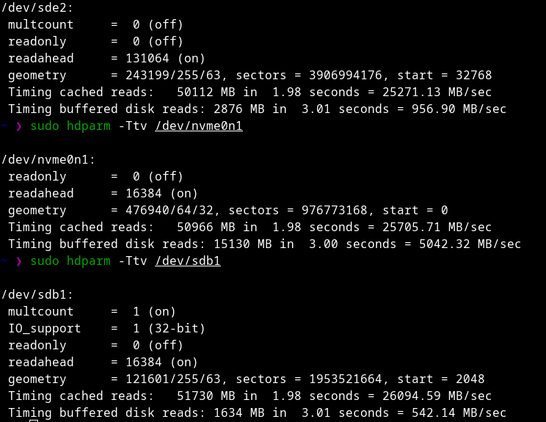
speaking of my drives, this is fascinating. I'm getting less than a GB/sec over a connection that should support like 2.2GB/sec.

I am confused. I'm not seeing a "build profile" button as shown on https://lvra.gitlab.io/docs/fossvr/envision/wmr_controllers_on_arch/ What could I have done wrong? I went ahead and did `sudo cmake --build . --target install` for the `dev-constellation-controller-tracking` branch of #monado and yet it's not finding an #OpenXR runtime.

#linux #virtualReality #windowsMixedReality

WMR Controller Tracking on Arch

Envision Installation on Arch with Controller Tracking# Install Envision-XR with Paru on Arch# Recommendations:# Paru as the Arch AUR helper KDE as the desktop environment for better compatibility with SteamVR (may not be necessary) Paru:# Paru GitHub Repository sudo pacman -S --needed base-devel git clone https://aur.archlinux.org/paru.git cd paru makepkg -siInstall Envision-XR from AUR using Paru:# Envision-XR AUR paru -S envision-xr-gitEnvision Configuration (Non-Arch users follow from here!)# Select profile: WMR default.

Linux VR Adventures Wiki

apparently I just need to enter developer mode  anyways, it does a thing. IT DOES A THING! I shall celebrate with a snack.
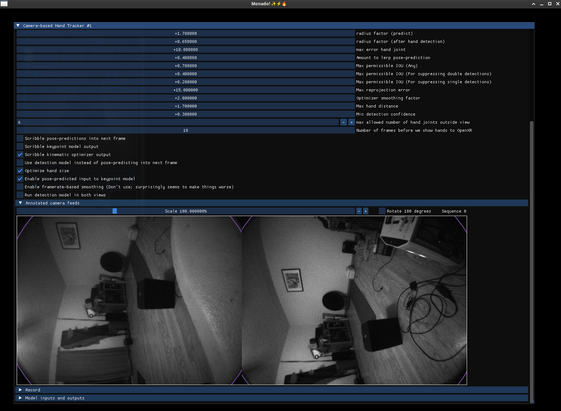
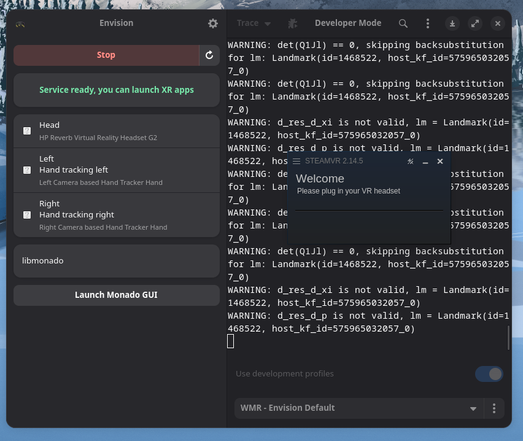
#linux #VirtualReality #windowsmixedreality #monado #monadoxr

For a moment I had #VRChat and OpenBrush working on #CachyOS Linux. But now that there’s a fresh xrizer branch that may improve WMR controller tracking which I am eager to try, basalt for slam tracking refuses to build.
P.S how do I monospace block quote from the masto web interface?

```
[289/291] Linking CXX executable basalt_vio
FAILED: [code=1]

/usr/include/fmt/format.h:4349:(.text._ZN13basalt_vio_ui11feed_imagesEv[_ZN13basalt_vio_ui11feed_imagesEv]+0x614): undefined reference to `fmt::v12::vformat[abi:cxx11](fmt::v12::basic_string_view<char>, fmt::v12::basic_format_args<fmt::v12::context>)'
collect2: error: ld returned 1 exit status
[290/291] Building CXX object CMakeFiles/basalt_time_alignment.dir/src/time_alignment.cpp.o
ninja: build stopped: subcommand failed.
Build failed!
```
#linuxvr #cahcyos #envision #monandoxr #VirtualReality #HPReverbG2

@PatrickQuin Something buried deep in my memories is shouting that hdparm timings cannot be trusted.
@PatrickQuin If it was ExFAT it would probably work. But NTFS drives are mountable, just requires some installing things to make it work though mainly the packages that allows modifying other filesystems.
@PatrickQuin You can convert from NTFS to BTRFS in place, but I don't know how safe it is or if BTRFS is acceptable for you.
@jackemled for the one NVMe that is little more than a collection of Steam games, I only care that Steam works.
@PatrickQuin Steam shouldn't have an issue with BTRFS, but I don't know how the conversion from NTFS works. I've never done it before, but I've seen it mentioned in the manual.