Second Hand Computer 0.18.0 - THE ROGUE UPDATE is out!

As promised yesterday, this version contains FT-Rogue, a simple roguelike game written in Funscript/Lua, with full source. I wanted to experiment with what more could be done in SHC, and what better way than a simple roguelike.

#GameDev #IndieDev #Roguelike #FantasyComputer

https://funtimeelectrics.itch.io/second-hand-computer/devlog/1360684/shc-0180-the-rogue-update

SHC 0.18.0 - The Rogue Update - Second Hand Computer by Funtime Electrics

SHC 0.18.0 is out! As always, thanks hugely to everyone reporting bugs and sending feedback via the forums here or via email. All bugs reported over the last week are now fixed,and I've added somethin...

itch.io

@vampiress Thaks for the v-sync fix!

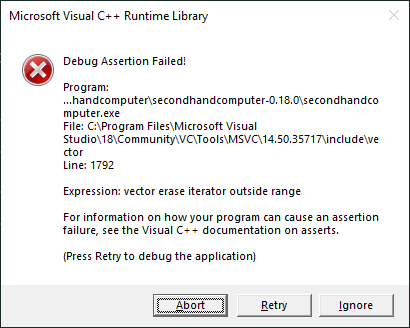
I just hit a crash (see attached image) while scrolling through the man page. I had the down arrow key held so maybe a keyboard buffer overrun? IDK.

@vampiress Also, I get that it's supposed to be a slow machine but is it supposed to be _that_ slow? Currently, clicking to scroll the help window to a new location takes approx 0.9 seconds, and once a bunch of the map is uncovered in FTROGUE each step takes approx 0.8 seconds.

@Farbs No. None of my test machines run that slow. What are you running it on?

Also - you can turn on the fps counter to see if the whole renderer is running slow or not.

under $engine in the config file, add

option_gfx_show_fps=true

@vampiress
Keypress Sounds:
On both times I've seen this (the second time was holding to walk in ftrogue.scr)

Now that I've fiddled with turning keypress sounds on and off I don't seem to be able to reproduce it.

Machine:
Windows 10 Home 22H2
16GB RAM
2.70GHz CPU
GTX 1060 (6GB) + Intel HD Graphics (128MB)

I haven't checked which GPU it's using.

FPS:
Solid 60 when idle but spikes as low as 1 on these events.

Bonus windows bug:
It's always fullscreen regardless of the option setting.

@vampiress Oh also, adding this near the end of ftrogue.scr improved performance drastically :)

-- dodgy write buffering as a performance hack
_written = {}
function draw_tile(x, y)
local c = tile_char(x, y)
if _written[x+y*WIDTH] ~= c then
move_cursor(x, y)
write(tile_char(x, y))
_written[x+y*WIDTH] = c
end
end

function full_draw()
for y = 0, MAP_H - 1 do
for x = 0, WIDTH - 1 do
draw_tile(x, y)
end
end
end

@Farbs There's a LOT of little hacks like that that would fix it. (And writing a proper render caching system too).

I'm kind a half tempted to just put the whole code in a repo for people to push whatever changes they want to it.

@Farbs I've had one or two crashes during testing with that precise vector error, and it was related to the key press sound. Near as I could tell (it proved impossible for me to reproduce intentionally) when you held down a key, and there was a system stutter, it'd try to play MANY sounds at once, fail, but fail in such a way that the system thought it had succeeded, and they needed to be removed from the playing sounds stack.

Which things go slow? It sounds like it's full screen re-draws that are slow. I'm not sure why they're slow on your system and not others though.

@vampiress Yeah, it's interesting!

Every text draw is a bit slow, but specifically opening the help menu from the left and clicking on the scrollbar is very slow, and as I uncover more of the map in ftrogue each step is slower.

It's interesting that scrolling through a man page is much faster than clicking on the help scrollbar.

Is man batched in a way that the help window isn't? One line at a time vs one character at a time maybe?

@vampiress Also, I'm curious about how you're drawing the text. Is it a giant dynamic mesh where you keep updating UVs and vertex colours to show different bits of the character atlas? Or a render target that you're blitting sprites to? Or a dynamic character lookup texture? Or some fourth thing I haven't thought of yet?

@Farbs It's SDL, I don't write that low.

Though, I just saw this - it's possible it's not batching the draws at all, which might explain a lot.

I will have to look at updating my SDL3 version.

https://www.phoronix.com/news/SDL3-Batch-Rendering

SDL3 Now Implements Render Batching For Direct3D, Metal & Vulkan

The SDL3 library that is popular with cross-platform games for abstracting various software/hardware features has implemented render batching for its built-in rendering API

@Farbs Actually I'm now wondering if that is indeed the issue.

https://github.com/libsdl-org/SDL/issues/7534

Batch rendering not implemented for d3d11 · Issue #7534 · libsdl-org/SDL

OS: Windows 10 SDL: 2.26.4 GCC: 12.2.0 (x86_64-posix-seh-rev2, Built by MinGW-W64 project) I was using RenderDoc to confirm that the batch rendering was working but it is actually not. I am specify...

GitHub
@vampiress Lol, that's not ideal. 80x25 draw calls is a lot, though I still wouldn't expect it to take a whole second unless it's doing something completely bananas on top of that like reuploading the font texture atlas for each one.

@Farbs I just upgraded the engine from SDL SDL-3.2 to 3.4. I can't see any performance difference at my end, but allegedly it DOES batch things properly now.

Next update will have that in - curious if it makes an impact on performance for you.

I get almost the exact same ~210fps without vsync enabled on my dev machine with both versions, so I guess that just isn't the bottleneck on my system.

@Farbs Okay you just sent me down a rabbit hole.

I threw in a bunch of optimisations. One issue I found meant that every glyph update was hitting disk read access.

Again, no noticeable speed bump on my test machines here but they always ran fast.

Anyway, 0.18.1 will have a bunch of speed optimisations and the SDL3 update. Curious to see how that goes for you!

@vampiress Lol, yes maybe 2,000 disk hits in a frame was a problem :)

Thanks for checking this out.

@Farbs Thanks for prodding me to check this haha. It ran okay on the slowest machine I had, doesn't mean I shouldn't have checked for things that'd speed it up more.

@Farbs Well they're rendered differently. The terminal uses its own glyph rendering system with an 80x25 grid of sprites that either exist or don't.

The in-window help UI is entirely different, in that it's just regular sprites using the window as a parent, like any other UI system.

There are more sprites in the Window though.

It sounds like adding/removing glyphs is slow on your system. I'm not sure why though - it's just SDL draw calls.

@Farbs No problem! Quick question: do you have keypress sounds on or did you turn them off?