wow incus (anti-ubuntu fork of lxd) and its web ui is pretty slick

also libvirt and virt-manager connected to lxc offers the ability to create an application container or an operating system container

(compared to incus which says application containers require docker?)

this feels like a deep rabbit hole, hope i can get grips on it soon

all right incus there you go, a whole-ass lvm volume group all to yourself, let's see what you do with it

also: learning wtf a network bridge is and how to use one 🧑‍🎓📖 instead of the usual winging it with vague guesswork and assumptions from context

is xmpp's direct-tls protocol (usually on port 5223) the same as its unencrypted protocol (usually port 5222) wrapped in tls? same as imaps and pops and https? so could i terminate the tls with haproxy and reverse proxy to an unencrypted xmpp server?

the protocol is all spec'd in RFCs for anybody to look at but they don't wanna get in my brain

also, aw, the wikipedia article for xmpp describes as an example a transport for icq, rip https://en.wikipedia.org/wiki/XMPP

XMPP - Wikipedia

the docs don't reveal the info i want, and i don't want to try reading reams of source code in an unfamiliar language right now, so i'll set up an experiment and see how it behaves i guess

(the only activity that ever feels slightly close to doing science in my field of software-jiggling)

my ipv4-only client
-> ipv4-to-ipv6 sniproxy port 443
-> ipv6-only vm
-> haproxy to conditionally unwrap proxy protocol
-> prosody xmpp server

... experiment is working ✨🤩✨

calling it now: even though haproxy has lots of sharp edges, i like it, or its configuration mechanism, way more than caddy's

  • i seem to be able to make stuff work in haproxy that takes struggle and uncertainty in caddy
  • caddy's magical get-your-free-ssl-cert-automatically is nice when you want to stand up an experiment but i like cronned certbot for "prod"
  • otoh caddy has a nice builtin static webserver 🤷

i think i'm going to be stuck using both for a while

migrating xmpp services from my old vps to my colocataires vm is the last thing remaining to do before i'm able to delete the old account (and stop paying for it)

(dreamcompute hasn't been bad, but i like colocataires way better)

now that i've proven to myself that it can work over port 443 and ipv6-only, it's time to configure it properly

next: see if i can move the service over without xmpp clients complaining

but first, sleep 😴

Colocataires: Host with Friends

We offer artisanal server colocation and virtual machine hosting in our Ottawa, Canada-based data center. Pick from our standard rackmount or VM options or propose something custom.

all the clients we usually use on android and linux are now connecting to my new xmpp server at colocataires, with no settings changes, on the https port so it looks like website traffic 😮

i don't have stun/turn turned back on yet, so voice and video calls probably won't work just yet

i don't have the conversations.js web client set back up yet but that's mostly for emergency use

this may be success enough to decommission the old servers! 🎉

also need to double check to make sure i haven't left any gaping security holes open, like exposing a server accepting proxy protocol to the fetid internet

https://conversejs.org/ is back up on my domain and working just fine 🎉

old dreamcompute vps is turned off, sitting there just in case for a bit, then i can delete my account 🎉

(i don't hate dreamcompute but i like https://colocataires.dev way better)

think i'm just gonna leave stun/turn not running for now. if both parties are on ipv6-capable networks, calls should work. let's see how often that's an issue

Converse

Converse.js - Open source, web-based XMPP chat client. Self-hosted, customizable web chat with end-to-end encryption.

if i want to set up stun/turn, i should abandon my somewhat irrational ipv6-purist intentions and pay the loonie for an ipv4 address

if i'm gonna do that then maybe i can keep almost all of my vm ipv6-only, except for one container that runs coturn?

if i'm gonna do that then maybe i can figure out how to make that container, that only does whatismyipaddress and proxy video calls, shareable with my datacenter neighbors 

Loonie - Wikipedia

my prosody xmpp setup in its new server mostly works great (assuming ipv6 capable network) but somewhere i've introduced a timeout that closes the connection after a uniform number of seconds

pretty sure it has something to do with haproxy, though from a skim of the docs these timeouts are supposed to apply to the initial connection setup, not inactivity

also after a chat with someone more knowledgeable i think i'm resigned to eventually acquire that ipv4 address

i think i might have fixed haproxy closing the socket on my long-lived idle xmpp connections by setting timeout tunnel 1h

i'll check again in several hours to be sure

wish i knew more precisely why this fixes the issue. are clients and/or the server sending keepalive messages more often than 1h but less often than 10m? is the tcp keepalive stuff not being used? someday perhaps but more likely i'll leave it unexamined as long as it works

recent impulses have been like

"this is too long for toots i should blog about it"
"but i don't want to put anything new or deploy a new website until i have something installed to block the scrapers like iocaine"
"so let's install it"
"ehh not enough brain rn, maybe next time"

so i set up some rules to block a good portion of bots (until they smarten up)

which frees me up to actually post some blog 👍

i'll install iocaine properly after that

iocaine - the deadliest poison known to AI

i want to set up a photo storage server

photoprism seems like a good browsing interface but what i'm more concerned about rn is the upload

so a client on each android phone that backs up photos to the server

but i want to be able to turn the server off for a while, as a normal/expected thing one does, and not have the clients moan about it. they should just retry occasionally until the server comes back online

anybody have a setup like this running already?

musing about how to do high(ish)-availability systems on the cheap, goblin style

  • i got this sweet vm on a friend's server
  • someday i wanna convince employers they're better off in there, than on aws
  • if the host, or the whole datacenter, or the hose from the internet to that datacenter get orbital-lasered to slag in the middle of the business day, how to automatically shunt traffic to backup systems?
  • dns records are too cached, too slow to flip

...

  • also don't want to send all traffic through a load balancing proxy, expensive and another single point of failure

but wait i have some tradeoffs that might enable some tricks:

  • i want high availability for existing users but new users can wait for dns to propagate
  • the site can be a "progressive web app" that gets mostly cached in the browser

so in this specific case i think i could do client-side js failover. maybe even a service worker?

also trying to learn incus vs podman vs docker nope vs kubernetes not u

wait, how often does the whole region disappear anyway?

that was never a concern multiple employers ago when i got to help out at the datacenter

they did redundant everything inside the rack, regular cable-yank failover tests and everything, but no geographical redundancy iirc

maybe i'll inquire about a vm on another host within the same rack when i get closer to dragging clients on board and just forget about higher availability than that for now

embarrassed to admit that i've today taken one halfhearted step toward learning wtf snmp is by way of (re)reading the rrdtool tutorial

no, not smtp the email sending thing. snmp the monitoring of hardware status thing

all because i want to put up some pretty charts of computer doing inscrutable computer thing

(accuracy? that's like number seven or twelve down the list of nice-to-haves)

RRDtool - rrdtutorial

well, actually,
my ipv4-only client
-> colocataires' ipv4-to-ipv6 sniproxy on port 443
-> my ipv6-only vm
-> haproxy to unwrap proxy protocol
-> prosody xmpp server
... experiment is not working ✨😕✨

so:

did it never work and i mistakenly thought that it did?
or
did it work at first but i broke it?

an easy fix would be to get an ipv4 address which obviates the need for sniproxy. but dammit before i do that i want answers: is this setup possible? if so, what'd i mess up?

(maniacal cackling)

i have finally got iocaine installed. wasn't even hard, just needed to sit down and do the steps and brain is real good at not that sometimes

hooked it up to the apt-installable anarchism faq for its markov corpus and the biggest canadian flavored apt-installable wordlist i could get

feels good. like the invulnerability you get from your favorite winter gloves and jacket before going out to play in the blizzard

now it's safe to blog again 🎉

i um only just now noticed that the apt-installable anarchism faq, in uncompressed markdown format, which i fed to iocaine for its markov corpus,

is twelve megabytes. of text.

almost 1.9 million words.

iocaine seems to be doing just fine so far

accidentally set caddy to syslog every request sent to iocaine 3 and oh gosh my website is pumping so much poison markov trash into chatgpt and claude rn 😍 💕

and it's using less cpu and memory than systemd-journald to do so

might need to look into setting bandwidth limiters on this thing

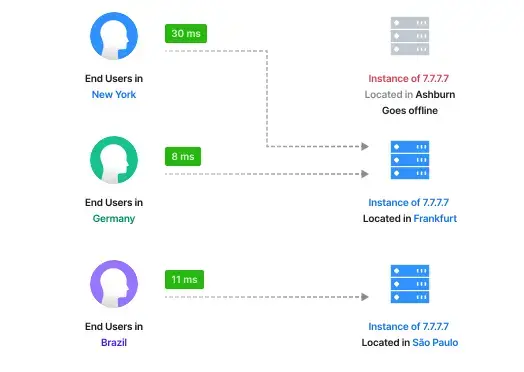
i'm still casting around for anti-cloud(flare) mechanisms of regional failover. like if the cable to the datacenter i use gets cut, or there's political upheaval, how to automatically shunt traffic to a different datacenter faster than a dns update would propagate through caches

i'm vaguely aware of this technology called anycast but i don't know much

https://grebedoc.dev/ uses https://rage4.com/ to do it

https://en.wikipedia.org/wiki/Anycast

yeah eat it, ai scraper assholes

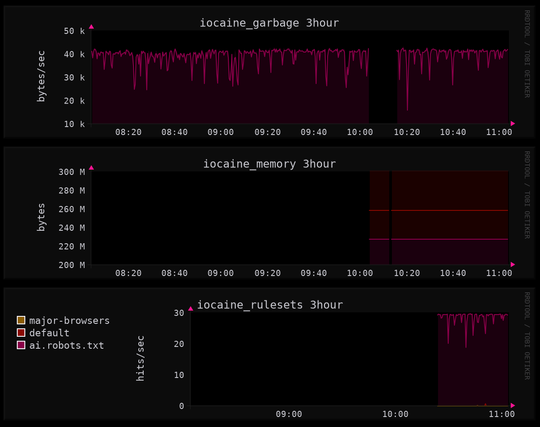
(gradually improving my monitoring, iocaine stats newly added to my collectd/rrdtool dashboard)

tiddlywiki doesn't come with a basic to-do feature, to make checkboxes and tick them off without having to tediously edit the page and type some [x]s

but it does have a plugin mechanism. found two plugins (both by the same author) that do checklists: Kara and Todolist

installation instructions made me nervous though, since i'm using tiddlyPWA that is rather different on the backend...

Kara 0.9.7

In tiddler plain checklist and interstitial journaling plugin

turns out though, Todolist is super easy to install on a self-hosted TiddlyPWA! drag and drop, click the button to reupload the wiki file to the server, and done.

entirely through the browser, way easier than messing around with directories. woah tiddlypwa is easier than stock tiddlywiki!?

Todolist Plugin 1.5.0

Organize, prioritize, and plan your work

i haven't put any rate limiters on here yet (i definitely will), but seems like claude and chatgpt limit themselves to 25 requests per second to my websites. i wonder how they picked that number, and if they'll ramp it up. and if i ratelimit, will they send more requests from other ip addresses. etc.

feels so good to know these assholes' language models are chugging down low-effort ungrammatical poison after ignoring my robots.txt

should i do traffic shaping using tc, haproxy, or shove yet another plugin into caddy?

should i slow the response down to a trickle for all the llm scrapers, or randomly drop their connections? 😈

despite it being part of linux since version 2.2, which is about as long as i've been daily-driving it, i hadn't heard of tc until this past month. that's "traffic control," a tool to control the kernel's network traffic limiting, smoothing, and prioritization

and for a command with such a tiny name wow it's a lot

i only want to restrict the bandwidth of one process so i think i'll look for easier mechanisms before i attempt to swallow this whole burrito

til: trickle, a lightweight userspace bandwidth shaper

could i just wrap iocaine with this and be done?

... except trickle doesn't work on statically linked executables, like iocaine. womp womp

i guess i could do a trick like wrap socat with it, then talk to iocaine through that,

but that feels more complicated than just switching back to haproxy and using its builtin traffic shaping features

GitHub - mariusae/trickle: Trickle is a userland bandwidth shaper for Unix-like systems.

Trickle is a userland bandwidth shaper for Unix-like systems. - mariusae/trickle

GitHub

what bits of haproxy, lighttpd, nginx, caddy, static-web-server should i string together?

requirements:

  • iocaine can plug in somewhere
  • can control the bandwidth of iocaine's garbage generator
  • static web server
    • for multiple domains ("virtual hosts")
    • uses sendfile() for speed
    • precompressed files trick
  • haproxy: has traffic shaping, proxy, fastcgi. no sws; have to proxy one. which?
    • lighttpd: small, sendfile(), correct webdav. can do reverse proxy itself, makes haproxy redundant? can i plug in iocaine?
    • nginx: i quit it because it was segfaulting when i tried to configure too many features. but if i'm only using it for static files maybe it's ok
    • static-web-server: i like rust. don't like a copy paste chunk of toml per configured domain
  • caddy: proxy, fastcgi, builtin static fileserver, traffic shaping requires a module that doesn't do quite what i want. getting tired of guessing my way around caddyfile syntax. don't need its magic certificate management.
    • use 'tc' for traffic shaping? big learning curve
    • front it with haproxy? lots of redundant features, feels heavy

dang i gotta draw up a feature matrix or something

it's pretty weird that it took me this long to actually do but

tonight i have set up for the first time a program running on a computer inside my home, that people may access like a normal website, without learning my cable modem's ip address in the process, and if someone starts ddosing me i can just unplug and let the household continue watching videos unaware

(i'm having my @colocataires vps proxy traffic through a tailscale vpn to my closet fileserver)

safe(r) home-hosting by reverse proxy from a little computer in a datacenter is one of those things that seems like complex esoteric engineering from afar

but once you've experienced it, and then again when you've set it up yourself, all of a sudden it makes sense and is totally normal and a whole mess of possibilities for what you can cheaply and casually build on the internet blasts wide open

like the first time you experience nerd astral projection

llm scrapers ignoring my robots.txt and pounding on my small website 28 times per second, 24/7. 600kbps of my available bandwidth wasted just on markov trash

it's easy to imagine how they'll ddos any service that does a bit of compute on each request

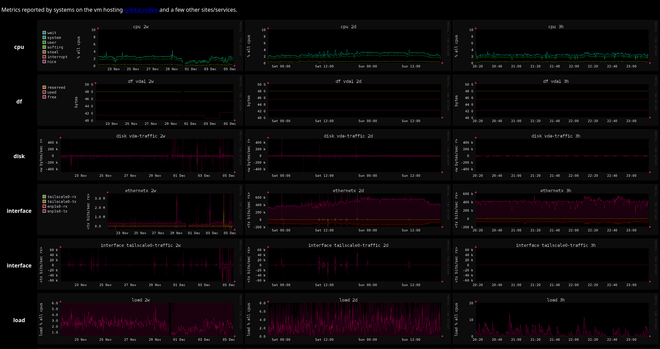
it's not super exciting but if you're the kind of weirdo who wants to look at my vm's gauges, they are viewable here:

https://telemetry.orbital.rodeo/

i have been cobbling it together using collectd, rrdtool, and scripts instead of the far more reasonable and popular prometheus / grafana combo. because it might be more lightweight? haven't measured

for now it updates only when i run the command, so don't sit there wondering

no light mode or explanatory text (yet) soz

i learned how to make haproxy throttle iocaine's output so the scrapers continue to download delicious poison but now only at 56kbps (down from 600kbps) 🎉
@pho4cexa Please share! This would be a great addition to the iocaine + haproxy docs! O:)

@algernon i'm no expert here and i probably got this wrong. i'm already seeing bandwidth higher than this limit so i suspect this ends up being 7KB per client not per backend. that said:

listen slowpoison
bind localhost:42068
mode http
filter bwlim-out my-limit default-limit 7k default-period 1s
http-response set-bandwidth-limit my-limit
server iocaine localhost:42069

then have caddy proxy to port 42068 instead of 42069