 Michael Jack
Weekend project: "Raspberry Pi Pico Weather Station" by @stfn
Right now, I only have a BME280 sensor and a Pico 2 W, solar power will have to wait. Sensor readings look good!


Weekend project: "Raspberry Pi Pico Weather Station" by @stfn
Right now, I only have a BME280 sensor and a Pico 2 W, solar power will have to wait. Sensor readings look good!
The Pico 2 W now sends MQTT messages to Home Assistant, via the Mosquitto broker add-on.
The sensor is read by adding the following snippet to HA configuration.yaml:
...
mqtt:
sensor:
- name: "Temperature"
state_topic: "weather/inside"
suggested_display_precision: 1
unit_of_measurement: "°C"
value_template: "{{ value_json.temperature }}"
- name: "Humidity"
state_topic: "weather/inside"
unit_of_measurement: "%"
value_template: "{{ value_json.humidity }}"
- name: "Pressure"
state_topic: "weather/inside"
unit_of_measurement: "hPa"
value_template: "{{ value_json.pressure }}"
...
I also added the InfluxDB add-on, for possible longer data retention.
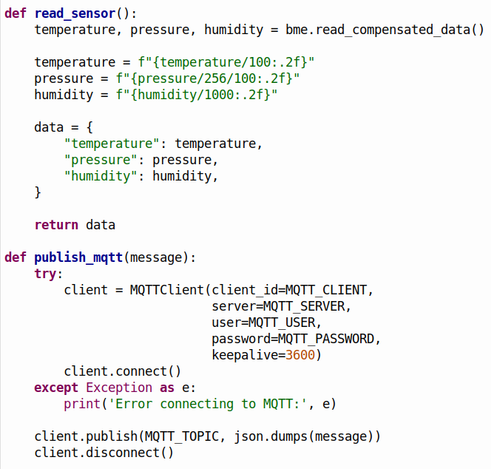
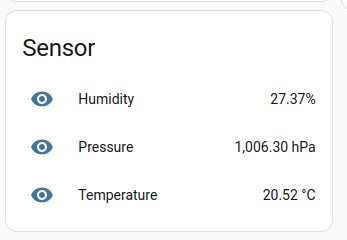

By adding "unique_id and "device_class" to each measurement, I get proper icons in the overview, I can rename them, and add them to a zone in Home Assistant:
...
mqtt:
sensor:
- name: "Temperature"
unique_id: "inside_temperature"
state_topic: "weather/inside"
suggested_display_precision: 1
unit_of_measurement: "°C"
value_template: "{{ value_json.temperature }}"
device_class: "temperature"
- name: "Humidity"
unique_id: "inside_humidity"
state_topic: "weather/inside"
unit_of_measurement: "%"
value_template: "{{ value_json.humidity }}"
device_class: "humidity"
- name: "Pressure"
unique_id: "inside_pressure"
state_topic: "weather/inside"
unit_of_measurement: "hPa"
value_template: "{{ value_json.pressure }}"
device_class: "pressure"
...

 zolaris
 stfn
stfn