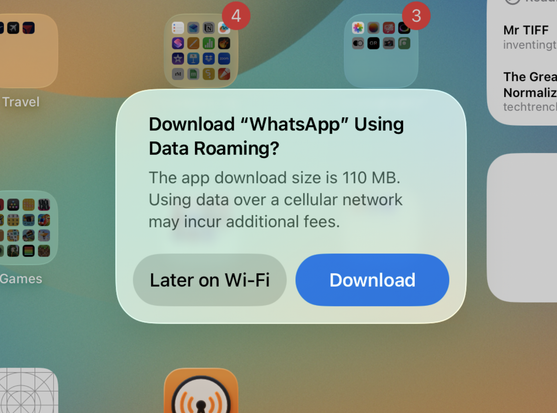
Stumped by this one. Setting up an iPad with iCloud restore, and none of the apps are downloading automatically. Tapping one brings this up.

I'm on my Wi-Fi network, other connectivity works… and while this iPad does have cellular, no plan has ever been activated on it yet.

Reboots and Reset Network Settings haven't fixed it. iPadOS 26.1. Tapping "Download" immediately downloads the item over Wi-Fi.

Anyone ever see this? Any ideas?
@marcoarment Any chance "Low data mode" has been activated for this network? (Settings > WiFi > i-Button)

@joel I hadn't thought of that. Good idea!

But nope.

@marcoarment Wifi-Assist? Probably had some issue with the wifi so was falling back to mobile data.
@glynd Can't even access the Wi-Fi Assist setting because there's no cellular plan.
@marcoarment Well that is weird then!
@marcoarment no idea what the solution is but this seems like a good omen for Remarcoable
@marcoarment Saw this when setting up a new iPad for a friend right after iPadOS 26 was released. It resolved overnight. I have no idea why.
@marcoarment just the other day a streaming app gave me the same prompt when I was sitting in my home. Might be an iOS bug.
@marcoarment Sometimes if I get some oddball weirdness at the beginning of the restore process I just say 🤷‍♂️ and erase the iPad and try the restore from iCloud again. Usually that has worked.
@marcoarment FWIW, I'm trying to restore my macOS Photo Library on macOS 26.1 and it's just ... restoring. Been since day 1 of the official 26.1 release and I've tried restarting and all that.. I know it's not the same, but just saying.. 26.1 has been wonky for me.
@marcoarment think it's a bug, I saw the same a couple times with iPadOS 26 on my cellular iPad
@marcoarment Since you’re a developer: Could Settings → Developer → Network Link Conditioner be on?

@marcoarment Unfortunately I've had this bug, in the Apple Store of all places (I had opted to buy and set up my new iPhone right there in the store and this happened on the new phone.)

The only way the genius and I could fix it was to reset the iPhone and start over with the iCloud restore

@marcoarment different issue but my iPhone 17 Pro just asked me to get ready for my new iPhone and prompted me to reset so I can recycle it 😵‍💫

@marcoarment I had this happen on my new iPad, same restore situation. I don’t remember what I did exactly to fix it though - this was 3+ weeks ago and is now outside my context window 🤪

Do you have a VPN app? I think it might have been stuck on establishing a VPN connection and I may have had to explicitly disable it.

Also, popping in a SIM might shake things loose.

@finestructure i was gonna ask if VPN or Tailscale was enabled. Might interfere.
@finestructure @marcoarment - Tailscale works like a dream, but when it doesn't, it gives a whole new class of headaches.
Also happens when the authentication runs out after - what - 3 months? - with no intuitive error messages. They should give 1 week's warning rather than just cutting access.
@axel_hartmann @finestructure @marcoarment 💯last week I had a shortcut failing over and over. Reworked the whole thing to discover it was just the Tailscale on the other computer needing a refresh

[EDIT] NVM it’s weird that iPadOS would try to use a VPN profile without an associated app..

@marcoarment any change if you turn on airplane mode and then WiFi?

@marcoarment Ipad / ios 26 is still kind of a mess.
@marcoarment Had it on my new iPhone Pro too.

@marcoarment

I think it is a vestige of an assumption that Apple actually prefers to do an iCloud restore using cellular signal; over several days if they can, and if you can tolerate it.

That is the way my iPhone iCloud restores go, and I have actively tried to avoid it ever since the first time.

The assumption is that because you have a device that can connect to cell, that it does have a cell account, and you will be moving around wanting to use it before you have a full restore.

@marcoarment IS IT YOUR NOTE TAKING APPS FAULT