 JavAlps

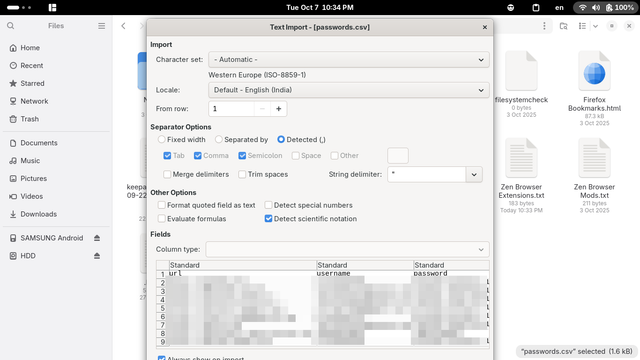
@libreoffice @gnome Yes yes. My bad. I'm running version 25.8.1.1. When I open a .csv file with LibreOffice Calc I see this Text Import window. The problem is that it doesn't fit to my screen size and for that reason the bottom buttons aren't visible.
@javalps @libreoffice @gnome
On gnome you can hold win-key and click anywhere on a window to move it. Clicking on the middle of the window should allow you to push it up enough to get at the ok buttons.
As to why they are so big in the first place, maybe check Settings->Display->Scale?
> On gnome you can hold win-key and click anywhere on a window to move it. Clicking on the middle of the window should allow you to push it up enough to get at the ok buttons.
It isn't working.
> As to why they are so big in the first place, maybe check Settings->Display->Scale?
I don't have the scale options.
alt+f7 should allow you to move the window via arrow keys. There is no indication it's activated, just press the arrow keys.
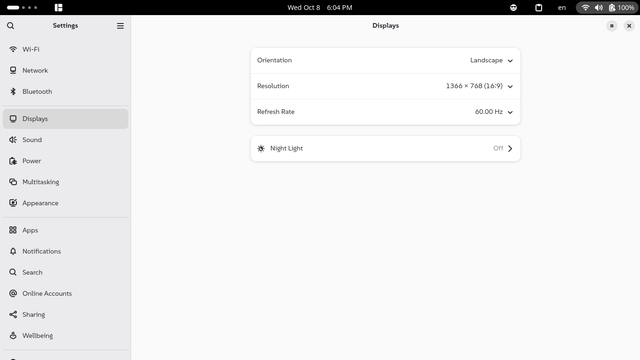
This is my gnome display settings, are you perhaps opening the image-viewer settings instead?

I think the scaling is intended for high resolution screens. So it's not the culprit.
Can you not resize the windows from the corners? With the mouse?
Try alt+f8 and the arrow keys for resizing.
But it's not a very good solution :(
 LibreOffice
 cava
cava