#TrashboatsGuide2FGCN

This is a simple thread that should help you get started. I plan to talk about a few simple things so you can start posting with confidence and start following accounts and making all sorts of new furry friends.

Here's what I'm gonna cover

  • Local, Home, and Fediverse Feeds
  • Basic Posting
  • Fediverse basics
  • Profile options
  • Bookmarks and lists
  • A heads up that I will mostly be describing how to operate the browser/desktop version, but much of the same info still applies.

    FGC.Network

    #TrashboatsGuide2FGCN

    The Three Feeds and You: Local

    If you're here and new to FGCN, welcome. I'm not sure what social media disaster brought you here, but I'm glad to have ya anyway.

    If you're brand spanking new here, then you'll likely see the Local Feed First. Local Feed is home all the public posts by every account that's local to FGCN. This is your home turf essentially.

    If the privacy isn't adjusted then you can even see replies your fellow fgc members send to other accounts.

    You don't have to see every account posted here just because they're local. You're more than welcome to block or mute anything here you don't wanna see.

    #TrashboatsGuide2FGCN

    The Three Feeds and You: Home

    Home is your personal feed made up of all the accounts you follow on the fediverse, FGCN or otherwise. Assumming Visibility Settings are right, you'll see pretty much anything your followed accounts post and repost.

    The main difference between accounts on Local and Home is that Local doesnt show reposts(RTs). So if you like the basic posts some on FGCN does, then you won't need to follow them for that since you can see that on Local.

    However, if they RT alot of interesting stuff and you want to maybe see their more private posts or w/e then you can follow them for closer access.

    FGC.Network

    #TrashboatsGuide2FGCN

    The Three Feeds and You: Fediverse.

    OK, this is the big one. Fediverse displays the posts of every fediverse account in chronological order. Fediverse is a huge universal feed that doesn't display Reposts (thank god)

    I usually don't turn on the post spigot, but fediverse feed can be a neat way to meet new people or find interesting posts when your local and home feeds are kinda dead.

    There's no algorithm, so posts just show up as they come up. You see anyone as long as you or our instance don't have them blocked.

    FGC.Network

    #TrashboatsGuide2FGCN

    Basic Posting

    Alright! you've done enough reading. It's time to post. Here's our posting UI. You can type whatever you want (within TOS) and have a whopping 5000 character limit. That's alot of posting. We also have some icons at the bottom for extra options.

    From left to right these icons are.

  • Add Attachments
  • Emojis
  • Add Poll
  • Privacy
  • Schedule Post
  • Add Content Warning
  • Markdown Enabled/disabled.
  • I'm gonna go a little more in-depth on these options in the following posts.

    #TrashboatsGuide2FGCN

    Basic Posting: Attachments

    FGCN has a 50mb attachment limit. There are maybe some format limitations, but I haven't run into any yet. your basic mp4s and jpegs, and mp3s should work fine.

    For pictures, and video, you can add alt text that will make it easier for blind or visually impaired users to understand what you posted. there's also an extra opportunity to add more information, like you can put combo notation in your alt text.

    Some people get nervous about the proper way to do alt text, and I'll share an easy rule that's helped me write good alt text:

    How would you describe this is you wanted to show your friend, but they're in the bathroom?

    This general rule of thumb helps me keep my alt text in a balance between short and informative.

    FGC.Network

    #TrashboatsGuide2FGCN

    Basic Posting: Privacy

    Privacy is an important option since alot of the fediverse is dependent on privacy.

    Public: Posted to Fediverse, Local, and the feeds of any non-FGCN accounts that follow you. As I mentioned before this can also include replies to non-FGCN pages.

    Unlisted: Won't show up on Fediverse or local feeds, but someone can go directly to your profile to see they post if they wnated.

    Followers-Only: Only accounts that follow you (FGCN or otherwise) will see this post. Sometimes when you set this option, the UI will warn you that you don't have follow approval, so anyone can just follow to see the hidden post.

    Direct: Only visible to the mentioned accounts. Basically this is how DMs work.

    #TrashboatsGuide2FGCN

    Basic Posting: Content Warnings

    Back in the early days of FGCN we didn't have this feature, but now that we're on soapbox we can add content warnings to our posts.

    content warnings don't affect privacy, so if a post is public it'll still show up on FGCN Local feed, but most of the post will be hidden behind a screen that warns users what's behind the veil.

    Content warnings are a good way to warn users that your post has an excessive amount of violence, sex, or something you may not want someone to see overlooking a reader's shoulder in public.

    Another thing I like to use content warnings for is they can shorten the height of your post if it has a shit ton of text. Or at least it let's folks pass by your posts more easily.

    FGC.Network

    #TrashboatsGuide2FGCN

    Basic Posting: Quote RTs

    I almost forgot that we can QRT here on FGCN. Not everyone on Fedi has this feature because different home servers let you have access to different features.

    To do a QRT, simply click the Repost button then click quote post. You can also paste the link to a post in the test area to also do a QRT.

    Funny enough, Repost won't show up on Local Feed, but since QRTs are technically regular posts, then they can show up on the Local feed with public visibility.

    FGC.Network

    #TrashboatsGuide2FGCN

    Fediverse Basics

    So let me take this chance to describe some basics about how fediverse works. So it's kinda like the social media equivalent of email. You have specific account on various home servers (commonly referred to as instances)

    Alot of fediverse servers are self-hosted or hosted by small organizations. Our own FGCN is hosted by shib and is a part of the supercombo.gg Shibiverse. You can donate to patreon to help with server costs, but there hasn't been alot of hay made about finances afaik.

    Maybe we can host a FGCN funding tournament one day.

    Many people refer to the fediverse as mastodon and vice versa like how some folks equate Gmail with email. No big deal if you mix em up.

    So let's take my username

    @ TrashboatdaGod @ fgc.network

    The name after the first @ is the username and the name after the second @ is the instance. In addition to the fediverse, you can sometimes look at other folks' local feeds to see what other home servers are about, you might find something new and interesting.

    Like the 6 button icon FGCN users have, other users will have similar icons near their names. You can click those icons to get a look at other local feeds assuming that you or FGCN isn't blocked by that instance.

    FGC.Network

    #TrashboatsGuide2FGCN

    Profile Options

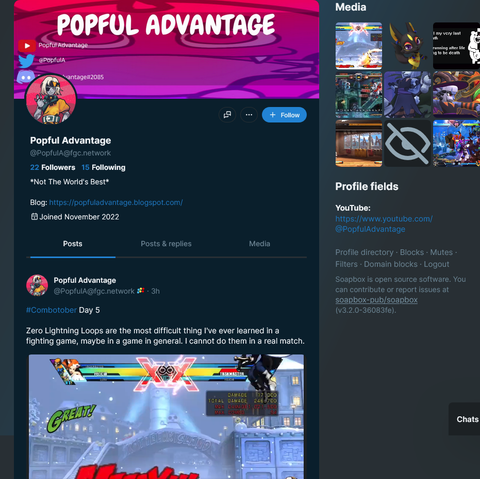
    So let's take a look at one of our fellow neighbors to talk about ways you can interact with other profiles.

    This is where you can see their PFP, Profile Banner, and even a bit of their recent media. Sorta like twitter, you can adjust their profile feed to filter certain posts out.

    If you're looking at a fellow FGCN member, you can see the chat icon next to the follow button and meatball menu.

    #TrashboatsGuide2FGCN

    Profile Options

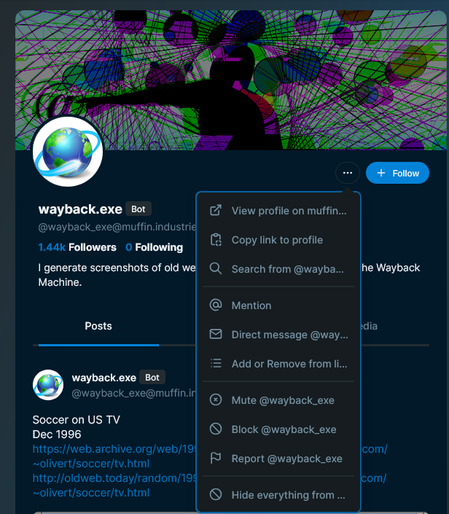
    Here's the meatball menu of an account that isn't on FGCN. This menu let's you mute, block, hide RTs, and more. another option you have when looking at the menu of non-FGCN accounts is blocking the all accounts from the particular home server of the selected account.

    Also this account has a bot indicator, but that's a voluntary label the account owner has to turn on.

    #TrashboatsGuide2FGCN

    Bookmarks and Lists

    You can bookmark posts by clicking the meatball menu and clicking bookmark. Bookmarked posts are saved for you to find later. I think these posts can go away if their owning account or home server go down for whatever reason.

    Lists are ways for you to make customized feeds. You can group accounts by what they post, and when you access those list you'll see a feed made up of the accounts you saved together. you can save accounts to lists using the meatball menu in their profile.

    FGC.Network

    #TrashboatsGuide2FGCN

    end of thread

    So that's all for basic usage of FGCN. If you want more info, then you can ask me for specifics or check the support portal in the upper right hand corner of the Local feed for a help wiki on FGCN.

    I wanna note that you can't see every public Fediverse post on FGCN. From my understanding, different Fediverse instances are generally connected through accounts following other accounts. For example, when viewing AllimackArt on mastodon.social/@AllimackArt (their home instance) you can all of their posts, but none of them start showing up on fgc.network/@[email protected] until I started following them sometime in April or May.

    Viewing stuff on their hone instances is also useful when you wanna see replies to a post, and when you wanna see stats like the results of a poll.
    In short, use the "View Post/Profile On-" buttons a lot to see more stuff.