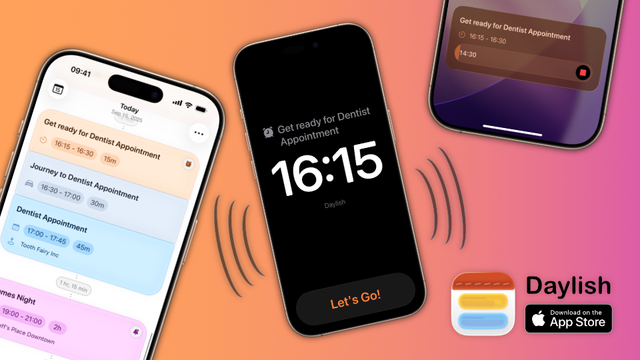
Daylish, your friendly day planner for #iOS26 that helps you never be late again, is live on the App Store šŸš€

https://apps.apple.com/app/day-planner-alarm-daylish/id6751201325

Calendar events, alarms and timers in a single timeline šŸ—“ļøā°ā³

To celebrate I am currently offering a 25% launch discount with code DAYLISH
#productivity #ios #apps #calendar

@DaylishApp is it possible to know where work is and then automatically add the travel time for any event not at work?

@RossA Integration with Apple Maps for travel time calculation is definitely planned!

The way I envisioned it so far is that when you insert a dependent journey via the "leave on time" routine or via the "add related item" context menu, it would use the location of the target event as a destination and use either your default/home address or the location of the previous event as a start.

Of course you could override this - just aiming to have reasonable defaults.

@RossA But if I understand correctly, your proposal goes a step further, right?

You'd want the travel time to automatically be added unless an event is at work.

I plan to add a feature that would allow you to batch edit multiple events based on certain rules.

You could do something like "Insert an alarm for all events that are not from the 'work' calendar".

@RossA Also, I completely forgot to say thank you so much for trying out my app and sharing this amazing feedback!

Since the app just launched and I have a long roadmap ahead of me to even get it in the shape that I currently have in my own mind, there are still a lot of things moving and decisions to make, so every bit of feedback helps shape the future of the app šŸ™

@DaylishApp no problem. I like the idea behind the app. Still a little off for me to use as my main calendar app at the moment but I’d love to dump Fantastical / Outlook to use this in the future.

Do you have a timeline of planned features?

@DaylishApp and, I think, you are also behind Zenitizer, which is another app I love.

@RossA Yes, that's right. Both of these apps are projects that I am working on because I couldn't find anything that ticked all the boxes for me… I’m definitely the ā€œscratch your own itchā€ type of app developer šŸ¤“

Really appreciate your kind words about @zenitizer ā˜ŗļø

Speaking of Zenitizer, if you don’t mind me asking: how do you feel about the Liquid Glass redesign? (1/2)

Adopting it in an existing app actually felt more challenging than starting with a clean slate and going straight for iOS26 like I did for @DaylishApp…

I tried to keep the layout and main user interface close to the original as not to add unnecessary friction but adopt the Liquid Glass elements where it made sense - and where it’s in accordance with the Apple Guidelines šŸ¤“

I haven’t gotten any feedback - negative or positive - which makes me a bit nervous šŸ˜… (2/2)

@manuel @DaylishApp haha - I’ll keep quiet but I rather like the glass interface generally. I know that it’s like Marmite!

Works fine on Zenitizer for me. Like where it’s used - maybe seems a bit jarring if you don’t slide between the options and just click but it’s nothing I’d be worried or concerned about. That’s maybe an Apple thing anyway.

I don’t have my eyes open most of the time I’m using the app to be fair! šŸ˜‚

@RossA @DaylishApp Haha yeah that’s right. You either love it or hate it I suppose. I’ve been using it all summer and it has definitely grown on me 😊

I agree about the tab bar on the bottom being too ā€œjumpyā€ and ā€œjelly-likeā€ and your hunch is correct that this is actually for Apple to fix. We developers have no control over that UI element unless we completely opt out of Liquid Glass altogether…

I’m sure Apple’ll tone it down a bit over time (or we all get used to wobbly tab bars in apps šŸ˜…)

@RossA @DaylishApp But thanks for sharing your thoughts!

Haha good point about mostly using the app without looking at it haha - still, I want it to be a pleasant experience whenever you do interact with the UI between sessions šŸ˜‰

@RossA Yes, there are a number of features missing that would make it a complete calendar app replacement. I had to cut a lot of features for version 1 in order to be able to launch alongside iOS 26, but it's definitely something I'm working towards. (1/2)
I don't have a published roadmap anywhere yet, because I think I'm still in a phase where I'm just collecting individual user feedback and trying to make sense of the midterm vision before committing to specific goals publicly, but it is something I'm hoping to do soon and maybe even add a little roadmap preview with ā€œfeature upvote functionalityā€element inside the app itself. (2/2)

@DaylishApp yes - that is correct. Being a school teacher I work from the same place everyday. However if I have an appointment that is not at school I’d like it to automatically work out the time I need to leave to get there (and keep it updated based on traffic?).

I cycle some days so ideally like to be able to say I’m on my bike that day so based travel time on cycling etc.