 nixCraft 🐧
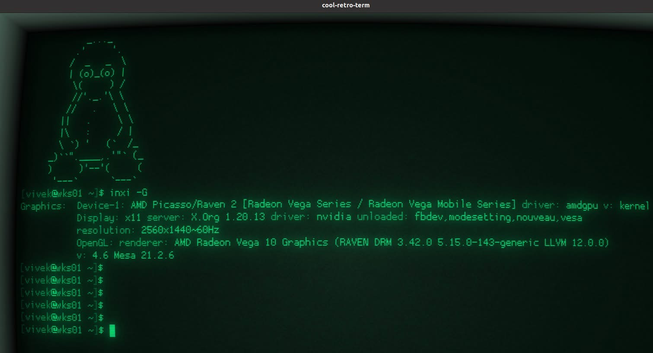
Open your Linux terminal and type the `inxi -G` command to list installed GPU on your system. It is simple as that. You need to install inxi using your package manager
@nixCraft Thanks for the tool-tips!
Didn't know about `cool-retro-term` or `inxi`. 💻
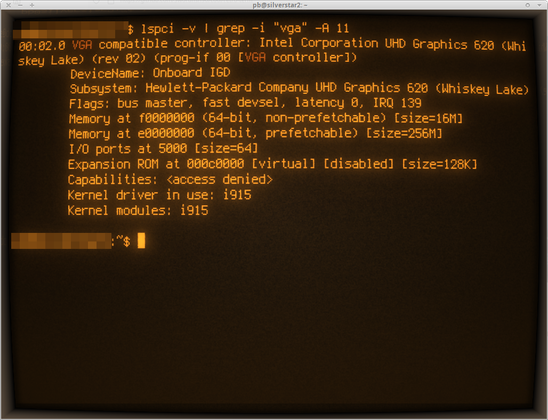
With on-board tools, I usually do:
`> lspci -v | grep -i "vga" -A 11`
Sure inxi displays more info about the whole GFX-stack (like renderer or Xorg details)
@nixCraft It doesn't seem to work on Mac OS:
0> brew install inxi
==> Fetching downloads for: inxi
...
==> Pouring inxi--3.3.38-1.ventura.bottle.tar.gz
🍺 /usr/local/Cellar/inxi/3.3.38-1: 8 files, 2.3MB
==> Running `brew cleanup inxi`...
0> inxi -G
Graphics:
Message: No PCI device data found.
Display: server: No display server data found. Headless machine?
tty: 80x24
API: N/A Message: No API data available in console. Headless machine?
Info: Tools: No graphics tools found.
 Siph
Siph 
 korin 🔜 kodi
 🪨
🪨 Peter B.
 Jan Steinman