Today in *very long* overdue features (looks like I opened the issue even before v0.1.0): moving the mouse against a monitor edge now scrolls the view during drag-and-drop.

(before this change, you had to use the keyboard for this, and yes it was very awkward)

#niri

Another neat new thing: a bind to expand column to available width. Basically, "expand to fill empty space".

But, a bit smarter: with scrollable tiling we can have windows partially off-screen. This bind ignores such windows, making it easy to position things to exactly fill the screen, even in the middle of a scrolling layout.

#niri

Today I'm releasing niri v25.02 with tabs, shadows, DnD view scrolling, and a ton of other improvements! Read the release notes at https://github.com/YaLTeR/niri/releases/tag/v25.02 and @ your distro to update the package.  

[[honestly wtf how did so much stuff happen, it's been barely over a month]]

#niri #smithay #wayland #rust

This is not on main yet, but I've heavily reworked how offscreening works in niri.

Offscreening is when you render a group of elements to a separate texture, then draw that texture to the final render. In niri it's used for window opening and resize animations, and now also for full-tile opacity changes.

Before, it was very simple: every frame create a new texture and render it from scratch. The new code caches textures and does full damage tracking both "inside" and "outside" the offscreen.

In practice this means much less texture re-creations and much less redrawing.

The main reason to do this was to unlock using offscreens for more persistent visuals. E.g. it's fine to do some extra rendering for a 150 ms animation, but it's not fine to do it for something that can last seconds or minutes.

In particular, I can finally make windows semitransparent while dragging them in the tiling layout! Which needs an offscreen since it's a stack of border + window + subsurfaces.

#niri

Still testing this one: a window rule to set the xdg-toplevel Tiled state.

By default niri matches it to prefer-no-csd, because the Tiled state currently happens to be the best way to ask always-CSD windows to square their corners.

With this tiled-state window rule you can override it, for example to get title bars (for easy mouse-only gestures) together with square corners (if you're going for a square style with borders, like mine here). You can also e.g. limit it to tiled windows.

#niri

And another thing for today: finally made it so niri waits a bit for the lock screen to paint before locking the session. This fixes the "red flash" issue.

Please test this since it's security sensitive. I already caught one mistake before pushing where killing a lock screen, then spawning a new one, would briefly flash the session contents.

(Note that some lockers fade in from transparency, so you'll still briefly see red, that's just the niri locked session background.)

#niri

Since adding tabbed columns, just about everyone is asking for a way to open a new window directly in the focused tabbed column. This is rather complicated, but yesterday I came up with a 1 line change that should cover some workflows (covers how I use tabs at least).

I have logic that restores the view position when you open and close a window right away. Now I enabled it for consume-left, which means that you can open a new window, consume left (into a tab), and the view will go back.

#niri

Today I implemented a new niri screencasting feature: the dynamic cast target.

It shows up as a special "window" in the portal dialog. Once you select it, you can change what it casts with niri binds! Switch between windows, monitors, and in the future maybe workspaces and other stuff. Works with OBS, browsers, anything else.

I also wrote a wiki page with all our screencasting-related features: https://github.com/YaLTeR/niri/wiki/Screencasting

Thanks @elkowar for coming up with the dynamic cast idea!

#niri

Screencasting

A scrollable-tiling Wayland compositor. Contribute to YaLTeR/niri development by creating an account on GitHub.

GitHub

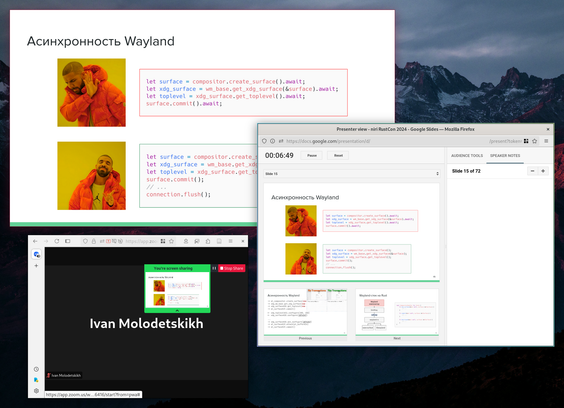
Had to show slides a few times for uni lately, which motivated me to add this next feature.

Windowed fullscreen, also known in other WMs as fake or detached fullscreen, makes the window think that it went fullscreen, while in reality keeping it as a normal window. Useful in combination with apps like Google Slides to hide the browser UI without taking up the whole screen, especially on ultrawide monitors.

Wiki section: https://github.com/YaLTeR/niri/wiki/Screencasting#windowed-fakedetached-fullscreen

#niri

Screencasting

A scrollable-tiling Wayland compositor. Contribute to YaLTeR/niri development by creating an account on GitHub.

GitHub

This one seems simple, but actually turned out quite tricky to implement.

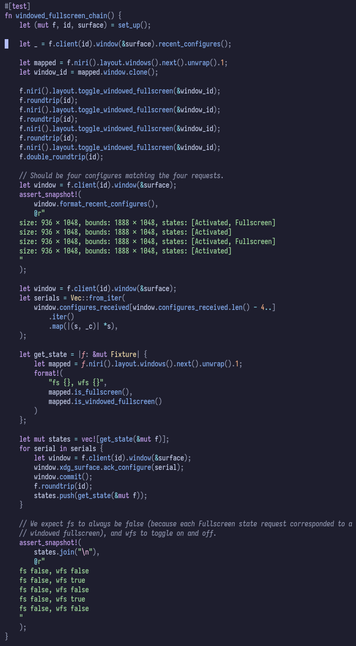
I wrote niri code under the assumption that the fullscreen state does not apply immediately: we send a configure to the window, then only at a later point it commits in response. Windowed fullscreen breaks this because in some cases it can apply instantly (going from real to windowed fullscreen needs no state change from the window).

#niri

After trying a few approaches, I ended up doing it "properly" by associating the (entirely compositor-side) windowed fullscreen state to window configures and commits. This lets niri correctly track if a given fullscreen window commit was real fullscreen (so e.g. we need to draw a black backdrop), or if it was windowed fullscreen.

This even works across a chain of toggling windowed fullscreen, then the window slowly acking and committing them, and I have a test to verify that.

#niri

New niri users frequently come from other tiling WMs with static workspace systems. For them, dynamic workspaces is an unusual system, and it can be unclear how to use dynamic workspaces effectively. (Especially until we get an Overview type thing.)

I figured I'd write a wiki page describing niri's workspaces in more detail: https://github.com/YaLTeR/niri/wiki/Workspaces I also included an example of how I personally use workspaces on niri.

Hopefully this makes it easier to understand what's going on!

#niri

Workspaces

A scrollable-tiling Wayland compositor. Contribute to YaLTeR/niri development by creating an account on GitHub.

GitHub

slowly going through the piled up PRs (how's your weekend going?), today merged the pick-color IPC from nnyyxxxx. comes with Portal support of course

#niri

A secret niri v25.02 feature! Make your floating windows FLOAT by putting this in your config:

window-rule {
match is-floating=true
baba-is-float true
}

Works in the nix flake too  

#niri #wayland

started working on an Overview for niri. very wip, lots to do, got some basic rendering and dragging working though

#niri

today's progress: wheel scrolling up and down, right click to scroll left and right, click on workspace to focus, some keyboard fixes

this is all mouse-only on the video. only currently using a 3rd-party tool for the hot corner (waycorner), i'll integrate that later

#niri

i have this old ASUS Eee PC collecting dust, decided to try if niri will run on it. well, it actually runs! a few shaders failed compiling (ran into ALU instruction limits), but otherwise seems to work

#niri

today's overview progress: some rendering and input fixes, plus implemented built-in hot corner, and workspace switch on drag-and-drop hold. which means that now you can perform an entire drag-and-drop to a different workspace mouse-only!

#niri

spent many hours today trying to make the combined exit overview + switch workspace animation monotonic. This is hard because zoom and vertical movement are separate axes, and you can e.g. "catch" one of them with a touchpad gesture, while the other must continue animating (so you can't easily convert this into rect interpolation).

Ended up working out a correction formula for the workspace Y positions when both axes have matching animations. Appears to behave so far from my testing

#niri

today I opened a draft PR for the Overview, and request everyone to test it and report issues: https://github.com/YaLTeR/niri/pull/1440

also, today's new overview feature: drag-and-drop into a new workspace between/above/below!

#niri

Overview by YaLTeR · Pull Request #1440 · YaLTeR/niri

Implements #850. Related: #849. This is an overview. It zooms out your workspaces and lets you move your windows around. niri-wip-overview-4.mp4 Open it with a ...

GitHub

POV: GoPro mounted on the xwayland-satellite

#niri

Today: added touch support to the Overview. Somehow, the entire thing just worked first try.

#niri

After some more fixes, and a long rebasing session, I merged the Overview! Please give it more testing using your nearest niri-git package.

https://github.com/YaLTeR/niri/wiki/Overview

#niri

Overview

A scrollable-tiling Wayland compositor. Contribute to YaLTeR/niri development by creating an account on GitHub.

GitHub

The Eee PC rocking the Overview

#niri

Ppl naturally want to put something in the Overview backdrop, like a blurred version of the wallpaper (see how popular Blur My Shell is). Orthogonally, some ppl want the wallpaper to be static, rather than move with workspaces (it can be distracting).

I'm not prepared to dive head-first into image rendering and blur shaders yet, so I made it possible to put a layer surface into the backdrop. This enables both of those cases, likely even more cool things!

https://github.com/YaLTeR/niri/wiki/Overview#backdrop-customization

#niri

Overview

A scrollable-tiling Wayland compositor. Contribute to YaLTeR/niri development by creating an account on GitHub.

GitHub

Today, screenshot UI updates! Implemented tablet and touchscreen input for area selection (at long last). And, added a small clickable capture button, so screenshots can now be confirmed tablet-, touch-, or mouse-only!

#niri

After long 3 months of work, I'm glad to release niri v25.05 with the Overview, screenshot UI tablet and touch support, dynamic screencast target and windowed fullscreen, IPC pick-window and pick-color, window urgency, and lots of other things!   

Release notes prepared for your reading pleasure as always: https://github.com/YaLTeR/niri/releases/tag/v25.05

#niri #smithay #rust #wayland

Release v25.05 · YaLTeR/niri

Niri is a scrollable-tiling Wayland compositor. Windows are arranged in columns on an infinite strip going to the right. Opening a new window never causes existing windows to resize. Here are the i...

GitHub

Tagged a niri v25.05.1 hotfix, fixing kitty quick access terminal, numlock, and some jank with hidden cursor.

https://github.com/YaLTeR/niri/releases/tag/v25.05.1

#niri

Release v25.05.1 · YaLTeR/niri

This is a hotfix release for niri v25.05. Fixed handling of layer surfaces unmapped through a null buffer commit: they will now receive an initial configure as necessary (thanks @alex-huff). This ...

GitHub

Alright after some much needed rest, I set out to deal with the thing everyone has to bump into when setting up niri: some way to use Xwayland. I am still very much *not* planning to integrate Xwayland directly, but with this PR (and an accompanying xwayland-satellite PR), niri will create the X11 sockets and autostart xwl-s on demand, all out of the box with zero configuration. So, it'll work just like other compositors, but with xwl-s instead of direct Xwayland.

https://github.com/YaLTeR/niri/pull/1728

#niri

Automatic xwayland-satellite integration by YaLTeR · Pull Request #1728 · YaLTeR/niri

When a recent enough (with this PR) xwayland-satellite is detected, niri will create the X11 sockets and set DISPLAY, then automatically spawn xwayland-satellite when an X11 client tries to connect...

GitHub

8k stars! 🎉

#niri

In niri v25.05, the screenshot UI learned to respond to some keyboard window movement bindings by moving the screenshot selection. Now it supports several more movement commands, including moving across monitors. It works similarly to a floating window: the selection origin is preserved relatively, and the size is adjusted by the monitor scale difference. Under the right conditions, it'll match a floating window exactly.

Also, holding Space will now let you move the selection origin!

#niri

...and now moving also works with on a touchscreen with a second touch :) Got this idea from how in osu! you can drag with one finger and press with second/third to "click".

#niri

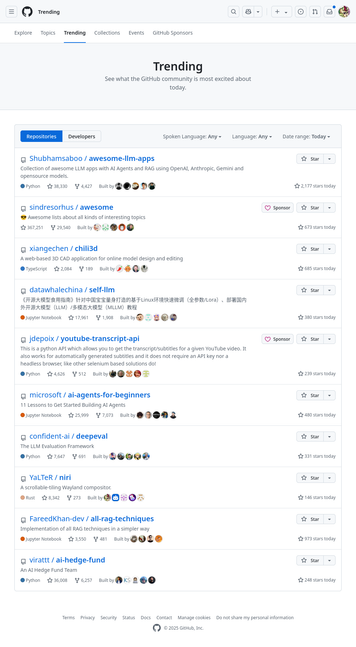
apparently niri is on the GH trending page today: https://github.com/trending Amidst a sea of LLM repos 🙃

#niri

Today I implemented most of the ext-workspace protocol [1] in niri. It lets desktop components (i.e. bars) show workspaces and do some basic operations on them.

The two bars with ext-workspace that I know of are sfwbar and xfce4-panel. Unfortunately, I seem to have surfaced several problems in their implementations. I opened issues in sfwbar; would be great if someone took a look from Xfce. Also if there are other clients I missed?

https://github.com/YaLTeR/niri/pull/1800

[1]: https://wayland.app/protocols/ext-workspace-v1

#niri

Implement ext-workspace by YaLTeR · Pull Request #1800 · YaLTeR/niri

Implements #135. TODO: ext_workspace_manager_v1::commit() request (currently changes are applied right away). Also, apparently the two existing clients (sfwbar and xfce4-panel) are quite broken? Wi...

GitHub

Everyone who dislikes GitHub Wiki: I finally made a write-down of my requirements/wishes for a replacement. Please feel free to chime in with suggestions: https://github.com/YaLTeR/niri/discussions/1830

#niri

GitHub Wiki replacement ideas · YaLTeR niri · Discussion #1830

The GitHub Wiki is very convenient for me as the developer (it's right there, it's simple and it works), but it has some glaring issues, most notably the lack of a good search. (You can in fact sea...

GitHub
@YaLTeR sounds like material for mkdocs ticks all boxes. We use it for everything and are extremely satisfied with it.
@ju someone suggested it in the discussion, but it doesn't seem like it can render the GitHub admonition syntax?

@YaLTeR yeah I saw that afterwards.

If that is a priority, then I guess you'd be better served with alternatives.

I also have good experiences with vuepress, so I assume it's successor vitepress is good as well.

@ju to update on this after one of our users have been tinkering with mkdocs-material:
- GitHub admonitions seem to be supported by a "github-callouts" feature from the "markdown-callouts" extension
- they got KDL highlighting working in pygments and I think they intend to try upstreaming it
- they got most of the other stuff that I wanted working too

So perhaps mkdocs-material will indeed be a good choice

@YaLTeR that's great!

I basically have no complaints about this.

Interested to see how it will work for you.

Alternatively, I also like this one https://starlight.astro.build/

Starlight 🌟 Build documentation sites with Astro

Starlight helps you build beautiful, high-performance documentation websites with Astro.

Starlight